Sign In Start Free Trial
Account

Add to playlist

Create a Playlist

Modal Close icon
You need to login to use this feature.
  • Book Overview & Buying BackTrack 5 Wireless Penetration Testing Beginner's Guide
  • Table Of Contents Toc
BackTrack 5 Wireless Penetration Testing Beginner's Guide

BackTrack 5 Wireless Penetration Testing Beginner's Guide

By : Vivek Ramachandran
4.2 (75)
close
close
BackTrack 5 Wireless Penetration Testing Beginner's Guide

BackTrack 5 Wireless Penetration Testing Beginner's Guide

4.2 (75)
By: Vivek Ramachandran

Overview of this book

Wireless has become ubiquitous in today’s world. The mobility and flexibility provided by it makes our lives more comfortable and productive. But this comes at a cost – Wireless technologies are inherently insecure and can be easily broken. BackTrack is a penetration testing and security auditing distribution that comes with a myriad of wireless networking tools used to simulate network attacks and detect security loopholes. Backtrack 5 Wireless Penetration Testing Beginner’s Guide will take you through the journey of becoming a Wireless hacker. You will learn various wireless testing methodologies taught using live examples, which you will implement throughout this book. The engaging practical sessions very gradually grow in complexity giving you enough time to ramp up before you get to advanced wireless attacks.This book will take you through the basic concepts in Wireless and creating a lab environment for your experiments to the business of different lab sessions in wireless security basics, slowly turn on the heat and move to more complicated scenarios, and finally end your journey by conducting bleeding edge wireless attacks in your lab.There are many interesting and new things that you will learn in this book – War Driving, WLAN packet sniffing, Network Scanning, Circumventing hidden SSIDs and MAC filters, bypassing Shared Authentication, Cracking WEP and WPA/WPA2 encryption, Access Point MAC spoofing, Rogue Devices, Evil Twins, Denial of Service attacks, Viral SSIDs, Honeypot and Hotspot attacks, Caffe Latte WEP Attack, Man-in-the-Middle attacks, Evading Wireless Intrusion Prevention systems and a bunch of other cutting edge wireless attacks.If you were ever curious about what wireless security and hacking was all about, then this book will get you started by providing you with the knowledge and practical know-how to become a wireless hacker.
Table of Contents (18 chapters)
close
close
BackTrack 5 Wireless Penetration Testing
Credits
About the Author
About the Reviewer
www.PacktPub.com
Preface
3
Index

Time for action – configuring the access point


Let us begin! We will set the access point up to use Open Authentication with an SSID of "Wireless Lab".

Follow these instructions step-by-step:

  1. Power on the access point and use an Ethernet cable to connect your laptop to one of the access point's Ethernet ports.

  2. Enter the IP address of the access point configuration terminal in your browser. For the DIR-615, it is given to be 192.168.0.1 in the manual. You should consult your access point's setup guide to find its IP address. If you do not have the manuals for the access point, you can also find the IP address by running the route –n command. The gateway IP address is typically the access point's IP. Once you are connected, you should see a configuration portal which looks like this:

  3. Explore the various settings in the portal after logging in and find the settings related to configuring a new SSID.

  4. Change the SSID to Wireless Lab. Depending on the access point, you may have to reboot it for the settings to change:

  5. Similarly, find the settings related to Authentication and change the setting to Open Authentication. In my case, the Security Mode configuration of None indicates that it is using Open Authentication mode.

  6. Save the changes to the access point and reboot it, if required. Now your access point should be up and running with an SSID Wireless Lab.

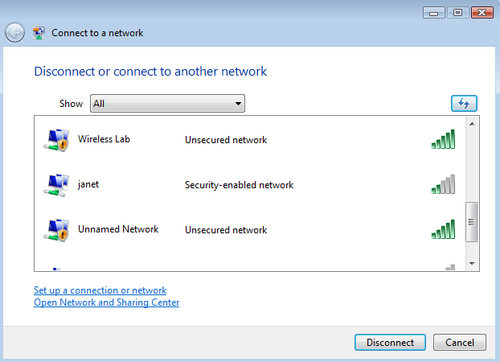
An easy way to verify this is to use the Wireless Configuration utility on Windows and observe the available networks using the Windows Laptop. You should find Wireless Lab as one of the networks in the listing:

What just happened?

We have successfully set up our access point with an SSID Wireless Lab. It is broadcasting its presence and this is being picked up by our Windows laptop and others within the Radio Frequency (RF) range of the access point.

It is important to note that we have configured our access point in Open mode, which is the least secure. It is advisable not to connect this access point to the Internet for the time being, as anyone within the RF range will be able to use it to access the Internet.

Have a go hero – configuring the access point to use WEP and WPA

Play around with the configuration options of your access point. Try to see if you can get it up and running using encryption schemes such as WEP and WPA/WPA2. We will use these modes in the later chapters to illustrate attacks against them.

CONTINUE READING
83
Tech Concepts
36
Programming languages
73
Tech Tools
Icon Unlimited access to the largest independent learning library in tech of over 8,000 expert-authored tech books and videos.
Icon Innovative learning tools, including AI book assistants, code context explainers, and text-to-speech.
Icon 50+ new titles added per month and exclusive early access to books as they are being written.
BackTrack 5 Wireless Penetration Testing Beginner's Guide
notes
bookmark Notes and Bookmarks search Search in title playlist Add to playlist font-size Font size

Change the font size

margin-width Margin width

Change margin width

day-mode Day/Sepia/Night Modes

Change background colour

Close icon Search
Country selected

Close icon Your notes and bookmarks

Confirmation

Modal Close icon
claim successful

Buy this book with your credits?

Modal Close icon
Are you sure you want to buy this book with one of your credits?
Close
YES, BUY

Submit Your Feedback

Modal Close icon
Modal Close icon
Modal Close icon