Sign In Start Free Trial
Account

Add to playlist

Create a Playlist

Modal Close icon
You need to login to use this feature.
  • Book Overview & Buying Learning Drupal 8
  • Table Of Contents Toc
Learning Drupal 8

Learning Drupal 8

By : Nick Abbott, Richard Jones
4.1 (8)
close
close
Learning Drupal 8

Learning Drupal 8

4.1 (8)
By: Nick Abbott, Richard Jones

Overview of this book

Drupal 8 sets a new standard for ease of use, while offering countless new ways to tailor and deploy your content to the Web. Drupal 8 allows user to easily customize data structures, listings, and pages, and take advantage of new capabilities for displaying data on mobile devices, building APIs, and adapting to multilingual needs. The book takes you step by step through building a Drupal 8 website. Start with the basics, such as setting up a local “stack” development environment and installing your first Drupal 8 site, then move on to image and media handling, and extending Drupal modules. Push your knowledge by getting to grips with the modular nature of Drupal, and learning to extend it by adding new functionalities to create your new modules. By the end of the book, you will be able to develop and manage a modern and responsive website using Drupal.
Table of Contents (16 chapters)
close
close
Lock Free Chapter
1
1. Introduction
15
Index

Working with Views blocks


In the previous section, we created two entirely separate Views-powered pages to list all the News items and Blog posts, that is, those Article nodes that had been marked as News or Blog posts. As an illustration of the ease with which you can create separate blocks for content lists using the Views module, let's now create a block version of the news listing and place that block on the Basic page entitled News that you created in Chapter 5, Basic Content.

Creating blocks using Views

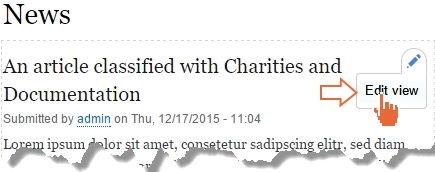
Locate the newly created Views-powered News page and hover your mouse pointer near the top of the view's output. This should reveal the contextual link for the view as a whole, allowing you to edit the view quickly and easily without even knowing its name.

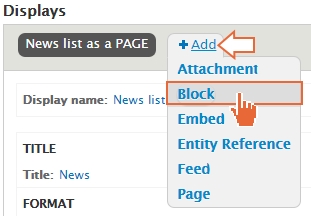
Create a block version of the existing display by clicking on the +Add button and choosing to add a new Block Display.

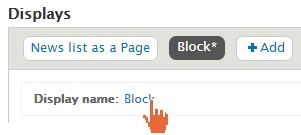
Click on the new Display name: label entitled 'Block'

Rename the Block to News list as a Block as you did earlier:

Since...

CONTINUE READING
83
Tech Concepts
36
Programming languages
73
Tech Tools
Icon Unlimited access to the largest independent learning library in tech of over 8,000 expert-authored tech books and videos.
Icon Innovative learning tools, including AI book assistants, code context explainers, and text-to-speech.
Icon 50+ new titles added per month and exclusive early access to books as they are being written.
Learning Drupal 8
notes
bookmark Notes and Bookmarks search Search in title playlist Add to playlist font-size Font size

Change the font size

margin-width Margin width

Change margin width

day-mode Day/Sepia/Night Modes

Change background colour

Close icon Search
Country selected

Close icon Your notes and bookmarks

Confirmation

Modal Close icon
claim successful

Buy this book with your credits?

Modal Close icon
Are you sure you want to buy this book with one of your credits?
Close
YES, BUY

Submit Your Feedback

Modal Close icon
Modal Close icon
Modal Close icon