Sign In Start Free Trial
Account

Add to playlist

Create a Playlist

Modal Close icon
You need to login to use this feature.
  • Book Overview & Buying PhpStorm Cookbook
  • Table Of Contents Toc
PhpStorm Cookbook

PhpStorm Cookbook

By : Chaudhary
1 (2)
close
close
PhpStorm Cookbook

PhpStorm Cookbook

1 (2)
By: Chaudhary

Overview of this book

If you are a competent PHP developer who knows the basics of PHPStorm and intends to gain better knowledge of PHPStorm by learning and implementing pro-level practices, techniques, and solutions, then this book is for you. It is assumed that you already have a working installation of the software setup.
Table of Contents (11 chapters)
close
close
10
Index

Customizing with PhpStorm

Sometimes thinking enough is not enough. Sometimes doing enough is not enough. The point is, despite learning so much, you still have a feeling that some more customization could have been possible. PhpStorm is at your disposal.

Getting ready

The best thing you can do is use PhpStorm for whatever PHP projects you take up. But therein the problem looms large. Executing PHP via a web server is OK, but what do you do about the use case when the script has to run in the background? What if your reporting manager wants you to do some socket programming? You need a command-line interpreter for PHP. Stunned silence? It's time to break that silence. Thank PhpStorm and integrate the command-line PHP interpreter with PhpStorm.

How to do it...

Just a small sequence of shortcuts is all that you need to invoke command-line PHP. There are actually two roads, that is, there is a bifurcation ahead. From the bifurcation, you will see two roads—on the left-hand side is the PhpStormish way, and on the right-hand side is the operating systemish way. The point worth noting is that both ways take you to the same destination. At the destination, you will attain your goal, which is to have the capacity to use PhpStorm for every PHP task.

You will be taken through the PhpStormish way first. This is easier, so you should try it first. This is termed as PhpStormish because PhpStorm lets you think that you are using PhpStorm itself to run your hard toiled PHP code. Perform the following steps:

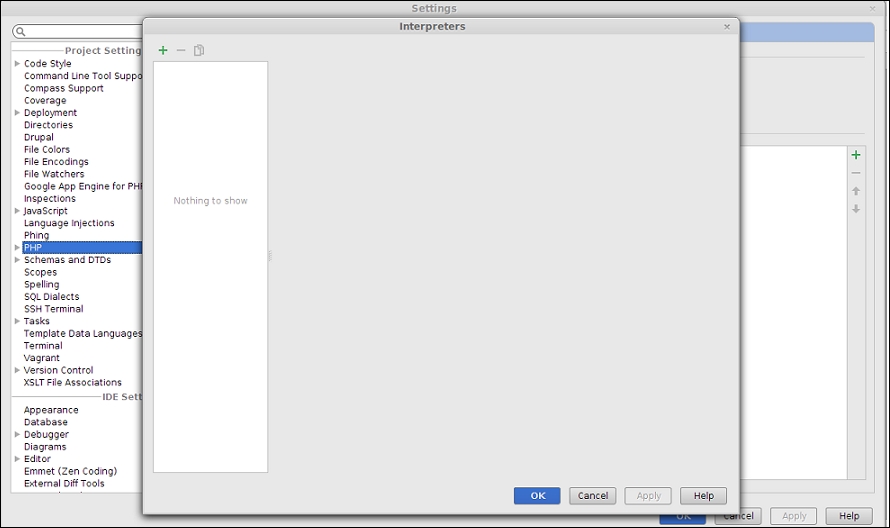
  1. In order to run command-line PHP this way, you need to go to Settings | PHP, as shown in the next screenshot:
    How to do it...
  2. There is this interpreter dropdown. You need to add an interpreter. You can do that by selecting the PHP interpreter from the bin folder of the PHP installation.
  3. Once selected, you need to customize it by providing various parameters, such as a name and configuration options. On applying the changes, the PHP environment in PhpStorm will be powered by the PHP environment of your underlying operating system.
  4. This will enable you to test and run your PHP scripts using the default keyboard shortcut Ctrl + Shift + F10.

See also

Note

You can add more interpreters if you have multiple versions of PHP installed and select from those for execution.

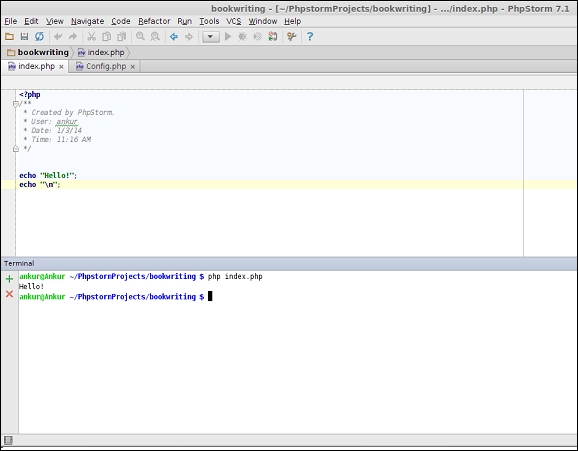
That was easy to cook, right? Feeling happy? In this happiness, please don't forget that there was one more road, which was on the right-hand side, and which again took us to the same destination. PHP scripts or codes can be run on the terminal. Terminal—did this word strike bells in your mind? PhpStorm provides you a terminal (emulator) such that you do not have to switch back and forth between your beloved IDE (presumably) PhpStorm and the command-line terminal. You can again use this feature to execute command-line PHP scripts. All you have to do is type php your-php-file.php if you have the PHP classpath set, or else you need to add some extra letters to make it /path/to/installed-php/php your-php-file.php.

The following screenshot shows you how to run PHP through command line in PhpStorm:

See also
CONTINUE READING
83
Tech Concepts
36
Programming languages
73
Tech Tools
Icon Unlimited access to the largest independent learning library in tech of over 8,000 expert-authored tech books and videos.
Icon Innovative learning tools, including AI book assistants, code context explainers, and text-to-speech.
Icon 50+ new titles added per month and exclusive early access to books as they are being written.
PhpStorm Cookbook
notes
bookmark Notes and Bookmarks search Search in title playlist Add to playlist font-size Font size

Change the font size

margin-width Margin width

Change margin width

day-mode Day/Sepia/Night Modes

Change background colour

Close icon Search
Country selected

Close icon Your notes and bookmarks

Confirmation

Modal Close icon
claim successful

Buy this book with your credits?

Modal Close icon
Are you sure you want to buy this book with one of your credits?
Close
YES, BUY

Submit Your Feedback

Modal Close icon
Modal Close icon
Modal Close icon