Sign In Start Free Trial
Account

Add to playlist

Create a Playlist

Modal Close icon
You need to login to use this feature.
  • Book Overview & Buying Node Cookbook: Second Edition
  • Table Of Contents Toc
Node Cookbook: Second Edition

Node Cookbook: Second Edition

By : David Mark Clements
4.3 (7)
close
close
Node Cookbook: Second Edition

Node Cookbook: Second Edition

4.3 (7)
By: David Mark Clements

Overview of this book

In Node Cookbook Second Edition, each chapter focuses on a different aspect of working with Node. Following a Cookbook structure, the recipes are written in an easy-to-understand language. Readers will find it easier to grasp even the complex recipes which are backed by lots of illustrations, tips, and hints. If you have some knowledge of JavaScript and want to build fast, efficient, scalable client-server solutions, then Node Cookbook Second Edition is for you. Knowledge of Node will be an advantage but is not required. Experienced users of Node will be able to improve their skills.
Table of Contents (18 chapters)
close
close
Node Cookbook Second Edition
Credits
About the Author
About the Reviewers
www.PacktPub.com
Preface
1
Index

Serving static files


If we have information stored on disk that we want to serve as web content, we can use the fs (filesystem) module to load our content and pass it through the http.createServer callback. This is a basic conceptual starting point to serve static files; as we will learn in the following recipes, there are much more efficient solutions.

Getting ready

We'll need some files to serve. Let's create a directory named content, containing the following three files:

  • index.html

  • styles.css

  • script.js

Add the following code to the HTML file index.html:

<html>
  <head>
    <title>Yay Node!</title>
    <link rel=stylesheet href=styles.css type=text/css>
    <script src=script.js type=text/javascript></script>
  </head>
  <body>
    <span id=yay>Yay!</span>
  </body>
</html>

Add the following code to the script.js JavaScript file:

window.onload = function() { alert('Yay Node!'); };

And finally, add the following code to the CSS file style.css:

#yay {font-size:5em;background:blue;color:yellow;padding:0.5em}

How to do it...

As in the previous recipe, we'll be using the core modules http and path. We'll also need to access the filesystem, so we'll require fs as well. With the help of the following code, let's create the server and use the path module to check if a file exists:

var http = require('http');
var path = require('path');
var fs = require('fs');
http.createServer(function (request, response) {
  var lookup = path.basename(decodeURI(request.url)) || 'index.html';
  var f = 'content/' + lookup;
  fs.exists(f, function (exists) { 
    console.log(exists ? lookup + " is there" 
    : lookup + " doesn't exist");
  });
}).listen(8080);

If we haven't already done it, then we can initialize our server.js file by running the following command:

supervisor server.js

Try loading localhost:8080/foo. The console will say foo doesn't exist, because it doesn't. The localhost:8080/script.js URL will tell us that script.js is there, because it is. Before we can serve a file, we are supposed to let the client know the content-type header, which we can determine from the file extension. So let's make a quick map using an object as follows:

var mimeTypes = {
  '.js' : 'text/javascript',
  '.html': 'text/html',
  '.css' : 'text/css'
};

We could extend our mimeTypes map later to support more types.

Modern browsers may be able to interpret certain mime types (like text/javascript), without the server sending a content-type header, but older browsers or less common mime types will rely upon the correct content-type header being sent from the server.

Remember to place mimeTypes outside of the server callback, since we don't want to initialize the same object on every client request. If the requested file exists, we can convert our file extension into a content-type header by feeding path.extname into mimeTypes and then pass our retrieved content-type to response.writeHead. If the requested file doesn't exist, we'll write out a 404 error and end the response as follows:

//requires variables, mimeType object...
http.createServer(function (request, response) {

  var lookup = path.basename(decodeURI(request.url)) || 'index.html';
  var f = 'content/' + lookup;
  fs.exists(f, function (exists) {
    if (exists) {
      fs.readFile(f, function (err, data) {
        if (err) {response.writeHead(500); response.end('Server Error!'); return; }
        var headers = {'Content-type': mimeTypes[path.extname(lookup)]};
        response.writeHead(200, headers);
        response.end(data);
      });
      return;
    }
    response.writeHead(404); //no such file found!
    response.end();
  });
}).listen(8080);

At the moment, there is still no content sent to the client. We have to get this content from our file, so we wrap the response handling in an fs.readFile method callback as follows:

//http.createServer, inside fs.exists:
if (exists) {
  fs.readFile(f, function(err, data) {
    var headers={'Content-type': mimeTypes[path.extname(lookup)]};
    response.writeHead(200, headers);
    response.end(data);
  });
 return;
}

Before we finish, let's apply some error handling to our fs.readFile callback as follows:

//requires variables, mimeType object...
//http.createServer,  path exists, inside if(exists):fs.readFile(f, function(err, data) {
    if (err) {response.writeHead(500); response.end('Server Error!');  return; }
    var headers = {'Content-type': mimeTypes[path.extname(lookup)]};
    response.writeHead(200, headers);
    response.end(data);
  });
return;
}

Note

Notice that return stays outside of the fs.readFile callback. We are returning from the fs.exists callback to prevent further code execution (for example, sending the 404 error). Placing a return statement in an if statement is similar to using an else branch. However, the pattern of the return statement inside the if loop is encouraged instead of if else, as it eliminates a level of nesting. Nesting can be particularly prevalent in Node due to performing a lot of asynchronous tasks, which tend to use callback functions.

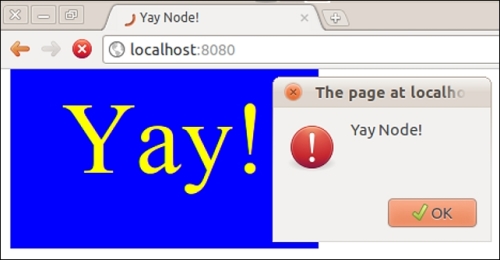
So, now we can navigate to localhost:8080, which will serve our index.html file. The index.html file makes calls to our script.js and styles.css files, which our server also delivers with appropriate mime types. We can see the result in the following screenshot:

This recipe serves to illustrate the fundamentals of serving static files. Remember, this is not an efficient solution! In a real world situation, we don't want to make an I/O call every time a request hits the server; this is very costly especially with larger files. In the following recipes, we'll learn better ways of serving static files.

How it works...

Our script creates a server and declares a variable called lookup. We assign a value to lookup using the double pipe || (OR) operator. This defines a default route if path.basename is empty. Then we pass lookup to a new variable that we named f in order to prepend our content directory to the intended filename. Next, we run f through the fs.exists method and check the exist parameter in our callback to see if the file is there. If the file does exist, we read it asynchronously using fs.readFile. If there is a problem accessing the file, we write a 500 server error, end the response, and return from the fs.readFile callback. We can test the error-handling functionality by removing read permissions from index.html as follows:

chmod -r index.html

Doing so will cause the server to throw the 500 server error status code. To set things right again, run the following command:

chmod +r index.html

Note

chmod is a Unix-type system-specific command. If we are using Windows, there's no need to set file permissions in this case.

As long as we can access the file, we grab the content-type header using our handy mimeTypes mapping object, write the headers, end the response with data loaded from the file, and finally return from the function. If the requested file does not exist, we bypass all this logic, write a 404 error message, and end the response.

There's more...

The favicon icon file is something to watch out for. We will explore the file in this section.

The favicon gotcha

When using a browser to test our server, sometimes an unexpected server hit can be observed. This is the browser requesting the default favicon.ico icon file that servers can provide. Apart from the initial confusion of seeing additional hits, this is usually not a problem. If the favicon request does begin to interfere, we can handle it as follows:

if (request.url === '/favicon.ico') {
  console.log('Not found: ' + f);
  response.end();
  return;
}

If we wanted to be more polite to the client, we could also inform it of a 404 error by using response.writeHead(404) before issuing response.end.

See also

  • The Caching content in memory for immediate delivery recipe

  • The Optimizing performance with streaming recipe

  • The Securing against filesystem hacking exploits recipe

CONTINUE READING
83
Tech Concepts
36
Programming languages
73
Tech Tools
Icon Unlimited access to the largest independent learning library in tech of over 8,000 expert-authored tech books and videos.
Icon Innovative learning tools, including AI book assistants, code context explainers, and text-to-speech.
Icon 50+ new titles added per month and exclusive early access to books as they are being written.
Node Cookbook: Second Edition
notes
bookmark Notes and Bookmarks search Search in title playlist Add to playlist font-size Font size

Change the font size

margin-width Margin width

Change margin width

day-mode Day/Sepia/Night Modes

Change background colour

Close icon Search
Country selected

Close icon Your notes and bookmarks

Confirmation

Modal Close icon
claim successful

Buy this book with your credits?

Modal Close icon
Are you sure you want to buy this book with one of your credits?
Close
YES, BUY

Submit Your Feedback

Modal Close icon
Modal Close icon
Modal Close icon