Sign In Start Free Trial
Account

Add to playlist

Create a Playlist

Modal Close icon
You need to login to use this feature.
  • Book Overview & Buying PrimeFaces Beginner's Guide
  • Table Of Contents Toc
  • Feedback & Rating feedback
PrimeFaces Beginner's Guide

PrimeFaces Beginner's Guide

By : K. Siva Prasad Reddy
2.5 (4)
close
close
PrimeFaces Beginner's Guide

PrimeFaces Beginner's Guide

2.5 (4)
By: K. Siva Prasad Reddy

Overview of this book

PrimeFaces is a lightweight UI component framework for JSF based applications. PrimeFaces is very easy to use because it comes as a single JAR file and requires no mandatory XML configuration. It provides more than 100 UI Components and an in-built AJAX support. It also provides theme support for UI components with more than 30 themes out-of-the-box. With PrimeFaces, developers can create rich user interfaces very easily.PrimeFaces Beginners Guide is a practical, hands-on guide that provides you with clear step-by-step exercises,that will help you to learn and explore the features of PrimeFaces.PrimeFaces Beginners Guide starts by showing you how to install PrimeFaces, create sample forms, and perform validations and then looks at various commonly used PrimeFaces utility components. Next, you will look into various basic text input components like form controls, Calendar, AutoComplete, and Rich Text Editor. Then you will learn about advanced UI components such as DataTables, panels, menus,and charts. Throughout the chapters we will be building a sample web application using PrimeFaces progressively that will give you a hands-on experience on using PrimeFaces effectively.You will learn how to create complex layouts using accordion panels, tab views, sophisticated menu navigations, breadcrumbs and much more. You will also learn how to display data using DataTable with pagination, filters, and lazy loading, and how to export data to Excel or PDF features. You will learn how to represent data in various formats like trees, charts, and TagCloud. You will also learn how to build an application supporting multiple themes.With this PrimeFaces Beginner's Guide , you will learn how to use PrimeFaces easily and effectively.
Table of Contents (15 chapters)
close
close
3
3. Using PrimeFaces Common Utility Components
6
6. Working with Selection Input Components
14
Index

Time for action – validate the UserName using AJAX listeners

Let's add AJAX event listener keyup event to the UserName input field so that as you type, it will check if the username entered is already in use or not.

  1. Create viewAjaxListener.xhtml with registration form to validate the UserName using AJAX Listener as follows:
    <h:form id="registrationForm">
      <p:panel header="Registration Form" style="width: 800px;">
      <h:panelGrid columns="3">
        <p:outputLabel value="UserName:*"/>
        <p:inputText id="userName" value="#{userController.registrationUser.userName}" required="true" label="UserName">
          <p:ajax event="keyup" listener="#{userController.checkUserNamesExists()}" update="userNameMsg"/>
        </p:inputText>
        <p:message id="userNameMsg" for="userName"/>
        
        <p:outputLabel value="Password:*"/>
        <p:password id="password" value="#{userController.registrationUser.password}" required="true" label="Password"/>        
        <p:message id="passwordMsg" for="password"/>
        
        <p:outputLabel value="FirstName:*"/>
        <p:inputText id="firstName" value="#{userController.registrationUser.firstName}" required="true" label="FirstName"/>
        <p:message id="firstNameMsg" for="firstName"/>    
        
        <p:commandButton action="#{userController.register}" value="Register" update="registrationForm"/>    
        
      </h:panelGrid>
      </p:panel>
    </h:form>
  2. Create a UserController.java managed bean with the checkUserNamesExists() method to check whether the entered UserName is already in use or not and add the error message accordingly:
    public void checkUserNamesExists()
    {
      String userName = this.registrationUser.getUserName();
      if("admin".equals(userName) || "test".equals(userName))
      {
        String msg = "UserName ["+userName+"] already in use.";
        FacesContext.getCurrentInstance().addMessage("registrationForm:userName", 
            new FacesMessage(FacesMessage.SEVERITY_ERROR, msg, msg));
      }
    }
  3. Point your browser to http://localhost:8080/chapter01/viewAjaxListener.jsf.

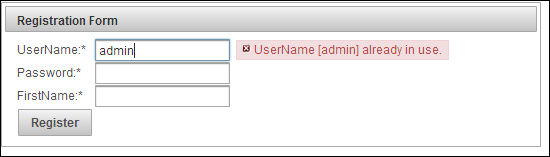
Enter admin or test in the UserName field then you should see the error message displayed immediately as in the following screenshot:

Time for action – validate the UserName using AJAX listeners

What just happened?

We have used AJAX listener in conjunction with keyup event on the UserName input field. So for each keyup event the callback method checkUserNamesExists() will be invoked to check whether the entered UserName value is admin or test, and adds error message if it is. As we are updating the view component with ID userNameMsg using update="userNameMsg", the error message is displayed immediately using the AJAX update.

Visually different images
CONTINUE READING
83
Tech Concepts
36
Programming languages
73
Tech Tools
Icon Unlimited access to the largest independent learning library in tech of over 8,000 expert-authored tech books and videos.
Icon Innovative learning tools, including AI book assistants, code context explainers, and text-to-speech.
Icon 50+ new titles added per month and exclusive early access to books as they are being written.
PrimeFaces Beginner's Guide
notes
bookmark Notes and Bookmarks search Search in title playlist Add to playlist font-size Font size

Change the font size

margin-width Margin width

Change margin width

day-mode Day/Sepia/Night Modes

Change background colour

Close icon Search
Country selected

Close icon Your notes and bookmarks

Confirmation

Modal Close icon
claim successful

Buy this book with your credits?

Modal Close icon
Are you sure you want to buy this book with one of your credits?
Close
YES, BUY

Submit Your Feedback

Modal Close icon
Modal Close icon
Modal Close icon