Sign In Start Free Trial
Account

Add to playlist

Create a Playlist

Modal Close icon
You need to login to use this feature.
  • Book Overview & Buying Sass and Compass Designer's Cookbook
  • Table Of Contents Toc
  • Feedback & Rating feedback
Sass and Compass Designer's Cookbook

Sass and Compass Designer's Cookbook

By : Jobsen, Stuart Robson
5 (2)
close
close
Sass and Compass Designer's Cookbook

Sass and Compass Designer's Cookbook

5 (2)
By: Jobsen, Stuart Robson

Overview of this book

Sass and Compass Designer's Cookbook helps you to get most out of CSS3 and harness its benefits to create engaging and receptive applications. This book will help you develop faster and reduce the maintenance time for your web development projects by using Sass and Compass. You will learn how to use with CSS frameworks such as Bootstrap and Foundation and understand how to use other libraries of pre-built mixins. You will also learn setting up a development environment with Gulp. This book guides you through all the concepts and gives you practical examples for full understanding.
Table of Contents (18 chapters)
close
close
17
Index

Installing Compass

Compass is an open source framework for Sass. Compass helps you write reusable CSS3 code with Sass by using reusable patterns. In this recipe, you will learn how to install Compass for command-line usage. Compass can easily be extended, and it ships with handy features, such as mixins for creating typographic rhythms and image sprites. Finally, Compass can also help you prefix your properties to handle browser compatibility. Read more about vendor prefixes in the Using vendor prefixes recipe of Chapter 7, Cross-Browser CSS3 Mixins. You can read more about Compass and its features further on in this book and especially in Chapter 6, Using Compass.

Getting ready

You will have to install Ruby before installing Compass. In the Installing Sass for command line usage recipe of this chapter, you can read how to install Ruby on your system. Both Compass and Ruby run on Linux, OS X, and Windows. When you install Compass before you have installed Sass, Sass will be installed automatically, since Ruby Sass is a dependency of Compass.

How to do it...

After installing Ruby, you simply have to run the following command in your console to install Compass:

gem install compass

That's all. You can also try the following steps to get a short impression of how to run Compass on the command line:

  1. Create a new compass project with the following command:
    compass create project
    
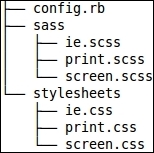
  2. The preceding command will create a new folder called project, which will contain the files shown in this image:
    How to do it...
  3. Now, you can compile your project by running the following command:
    compass compile project
    

How it works...

The config.rb file contains the configuration for your Compass project. This file is well-commented, and it contains, among others, the path to your project's folders.

Running the compile project command compiles each Sass file from the Sass (sass_dir) folder into a CSS file in the stylesheets (css_dir) folder. Files having a name starting with an underscore (_) are called partials and are not compiled into a CSS file. You can read more about partials and how to use them in the Working with partials recipe of this chapter.

There's more...

You can also directly use the features, mixins, and helper functions of Compass together with the command-line Sass compiler (see the Using Sass on the command line recipe of this chapter) by setting the --compass option. For more information on integrating compass in your compile process, you can read Chapter 6, Using Compass.

Compass is a widely used Sass framework. Many other frameworks for Sass are available too. Susy is a powerful set of Sass mixins for building grid-based layouts. Susy was originally built to be a part of the Compass ecosystem. In Chapter 9, Building grid-based layouts with Sass, and Chapter 10, Susy and Sass, of this book, you can read about Susy. And in Chapter 13, Meeting the Bourbon Family, of this book you will be acquainted with Bourbon. Bourbon is another library of Sass mixins.

This recipe demonstrates how to set up a project with only Compass. In the Adding Compass to an existing Sass project recipe of Chapter 6, Using Compass, you can read how to integrate Compass into existing projects too.

See also

The official website for the Compass framework can be found at http://compass-style.org/.

Visually different images
CONTINUE READING
83
Tech Concepts
36
Programming languages
73
Tech Tools
Icon Unlimited access to the largest independent learning library in tech of over 8,000 expert-authored tech books and videos.
Icon Innovative learning tools, including AI book assistants, code context explainers, and text-to-speech.
Icon 50+ new titles added per month and exclusive early access to books as they are being written.
Sass and Compass Designer's Cookbook
notes
bookmark Notes and Bookmarks search Search in title playlist Add to playlist font-size Font size

Change the font size

margin-width Margin width

Change margin width

day-mode Day/Sepia/Night Modes

Change background colour

Close icon Search
Country selected

Close icon Your notes and bookmarks

Confirmation

Modal Close icon
claim successful

Buy this book with your credits?

Modal Close icon
Are you sure you want to buy this book with one of your credits?
Close
YES, BUY

Submit Your Feedback

Modal Close icon
Modal Close icon
Modal Close icon