Sign In Start Free Trial
Account

Add to playlist

Create a Playlist

Modal Close icon
You need to login to use this feature.
  • Book Overview & Buying CodeIgniter Web Application Blueprints
  • Table Of Contents Toc
  • Feedback & Rating feedback
CodeIgniter Web Application Blueprints

CodeIgniter Web Application Blueprints

By : Robert Foster
3.8 (6)
close
close
CodeIgniter Web Application Blueprints

CodeIgniter Web Application Blueprints

3.8 (6)
By: Robert Foster

Overview of this book

If you are a PHP programmer or developer looking for a framework to quickly develop your applications, this book is for you. The prerequisites needed would be prior experience with CodeIgniter.
Table of Contents (11 chapters)
close
close
10
Index

Installing Twitter Bootstrap

Twitter Bootstrap is a frontend HTML5 framework that allows anyone to easily construct reliable interfaces. At the time of writing, the version of Bootstrap used is version 3.1.1.

We will use Twitter Bootstrap throughout this book to provide the framework for all view files and templates. We will look at how to download Twitter Bootstrap and how to install it in the CodeIgniter filesystem.

Firstly, we will need to download the Twitter Bootstrap files. To do that, perform the following steps:

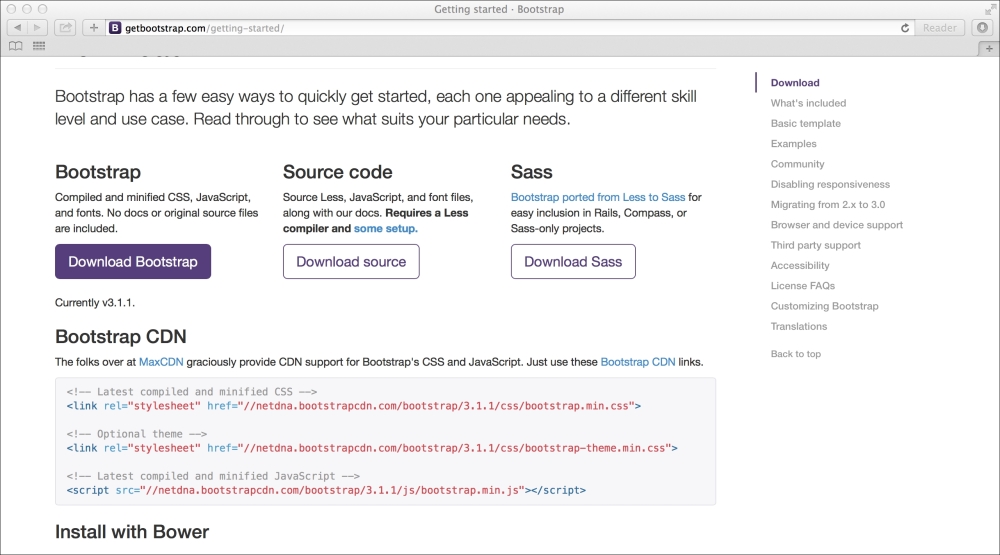
  1. Open your web browser and go to the Bootstrap download link at http://getbootstrap.com/getting-started. You'll see something similar to what is shown in the following screenshot:
    Installing Twitter Bootstrap
  2. Find the Download Bootstrap link and click on it (as indicated in the preceding screenshot); the download will start automatically.

Once the download is finished, go to its location on your machine and unpack the archived file. Inside the unpacked file, you should see something similar to what is shown in the following structure:

bootstrap/
├── css/
│   ├── bootstrap-theme.css
│   ├── bootstrap-theme.css.map
│   ├── bootstrap-theme.min.css
│   └── bootstrap.css
│   └── bootstrap.css.map
│   └── bootstrap.min.css
├── js/
│   ├── bootstrap.js
│   └── bootstrap.min.js
└── fonts/
    ├── glyphicons-halflings-regular.eot
    ├── glyphicons-halflings-regular.svg
    ├── glyphicons-halflings-regular.ttf
    └── glyphicons-halflings-regular.woff

Move the bootstrap folder to your CodeIgniter installation so that the file hierarchy looks like the following:

/path/to/web/root/
├── application/
└── views/
    ├── common
        ├── header.php
        ├── footer.php
├── system/
├── bootstrap/
├── index.php
├── license.txt

In the preceding tree structure, the application and system directories are to do with CodeIgniter, as are the index.php and license.txt files; however, the bootstrap directory contains the contents of your Bootstrap download.

I have also indicated the location of the common header.php and footer.php files. These files are used throughout the book and act as a wrapper for every other view file.

Visually different images
CONTINUE READING
83
Tech Concepts
36
Programming languages
73
Tech Tools
Icon Unlimited access to the largest independent learning library in tech of over 8,000 expert-authored tech books and videos.
Icon Innovative learning tools, including AI book assistants, code context explainers, and text-to-speech.
Icon 50+ new titles added per month and exclusive early access to books as they are being written.
CodeIgniter Web Application Blueprints
notes
bookmark Notes and Bookmarks search Search in title playlist Add to playlist download Download options font-size Font size

Change the font size

margin-width Margin width

Change margin width

day-mode Day/Sepia/Night Modes

Change background colour

Close icon Search
Country selected

Close icon Your notes and bookmarks

Confirmation

Modal Close icon
claim successful

Buy this book with your credits?

Modal Close icon
Are you sure you want to buy this book with one of your credits?
Close
YES, BUY

Submit Your Feedback

Modal Close icon
Modal Close icon
Modal Close icon