Sign In Start Free Trial
Account

Add to playlist

Create a Playlist

Modal Close icon
You need to login to use this feature.
  • Book Overview & Buying Learning Single-page Web Application Development
  • Table Of Contents Toc
Learning Single-page Web Application Development

Learning Single-page Web Application Development

By : Fernando Monteiro
3 (1)
close
close
Learning Single-page Web Application Development

Learning Single-page Web Application Development

3 (1)
By: Fernando Monteiro

Overview of this book

This book is aimed at web developers who are familiar with frontend technologies like JavaScript, HTML, and CSS, and modern tools like Bower, Yeoman, and Grunt.
Table of Contents (10 chapters)
close
close
9
Index

The SPA directory structure

There's lots of consensus among the main frameworks and libraries about how to do MVC architecture, declarative bindings, and so on. Your choice will deeply influence your architecture.

Some frameworks recommend a specific directory structure to be followed, but some others are more flexible.

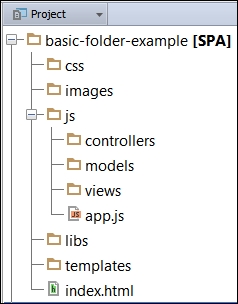
We'll adopt a boilerplate to build our API in the next chapters, and we'll discuss more about server structure and code organization; we should always think with regard to maintenance and scalability of the application. For now, let's see an example of a basic structure in detail that is very common to all MVC patterns:

The SPA directory structure

A simple basic SPA folder structure consists of the following:

  • Basic-folder-example [SPA]: This folder is the root of our application and has our one main file, index.html.
  • CSS: This folder contains all stylesheets.
  • images: This folder contains all images.
  • js: This has all the subfolders and a file called app.js (our startup file).
  • controllers folder: This contains all controllers' files, but we can name this as Collections or ViewModels depending on what kind of library or framework we will be using.
  • models: This folder contains all model files.
  • views: This folder has all view files (only data, no HTML rendering here).
  • libs: This contains all third-party libraries such as jQuery, Handlebars, and Knockout.
  • templates: This folder has all script templates such as Handlebars, Underscore. Note that this folder contains all the templates we will use in our application.

Note that we don't have any folder to deal with routes, but from a basic application, we can put our routing logic in our app.js or server.js file.

Tip

In Node.js applications, often the initialization file is called app.js or server.js and is always in the root directory of the application.

Despite being a very basic structure, it is sufficient for understanding the basics of folder names. Of course, as things are getting complex, we need to re-evaluate this structure (maybe include a folder for Sass or Less files and also add some other things). However, in the course of the book, we will see some alternatives.

CONTINUE READING
83
Tech Concepts
36
Programming languages
73
Tech Tools
Icon Unlimited access to the largest independent learning library in tech of over 8,000 expert-authored tech books and videos.
Icon Innovative learning tools, including AI book assistants, code context explainers, and text-to-speech.
Icon 50+ new titles added per month and exclusive early access to books as they are being written.
Learning Single-page Web Application Development
notes
bookmark Notes and Bookmarks search Search in title playlist Add to playlist font-size Font size

Change the font size

margin-width Margin width

Change margin width

day-mode Day/Sepia/Night Modes

Change background colour

Close icon Search
Country selected

Close icon Your notes and bookmarks

Confirmation

Modal Close icon
claim successful

Buy this book with your credits?

Modal Close icon
Are you sure you want to buy this book with one of your credits?
Close
YES, BUY

Submit Your Feedback

Modal Close icon
Modal Close icon
Modal Close icon