Sign In Start Free Trial
Account

Add to playlist

Create a Playlist

Modal Close icon
You need to login to use this feature.
  • Book Overview & Buying Building web applications with Python and Neo4j
  • Table Of Contents Toc
  • Feedback & Rating feedback
Building web applications with Python and Neo4j

Building web applications with Python and Neo4j

By : Sumit Gupta
4.3 (3)
close
close
Building web applications with Python and Neo4j

Building web applications with Python and Neo4j

4.3 (3)
By: Sumit Gupta

Overview of this book

If you are a Python developer and want to expand your understanding of Python-based web applications over Neo4j graph data models, this is the book for you.
Table of Contents (9 chapters)
close
close
8
Index

Using the Neo4j shell

The Neo4j shell is a powerful interactive shell for interacting with the Neo4j database. It is used for performing the CRUD operations on graphs.

The Neo4j shell can be executed locally (on the same machine on which we have installed the Neo4j server) or remotely (by connecting the Neo4j shell to a remote sever).

By default, the Neo4j shell (<$NEO4J_HOME>/bin/neo4j-shell) can be executed on the same machine on which the Neo4j server is installed, but the following configuration changes are required in <$NEO4J_HOME>/conf/neo4j.properties to enable the connectivity of the Neo4j database from the remote machines:

  • remote_shell_enabled=true: This configuration enables the property
  • remote_shell_host=127.0.0.1: This configuration enables and provides the IP address of the machine on which the Neo4j server is installed
  • remote_shell_port=1337: This configuration enables and defines the port for incoming connections

Let's talk about various other options provided by the Neo4j shell for connecting to the local Neo4j server:

  • neo4j-shell -path <PATH>: This option shows the path of the database directory on the local file system. A new database will be created in case the given path does not contain a valid Neo4j database.
  • neo4j-shell -pid <PID>: This option connects to a specific process ID.
  • neo4j-shell -readonly: This option connects to the local database in the READ ONLY mode.
  • neo4j-shell -c <COMMAND>: This option executes a single Cypher statement and then the shell exits.
  • neo4j-shell -file <FILE >: This option reads the contents of the file (multiple Cypher CRUD operations), and then executes it.
  • neo4j-shell –config - <CONFIG>: This option reads the given configuration file (such as neo4j-server.properties) from the specified location, and then starts the shell.

The following are the options for connecting to the remote Neo4j server:

  • neo4j-shell -port <PORT>: This option connects to the server running on a port different to the default port (1337)
  • neo4j-shell -host <HOST>: This option shows the IP address or domain name of the remote host on which the Neo4j server is installed and running.

Let's move forward and get our hands dirty with the system.

To begin with and to make it simple, first we will insert the data, and then try to fetch the same data through the Neo4j shell.

Let's perform the following steps for running our Cypher queries in the Neo4j shell:

  1. Open your UNIX shell/console and execute <$NEO4J_HOME>/bin/neo4j start. This will start your Neo4j server in another process.
  2. In the same console, execute <$NEO4J_HOME>/bin/neo4j-shell to start the Neo4j shell.
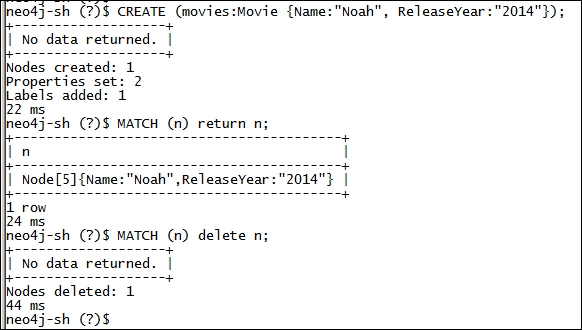
  3. Next, execute the following set of statements on the console:
    CREATE (movies:Movie {Name:"Noah", ReleaseYear:"2014"});
    MATCH (n) return n;
    MATCH (n) delete n;
  4. You will see something like the following image on your console:
    Using the Neo4j shell

Yes, that's it…we are done!

We will dive deep into the details of the Cypher statements in the upcoming chapters, but let's see the results of each of the preceding Cypher statements:

  • CREATE (movies:Movie {Name:"Noah", ReleaseYear:"2014"});: This statement creates a node with two attributes, Name:"Noah" and ReleaseYear:"2014", and a label, Movie
  • MATCH (n) return n;: This statement searches the Neo4j database and prints all the nodes and their associated properties on the console
  • MATCH (n) delete n;: This statement searches the Neo4j database and deletes all the selected nodes
Visually different images
CONTINUE READING
83
Tech Concepts
36
Programming languages
73
Tech Tools
Icon Unlimited access to the largest independent learning library in tech of over 8,000 expert-authored tech books and videos.
Icon Innovative learning tools, including AI book assistants, code context explainers, and text-to-speech.
Icon 50+ new titles added per month and exclusive early access to books as they are being written.
Building web applications with Python and Neo4j
notes
bookmark Notes and Bookmarks search Search in title playlist Add to playlist font-size Font size

Change the font size

margin-width Margin width

Change margin width

day-mode Day/Sepia/Night Modes

Change background colour

Close icon Search
Country selected

Close icon Your notes and bookmarks

Confirmation

Modal Close icon
claim successful

Buy this book with your credits?

Modal Close icon
Are you sure you want to buy this book with one of your credits?
Close
YES, BUY

Submit Your Feedback

Modal Close icon
Modal Close icon
Modal Close icon