Sign In Start Free Trial
Account

Add to playlist

Create a Playlist

Modal Close icon
You need to login to use this feature.
  • Book Overview & Buying Getting Started with Knockout.js for .NET Developers
  • Table Of Contents Toc
  • Feedback & Rating feedback
Getting Started with Knockout.js for .NET Developers

Getting Started with Knockout.js for .NET Developers

By : Andrey Ankshin
4.2 (9)
close
close
Getting Started with Knockout.js for .NET Developers

Getting Started with Knockout.js for .NET Developers

4.2 (9)
By: Andrey Ankshin

Overview of this book

This book is intended for .NET developers who want to use the MVVM design pattern to create powerful client-side JavaScript linked to server-side C# logic. Basic experience with ASP.NET, Razor, and creating web applications is needed.
Table of Contents (9 chapters)
close
close
8
Index

Installing Knockout.js

There are a few ways to install Knockout.js, and each method is outlined here. Generally, you want to use the first or second method, but the third and fourth methods can be useful in some special cases.

Method 1 – official site

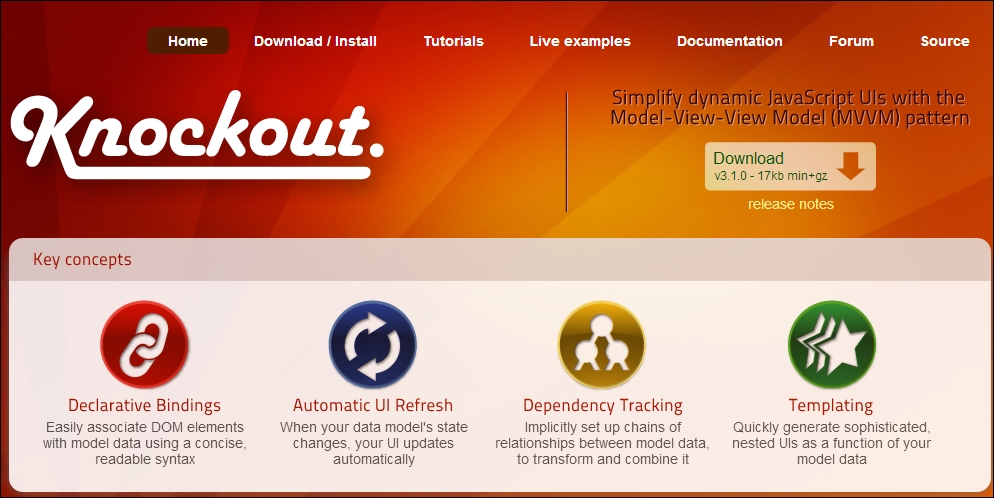
You can manually download Knockout.js from the official site http://knockoutjs.com/. You can see the screen of the main page in the following screenshot:

Method 1 – official site

After downloading, you can add a reference to Knockout.js from your HTML page using a <script> tag. For example, if the library was downloaded to the root directory of your application, then you can use the following line of code:

<script type='text/javascript' src='knockout-3.1.0.js'></script>

You should use the actual version of the library instead of version 3.1.0 (released in March 2014) in the preceding example line of code. Hereafter, we will use version 3.1.0 (it is the current version at the time of writing this book), but because of backward compatibility all examples should work with future Knockout.js versions very well.

Also, you can download the debug build for learning purposes (from the download page at http://knockoutjs.com/downloads/index.html). It helps you to understand how Knockout.js works. Don't use it for real production applications.

Method 2 – NuGet

If you develop a website with .NET, you can install it via NuGet (https://www.nuget.org/packages/knockoutjs). Just run the following command in the Package Manager Console:

Install-Package knockoutjs

Method 3 – CDNs

Content distribution network (CDN) is a large system for delivery or distribution of some content to end users' servers. You can use third-party CDNs for reference Knockout.js. Examples of CDNs can be found at http://cdnjs.cloudflare.com/ajax/libs/knockout/3.1.0/knockout-min.js and http://ajax.aspnetcdn.com/ajax/knockout/knockout-3.0.0.js.

Note that not all CDNs support the latest actual version of the library. The best way is to use a local library version on your server, but the CDNs method can be very useful for quick single-page solutions.

Method 4 – GitHub

Full sources of the library are placed on GitHub at https://github.com/knockout/knockout. You can build the latest Knockout.js version from source by yourself by executing the following steps:

  1. Clone the repo from GitHub. Make sure that you have Git installed on your local machine:
    git clone https://github.com/knockout/knockout.git
    cd knockout
    
  2. Acquire build dependencies. Make sure that you have Node.js installed on your local machine:
    npm install -g grunt-cli
    npm install
    
  3. Run the build tool:
    Grunt
    

Done! Now you can find the built files in the build/output/ directory.

Visually different images
CONTINUE READING
83
Tech Concepts
36
Programming languages
73
Tech Tools
Icon Unlimited access to the largest independent learning library in tech of over 8,000 expert-authored tech books and videos.
Icon Innovative learning tools, including AI book assistants, code context explainers, and text-to-speech.
Icon 50+ new titles added per month and exclusive early access to books as they are being written.
Getting Started with Knockout.js for .NET Developers
notes
bookmark Notes and Bookmarks search Search in title playlist Add to playlist font-size Font size

Change the font size

margin-width Margin width

Change margin width

day-mode Day/Sepia/Night Modes

Change background colour

Close icon Search
Country selected

Close icon Your notes and bookmarks

Confirmation

Modal Close icon
claim successful

Buy this book with your credits?

Modal Close icon
Are you sure you want to buy this book with one of your credits?
Close
YES, BUY

Submit Your Feedback

Modal Close icon
Modal Close icon
Modal Close icon