Sign In Start Free Trial
Account

Add to playlist

Create a Playlist

Modal Close icon
You need to login to use this feature.
  • Book Overview & Buying Building Scalable Apps with Redis and Node.js
  • Table Of Contents Toc
Building Scalable Apps with Redis and Node.js

Building Scalable Apps with Redis and Node.js

By : Johanan
4.3 (9)
close
close
Building Scalable Apps with Redis and Node.js

Building Scalable Apps with Redis and Node.js

4.3 (9)
By: Johanan

Overview of this book

If the phrase scalability sounds alien to you, then this is an ideal book for you. You will not need much Node.js experience as each framework is demonstrated in a way that requires no previous knowledge of the framework. You will be building scalable Node.js applications in no time! Knowledge of JavaScript is required.
Table of Contents (12 chapters)
close
close
11
Index

Using Express in Node

With everything installed, we can create our project directory. It does not matter where you create it (I created a projects directory under my user folder), but all the files we created will be referenced from the root of this folder. To do this, create an app.js file. Note that the aim here is to build our very own, simple Express application. To get started, open app.js and add the following code to it:

var express = require('express');
var app = express();

app.get('*',function(req, res){
  res.send('Express Response');
});

app.listen(3000);
console.log("App server running on port 3000");

To start the Express server, we will run the following commands:

node app.js
npm start

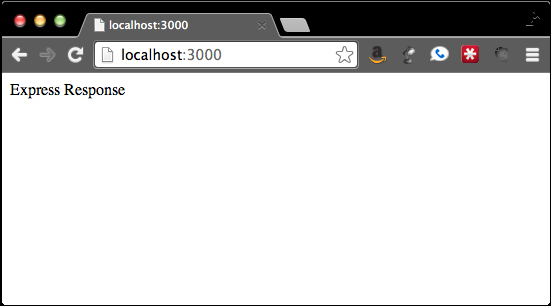
The first tells Node to run using this file. The other uses the value from our package.json file under scripts.start. We can then open our browser to http://localhost:3000. Any path we put into our browser will return the Express response, which you can see in the following screenshot:

Using Express in Node

In order to receive this response, the app.get function uses a regular expression to match any GET request, no matter the path. The req and res objects are the request and response objects. The res.send Express function adds all the basic headers for us, before sending the response back.

The Express application can respond to all the common HTTP verbs such as GET, POST, PUT, and DELETE. As you have guessed by now, we will use these verbs in order to use the method call passing in the path, as well as the callback.

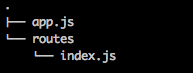
Although this works well, it is in fact not very useful. We will need to define routes, which are specific HTTP verbs matching with the URL. We need to add all of our routes and connect them to functions. Our application is very simple from a routing standpoint. We will have an index page, a login page that has a form, and a chat page. Although we can just as easily add all of these functions to app.js, app.js, it will then become very difficult to maintain quickly. Instead, we will create a routes folder and then add an index.js file. Our folder structure should then look similar to the one in the following screenshot:

Using Express in Node

Inside the index.js file in routes, we will create all our routes with the following code:

module.exports.index = index;
module.exports.login = login;
module.exports.loginProcess = loginProcess;
module.exports.chat = chat;
function index(req, res){
  res.send('Index');
};
function login(req, res){
  res.send('Login');
};
function loginProcess(req, res){
  res.redirect('/');
};
function chat(req, res){
  res.send('Chat');
};

Following this, app.js should only use our routes. Our app.js file should look similar to the following code:

var express = require('express');
var app = express();
var routes = require('./routes');

app.get('/', routes.index);
app.get('/login', routes.login);
app.post('/login', routes.loginProcess);
app.get('/chat', routes.chat);

app.listen(3000);
console.log("App server running on port 3000");

Our routes are now nice and clean, which also lends itself to aliases. If we want people to be able to see the login form from /login and /account/login, we just have to add the following line:

app.get('/account/login', routes.login);

We can also group related functions together in the same file. Our example is simple, but it will be easy to have as many files mapping to specific routes. Each file would just have the functions that relate to its primary duty, which means you could then wire them to any route you wanted.

You may already be asking, "What happens when a route is not defined?". This is, in fact, a great question, and it was something I was just about to discuss. By default, Express will respond with Cannot GET /notfoundURL. Usually, it is a bad idea to keep this as our 404 response. What we actually want is to tell the user that they have made a wrong turn somewhere. This naturally leads us to our next major idea—using middleware in Express.

Visually different images
CONTINUE READING
83
Tech Concepts
36
Programming languages
73
Tech Tools
Icon Unlimited access to the largest independent learning library in tech of over 8,000 expert-authored tech books and videos.
Icon Innovative learning tools, including AI book assistants, code context explainers, and text-to-speech.
Icon 50+ new titles added per month and exclusive early access to books as they are being written.
Building Scalable Apps with Redis and Node.js
notes
bookmark Notes and Bookmarks search Search in title playlist Add to playlist font-size Font size

Change the font size

margin-width Margin width

Change margin width

day-mode Day/Sepia/Night Modes

Change background colour

Close icon Search
Country selected

Close icon Your notes and bookmarks

Confirmation

Modal Close icon
claim successful

Buy this book with your credits?

Modal Close icon
Are you sure you want to buy this book with one of your credits?
Close
YES, BUY

Submit Your Feedback

Modal Close icon
Modal Close icon
Modal Close icon