Sign In Start Free Trial
Account

Add to playlist

Create a Playlist

Modal Close icon
You need to login to use this feature.
  • Book Overview & Buying Sitecore Cookbook for Developers
  • Table Of Contents Toc
Sitecore Cookbook for Developers

Sitecore Cookbook for Developers

By : Yogesh Patel, Patel Y Sunderbhai
3.7 (7)
close
close
Sitecore Cookbook for Developers

Sitecore Cookbook for Developers

3.7 (7)
By: Yogesh Patel, Patel Y Sunderbhai

Overview of this book

This book will get you started on building rich websites, and customizing user interfaces by creating content management applications quickly. It will give you an insight into web designs and how to customize the Sitecore architecture as per your website's requirements using best practices. Packed with over 70 recipes to help you achieve and solve real-world common tasks, requirements, and the problems of content management, content delivery, and publishing instance environments. It also presents recipes on Sitecore’s backend processes of customizing pipelines, creating custom event handler and media handler, setting hooks and more. Other topics covered include creating a workflow action, publishing sublayouts and media files, securing your environment by customizing user profiles and access rights, boosting search capabilities, optimising performance, scalability and high-availability of Sitecore instances and much more. By the end of this book, you will have be able to add virtually limitless features to your websites by developing and deploying Sitecore efficiently.
Table of Contents (15 chapters)
close
close
14
Index

Placing renderings dynamically using placeholders

In the previous recipes, you learned placing components on a layout or view statically. You can empower the dynamic placement of components using a placeholder, which comes with lots of benefits that you will learn in this recipe.

How to do it…

We will first replace statically placed renderings with placeholders in Main Layout:

  1. We will first decide places where we can put content dynamically or we need placeholders, for example, breadcrumb, side menu, and main content area.
  2. From Main Layout, remove the existing renderings from these places and add placeholders, breadcrumb, left-column, and main-content as follows:
    <div class="container">
      <div id="breadcrumb">
        @Html.Sitecore().Placeholder("breadcrumb")
      </div>
      <div id="sidemenu">
        @Html.Sitecore().Placeholder("left-column")
      </div>
      <div id="contentarea">
        <article>
          @Html.Sitecore().Placeholder("main-content")
        </article>
      </div>
    </div>
  3. We already have breadcrumb and Side Menu view renderings; we will create a simple view rendering to show the Title, Body, and other fields in the main content area. In the SitecoreCookbook project, create a TitleAndBody.cshtml view file in the /Views/Content/ folder with the following content, and register this rendering:
    <h1>@Html.Sitecore().Field("Title")</h1>
    <div> @Html.Sitecore().Field("Body") </div>
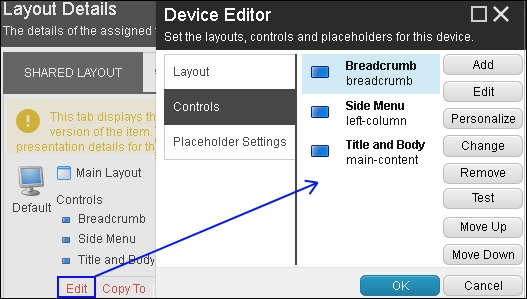
  4. Now, we will place Breadcrumb, Side Menu, and Title and Body renderings in breadcrumb, left-column, and main-content placeholders accordingly. From the Content Editor, select Standard Values of the Site Root template. From the ribbon, click on the Details button in the Layout group from the Presentation tab to open the Layout Details dialog. Click on the Edit button to open the Device Details dialog and select the Controls section. It will show an empty list, but once you add renderings on placeholders, they will be displayed, as shown in the following image:
    How to do it…
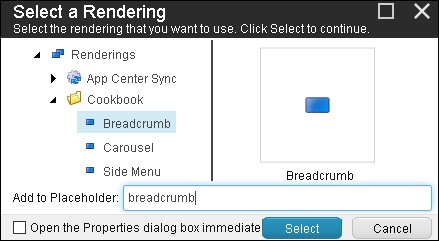
  5. To add renderings, click on the Add button from the Device Editor dialog. It will open the Select a Rendering dialog, where you can add renderings to particular placeholders, as shown in the following image:
    How to do it…
  6. Repeat steps 4 and 5 for all template standard values, where you want to add renderings. Now, preview different pages to see the power of placeholders; you will find the renderings are displayed on the pages!

Note

We could also have used the benefit of inheriting presentation details from base templates. In Sitecore 8 onward, if you don't find your renderings inherited, you can get a bug fix for it from https://goo.gl/OSMNkR.

How it works…

A placeholder is a Sitecore component used within a layout, view, or sublayout, which allows the dynamic placement of components in it. It does not have any user interface, the same as the ASP.NET placeholder control. In Sitecore MVC, a placeholder can be created using the @Html.Sitecore().Placeholder("<placeholder name>") helper class. In Web Forms, you can use <sc:Placeholder runat="server" />.

It allows users to have design flexibility and minimize the number of layouts and renderings. For example, in this recipe, we can convert our layout from a two-column (side menu and content area) to a three-column layout, simply by adding a two-column view in the main-content placeholder. Thus, you can create any type of dynamic design just using a single layout.

When you have multiple components in a single placeholder, their order is managed by layout engine, considering the order they are added to the layout details. Their order can be changed using the Move Up and Move Down buttons in the Device Editor dialog, shown in step 4. You can remove or replace any control by clicking on the Remove or Change button.

Note

If you apply layout details to an individual item, it will override layout details defined in standard values of the data template associated with the item. To revert them to standard values, use the Reset button in the Presentation tab and Layout group from the Content Editor ribbon.

See also

You can also implement dynamic placeholders (https://goo.gl/6NIF3z).

Tip

It's also possible to use nested placeholders. When you use a view inside a view, you can set the placeholder key as /<outer placeholder key>/<inner placeholder key> to place renderings to the inner placeholder.

CONTINUE READING
83
Tech Concepts
36
Programming languages
73
Tech Tools
Icon Unlimited access to the largest independent learning library in tech of over 8,000 expert-authored tech books and videos.
Icon Innovative learning tools, including AI book assistants, code context explainers, and text-to-speech.
Icon 50+ new titles added per month and exclusive early access to books as they are being written.
Sitecore Cookbook for Developers
notes
bookmark Notes and Bookmarks search Search in title playlist Add to playlist download Download options font-size Font size

Change the font size

margin-width Margin width

Change margin width

day-mode Day/Sepia/Night Modes

Change background colour

Close icon Search
Country selected

Close icon Your notes and bookmarks

Confirmation

Modal Close icon
claim successful

Buy this book with your credits?

Modal Close icon
Are you sure you want to buy this book with one of your credits?
Close
YES, BUY

Submit Your Feedback

Modal Close icon
Modal Close icon
Modal Close icon