Sign In Start Free Trial
Account

Add to playlist

Create a Playlist

Modal Close icon
You need to login to use this feature.
  • Book Overview & Buying SignalR: Real-time Application Development - Second Edition
  • Table Of Contents Toc
SignalR: Real-time Application Development - Second Edition

SignalR: Real-time Application Development - Second Edition

By : Einar Ingerbrigsten
3.7 (3)
close
close
SignalR: Real-time Application Development - Second Edition

SignalR: Real-time Application Development - Second Edition

3.7 (3)
By: Einar Ingerbrigsten

Overview of this book

With technology trends, demands on software have changed with more and more skilled users. Over the past few years, with services such as Facebook, Twitter and push notifications on smartphones, users are now getting used to being up to date with everything that happens all the time. With SignalR, the applications stay connected and will generate notifications when something happens either from the system or by other users thus giving new opportunities to enter into this new, exciting world of real-time application development. This is a step-by-step guide that follows a practical approach helping you as a developer getting to get started with SignalR by learning its fundamentals. It will help you through building real-time applications using the new methods and functions in the SignalR framework. Starting from getting persistent connections with the server, you will learn the basics of connecting a client to the server and how the messaging works. This will be followed by setting up a hub on the server and consuming it from a JavaScript client. Next you will be taught how you can group connections together to send messages. We will then go on to know how you can have state in the client to handle specific operations like connecting or disconnecting. Then, moving on you will learn how to secure your SignalR connections using OWIN and scaling SignalR across multiple servers. Next you will learn building a client for WPF and building a client using Xamarin that targets Windows Phone, iPhone and Android. Lastly, you will learn how to monitor the traffic in SignalR using Fiddler, Charles and hosting SignalR using OWIN.
Table of Contents (13 chapters)
close
close
11
11. Hosting a Server Using Self-hosted OWIN
12
Index

Tools

As with any craft, we need tools to build anything. Here is a summary of some of the tools we will be using to create our applications.

Visual Studio 2013

In this book, you will find that Visual Studio 2013 Professional is used. For the iOS content, we will be using Visual Studio—although it is in conjunction with Xamarin and Apple's Xcode.

Note

You can use the community edition of Visual Studio 2013 if you don't have a license to Visual Studio 2013 professional or higher. It can be downloaded from http://www.visualstudio.com/.

NuGet

All third-party dependencies and all the libraries mentioned in this chapter, for instance, will be pulled in using NuGet.

Note

In the interest of saving space in the book, the description of how to use NuGet sits here and only here. The other chapters will refer back to this recipe.

If you need to install NuGet first, visit http://www.nuget.org to download and install it. Once this is done, you can use NuGet by following these steps:

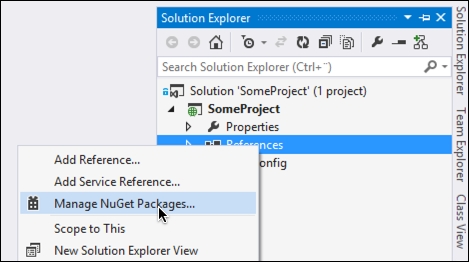
  1. To add a reference to a project, we start by right-clicking on References of your project and selecting Manage NuGet Packages..., as shown here:
    NuGet
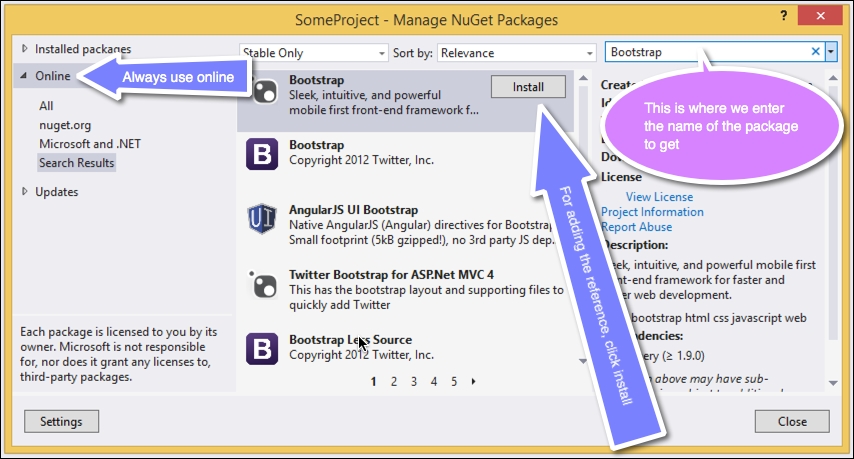
  2. Next, select Online and enter the name of the package that you want to add a reference to in the search box. When you have found the proper package, click on the Install button, as shown in the following screenshot:
    NuGet

    Tip

    In some cases, we will need a specific version of a file. This is not something we can do through the UI, and we will need the Package Manager Console. To specify a specific version of a package, if needed, the syntax of the command in the Package Manager Console is as follows:

    install-package <package-name> -version <package-version>
    
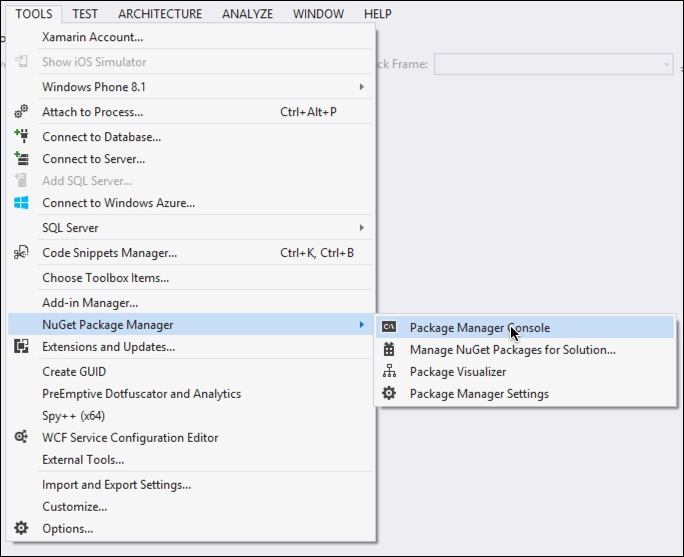
  3. Following this, go to TOOLS and then NuGet Package Manager. Click on Package Manager Console, as shown here:
    NuGet
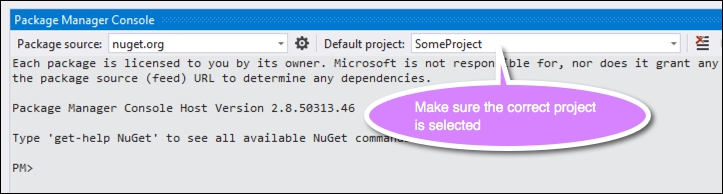
  4. You then need to go to the Package Manager Console window that appears and you need to make sure that the project that will have the reference is selected:
    NuGet

By now, you should be familiar with how you can add NuGet packages to reference third-party dependencies, which will be used throughout the book.

Visually different images
CONTINUE READING
83
Tech Concepts
36
Programming languages
73
Tech Tools
Icon Unlimited access to the largest independent learning library in tech of over 8,000 expert-authored tech books and videos.
Icon Innovative learning tools, including AI book assistants, code context explainers, and text-to-speech.
Icon 50+ new titles added per month and exclusive early access to books as they are being written.
SignalR: Real-time Application Development - Second Edition
notes
bookmark Notes and Bookmarks search Search in title playlist Add to playlist download Download options font-size Font size

Change the font size

margin-width Margin width

Change margin width

day-mode Day/Sepia/Night Modes

Change background colour

Close icon Search
Country selected

Close icon Your notes and bookmarks

Confirmation

Modal Close icon
claim successful

Buy this book with your credits?

Modal Close icon
Are you sure you want to buy this book with one of your credits?
Close
YES, BUY

Submit Your Feedback

Modal Close icon
Modal Close icon
Modal Close icon