Sign In Start Free Trial
Account

Add to playlist

Create a Playlist

Modal Close icon
You need to login to use this feature.
  • Book Overview & Buying Angular 2 Components
  • Table Of Contents Toc
Angular 2 Components

Angular 2 Components

By : Nir Kaufman, Thierry Templier Thierry
close
close
Angular 2 Components

Angular 2 Components

By: Nir Kaufman, Thierry Templier Thierry

Overview of this book

This book is a concise guide to Angular 2 Components and is based on the stable version of Angular 2. You will start with learning about the Angular 2 Components architecture and how components differ from Angular directives in Angular 1. You will then move on to quickly set up an Angular 2 development environment and grasp the basics of TypeScript. With this strong foundation in place, you will start building components. The book will teach you, with an example, how to define component behavior, create component templates, and use the controller of your component. You will also learn how to make your components communicate with each other. Once you have built a component, you will learn how to extend it by integrating third-party components with it. By the end of the book, you will be confident with building and using components for your applications.
Table of Contents (11 chapters)
close
close
10
Index

Bootstrapping the application

Before dealing with how the link is made between components and the DOM, let's introduce the concept of module and how it's used to bootstrap the application.

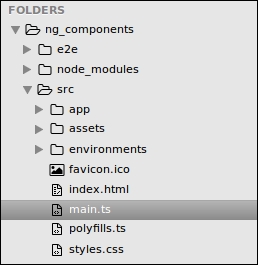
Under the src directory in the project root, locate and open the main.ts file:

Bootstrapping the application

This file is the starting point of our Angular application. It is responsible for instantiating the main module of the application and the root component in it. To do so, we import a platformBrowserDynamic method from the platform-browser-dynamic module, which is a part of Angular. This method returns an object to bootstrap the application. The bootstrapModule method of this object is responsible for kicking off Angular by rendering the root component of the component tree. It requires the main module to be passed as an argument, so we import our module class AppModule and pass it to bootstrap:

The following code is from the main.ts file:

import './polyfills.ts';
import { platformBrowserDynamic } from &apos...
CONTINUE READING
83
Tech Concepts
36
Programming languages
73
Tech Tools
Icon Unlimited access to the largest independent learning library in tech of over 8,000 expert-authored tech books and videos.
Icon Innovative learning tools, including AI book assistants, code context explainers, and text-to-speech.
Icon 50+ new titles added per month and exclusive early access to books as they are being written.
Angular 2 Components
notes
bookmark Notes and Bookmarks search Search in title playlist Add to playlist download Download options font-size Font size

Change the font size

margin-width Margin width

Change margin width

day-mode Day/Sepia/Night Modes

Change background colour

Close icon Search
Country selected

Close icon Your notes and bookmarks

Confirmation

Modal Close icon
claim successful

Buy this book with your credits?

Modal Close icon
Are you sure you want to buy this book with one of your credits?
Close
YES, BUY

Submit Your Feedback

Modal Close icon
Modal Close icon
Modal Close icon