Sign In Start Free Trial
Account

Add to playlist

Create a Playlist

Modal Close icon
You need to login to use this feature.
  • Book Overview & Buying Laravel 5.x Cookbook
  • Table Of Contents Toc
Laravel 5.x Cookbook

Laravel 5.x Cookbook

By : Terry Matula, Alfred Nutile
2 (6)
close
close
Laravel 5.x Cookbook

Laravel 5.x Cookbook

2 (6)
By: Terry Matula, Alfred Nutile

Overview of this book

Laravel is a prominent member of a new generation of web frameworks. It is one of the most popular PHP frameworks and is also free and an open source. Laravel 5 is a substantial upgrade with a lot of new toys, at the same time retaining the features that made Laravel wildly successful. It comes with plenty of architectural as well as design-based changes. The book is a blend of numerous recipes that will give you all the necessary tips you need to build an application. It starts with basic installation and configuration tasks and will get you up-and-running in no time. You will learn to create and customize your PHP app and tweak and re-design your existing apps for better performance. You will learn to implement practical recipes to utilize Laravel’s modular structure, the latest method injection, route caching, and interfacing techniques to create responsive modern-day PHP apps that stand on their own against other apps. Efficient testing and deploying techniques will make you more confident with your Laravel skills as you move ahead with this book. Towards the end of the book, you will understand a number of add-ons and new features essential to finalize your application to make it ready for subscriptions. You will be empowered to get your application out to the world.
Table of Contents (12 chapters)
close
close
11
Index

Altering a migration

Migration workflows are one more thing that makes Laravel such a great framework for teams as well as the lone developer. In this recipe, we are going to show the proper way to change a migration.

Getting ready

Even a fresh install will get you started, we just need a migration and then we will alter it. In this case, we are going to alter the users table.

How to do it....

Follow these steps to alter the users table:

  1. Inside Vagrant, run your migration if you have not already. We talked about setting up Vagrant in Chapter 1, Setting Up and Installing Laravel.
  2. Then type:
    >php artisan make:migration alter_users_table_add_twitter_name_field
    
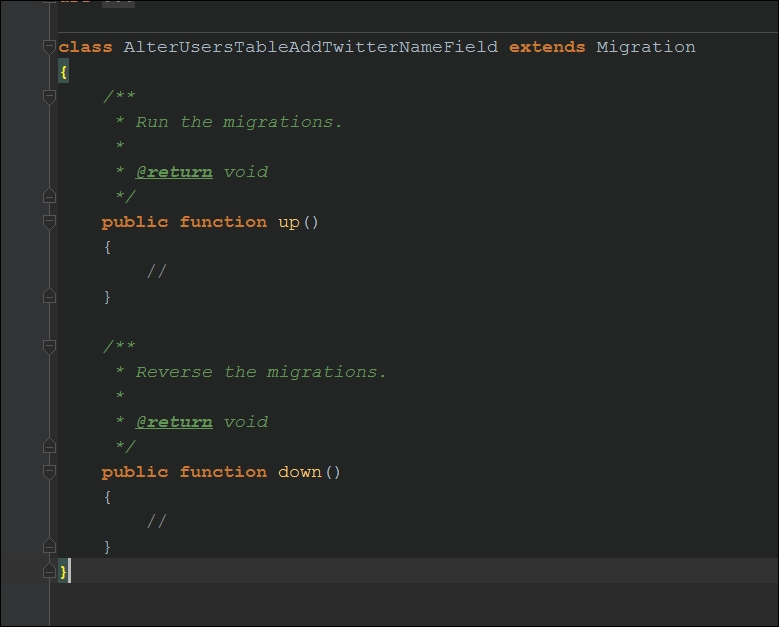
  3. Now you will have the file in your database/migrations folder—edit that so it looks like the following:
    How to do it....
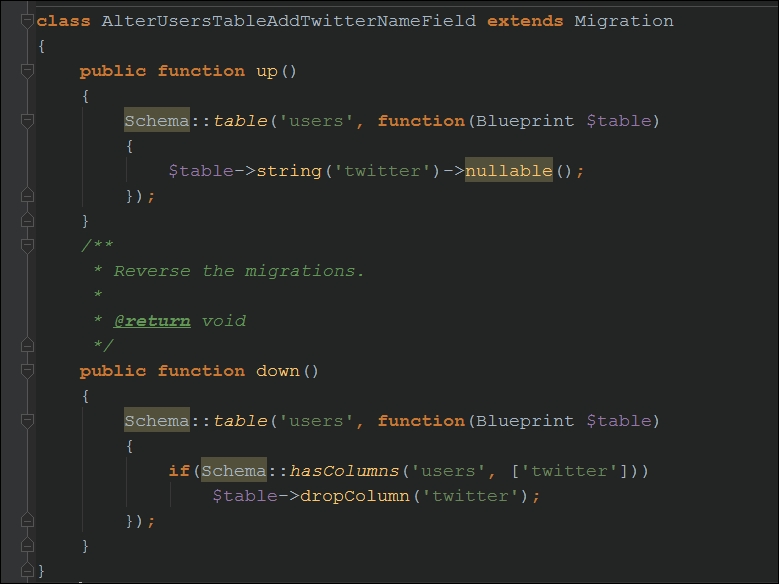
  4. Then we need to modify it to add the actual logic to alter the table users. In this case by adding a field:
    How to do it....
  5. Then run the migration:
    >php artisan migrate
    
  6. That's it, you now have a new field to save twitter names too!

How it works...

CONTINUE READING
83
Tech Concepts
36
Programming languages
73
Tech Tools
Icon Unlimited access to the largest independent learning library in tech of over 8,000 expert-authored tech books and videos.
Icon Innovative learning tools, including AI book assistants, code context explainers, and text-to-speech.
Icon 50+ new titles added per month and exclusive early access to books as they are being written.
Laravel 5.x Cookbook
notes
bookmark Notes and Bookmarks search Search in title playlist Add to playlist download Download options font-size Font size

Change the font size

margin-width Margin width

Change margin width

day-mode Day/Sepia/Night Modes

Change background colour

Close icon Search
Country selected

Close icon Your notes and bookmarks

Confirmation

Modal Close icon
claim successful

Buy this book with your credits?

Modal Close icon
Are you sure you want to buy this book with one of your credits?
Close
YES, BUY

Submit Your Feedback

Modal Close icon
Modal Close icon
Modal Close icon