Sign In Start Free Trial
Account

Add to playlist

Create a Playlist

Modal Close icon
You need to login to use this feature.
  • Book Overview & Buying Service Worker Development Cookbook
  • Table Of Contents Toc
Service Worker Development Cookbook

Service Worker Development Cookbook

By : Sean Amarasinghe
3.5 (2)
close
close
Service Worker Development Cookbook

Service Worker Development Cookbook

3.5 (2)
By: Sean Amarasinghe

Overview of this book

It would be nice to have web apps that work offline and send push notifications. This is now possible with Service Workers, which can add native-like functionality to your web apps without requiring a download. This book will get your mobile and web apps functioning without Internet connectivity, improve performance and network interaction in order to increase the level of availability, and show you how to build performant applications that seamlessly integrate with third-party APIs. We’ll show you how to add Service Worker functionality to web apps and sites, access offline content through basic and advanced techniques, and build powerful interactive system notifications. We’ll also teach you about cache functionality and assets to provide immediate load even over narrow connections. We conclude by giving you various tips to improve app performance, including the background sync technique. By the end of this book, you’ll know build high performing and faster web and mobile applications with Service Workers.
Table of Contents (12 chapters)
close
close
11
Index

Setting up GitHub pages for SSL

Service workers are designed to run only across HTTPS. So, in order for us to test our code, we need our web pages to be delivered across HTTPS. GitHub pages are served across HTTPS and it's free to use. So let's get on with it.

Getting ready

Before registering for a GitHub account, please make sure you have a valid e-mail address.

How to do it...

Follow these instructions to set up GitHub pages:

  1. Head over to GitHub (https://github.com) and register yourself to obtain an account, if you don't have one already.
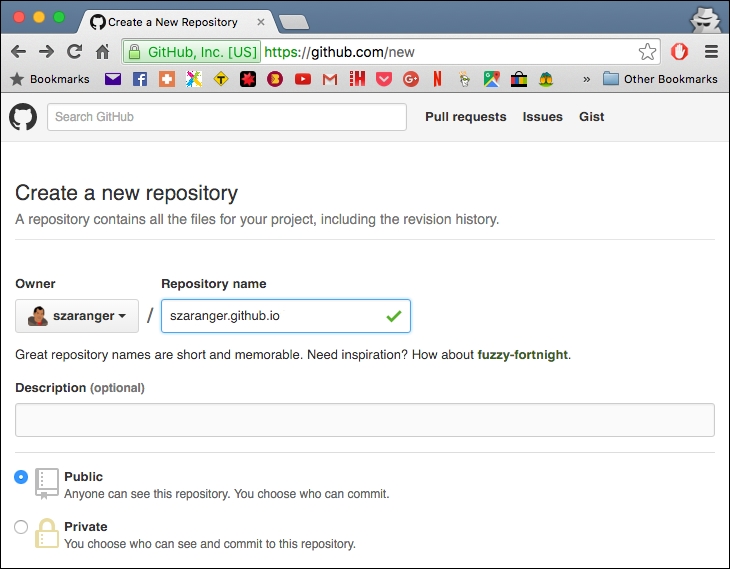
  2. Once you have done that, log in and create a new repository with the following format:

    username.github.io, where username is your username.

    How to do it...

    If the first part of the repository doesn't match your username exactly, it won't work.

  3. Open your command-line window and clone your repository.
    $ git  clone https://github.com/username/username.github.io
    
  4. Change the directory to username.github.io:
    $ cd username.github.io
    
  5. Create a directory called service-workers:
    $ mkdir service-workers
    
  6. Create an index.html file with some text:
    $ echo "Service Workers" > index.html
    
  7. Now let's commit and push our changes to the repository:
    $ git add --all
    $ git commit -m "initial commit"
    $ git push -u origin master
    
  8. Open up a browser and go to http://username.github.io/service-workers/.
Visually different images
CONTINUE READING
83
Tech Concepts
36
Programming languages
73
Tech Tools
Icon Unlimited access to the largest independent learning library in tech of over 8,000 expert-authored tech books and videos.
Icon Innovative learning tools, including AI book assistants, code context explainers, and text-to-speech.
Icon 50+ new titles added per month and exclusive early access to books as they are being written.
Service Worker Development Cookbook
notes
bookmark Notes and Bookmarks search Search in title playlist Add to playlist download Download options font-size Font size

Change the font size

margin-width Margin width

Change margin width

day-mode Day/Sepia/Night Modes

Change background colour

Close icon Search
Country selected

Close icon Your notes and bookmarks

Confirmation

Modal Close icon
claim successful

Buy this book with your credits?

Modal Close icon
Are you sure you want to buy this book with one of your credits?
Close
YES, BUY

Submit Your Feedback

Modal Close icon
Modal Close icon
Modal Close icon