Sign In Start Free Trial
Account

Add to playlist

Create a Playlist

Modal Close icon
You need to login to use this feature.
  • Book Overview & Buying Spring: Microservices with Spring Boot
  • Table Of Contents Toc
  • Feedback & Rating feedback
Spring: Microservices with Spring Boot

Spring: Microservices with Spring Boot

By : In28Minutes Official
2 (1)
close
close
Spring: Microservices with Spring Boot

Spring: Microservices with Spring Boot

2 (1)
By: In28Minutes Official

Overview of this book

Microservices helps in decomposing applications into small services and move away from a single monolithic artifact. It helps in building systems that are scalable, flexible, and high resilient. Spring Boot helps in building REST-oriented, production-grade microservices. This book is a quick learning guide on how to build, monitor, and deploy microservices with Spring Boot. You'll be first familiarized with Spring Boot before delving into building microservices. You will learn how to document your microservice with the help of Spring REST docs and Swagger documentation. You will then learn how to secure your microservice with Spring Security and OAuth2. You will deploy your app using a self-contained HTTP server and also learn to monitor a microservice with the help of Spring Boot actuator. This book is ideal for Java developers who knows the basics of Spring programming and want to build microservices with Spring Boot. This book is embedded with useful assessments that will help you revise the concepts you have learned in this book. This book is repurposed for this specific learning experience from material from Packt's Mastering Spring 5.0 by Ranga Rao Karanam.
Table of Contents (5 chapters)
close
close

Spring Initializr

Do you want to auto-generate Spring Boot projects? Do you want to quickly get started with developing your application? Spring Initializr is the answer.

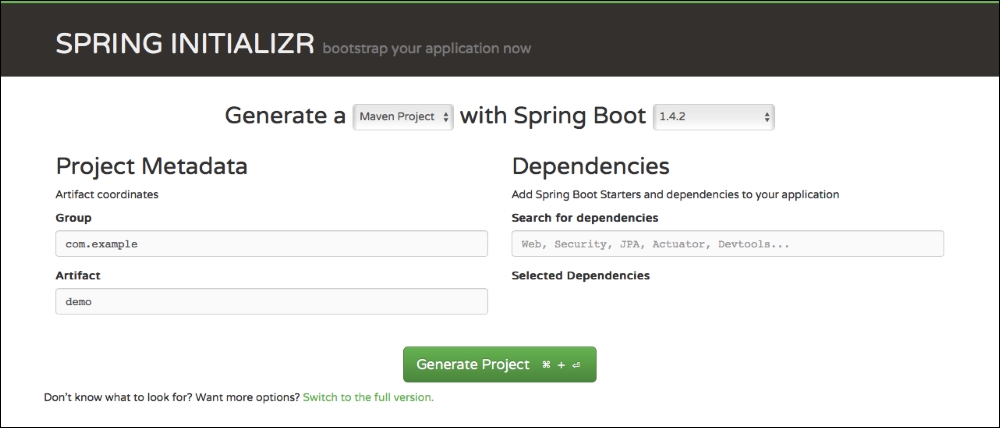
Spring Initializr is hosted at http://start.spring.io. The following screenshot shows how the website looks:

Spring Initializr

Spring Initializr provides a lot of flexibility in creating projects. You have options to do the following:

  • Choose your build tool: Maven or Gradle.
  • Choose the Spring Boot version you want to use.
  • Configure a Group ID and Artifact ID for your component.
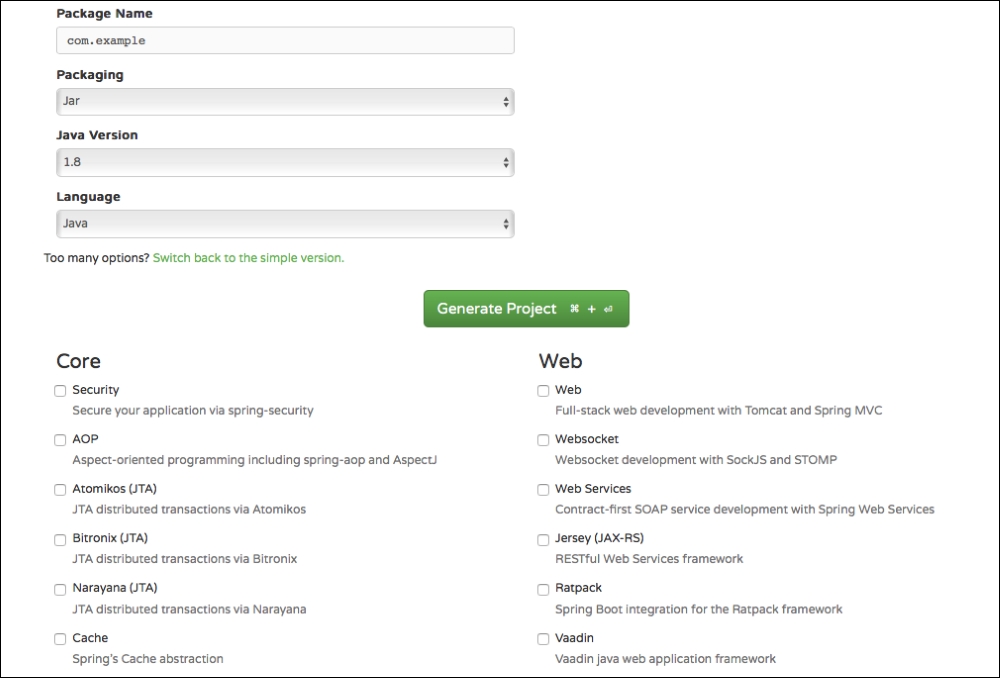
  • Choose the starters (dependencies) that you would want for your project. You can click on the link at the bottom of the screen, Switch to the full version, to see all the starter projects you can choose from.
  • Choose how to package your component: JAR or WAR.
  • Choose the Java version you want to use.
  • Choose the JVM language you want to use.

The following screenshot shows some of the options Spring Initializr provides when you expand (click on the link) to the full version:

Spring Initializr

Creating Your First Spring Initializr Project

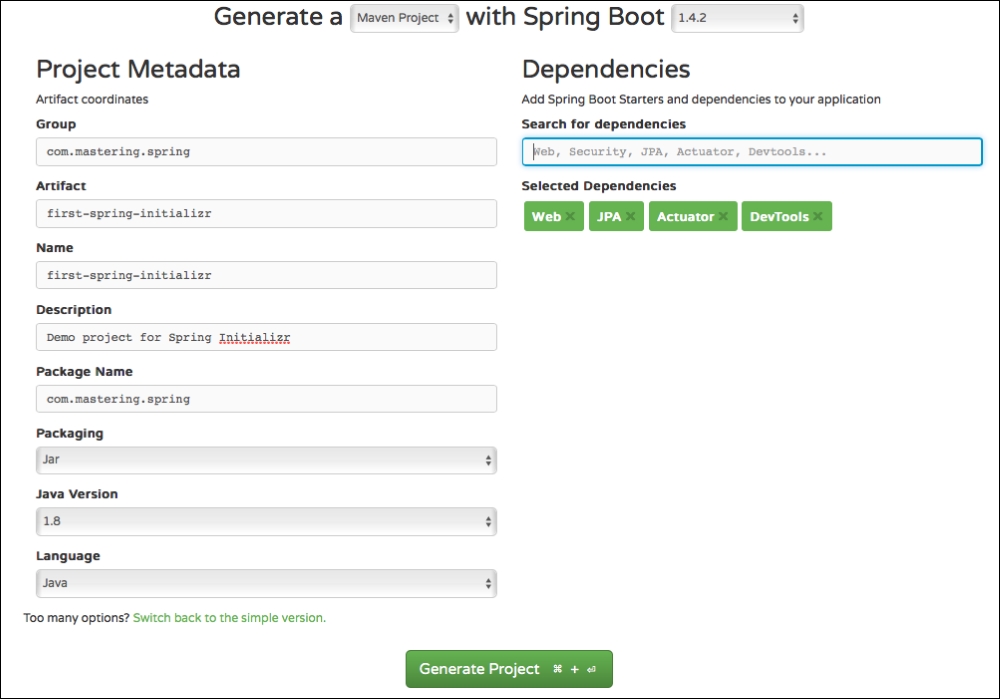
We will use the full version and enter the values, as follows:

Creating Your First Spring Initializr Project

Things to note are as follows:

  • Build tool: Maven
  • Spring Boot version: Choose the latest available
  • Group: com.mastering.spring
  • Artifact: first-spring-initializr
  • Selected dependencies: Choose Web, JPA, Actuator and Dev Tools. Type in each one of these in the textbox and press Enter to choose them. We will learn more about Actuator and Dev Tools in the next section
  • Java version: 1.8

Go ahead and click on the Generate Project button. This will create a .zip file and you can download it to your computer.

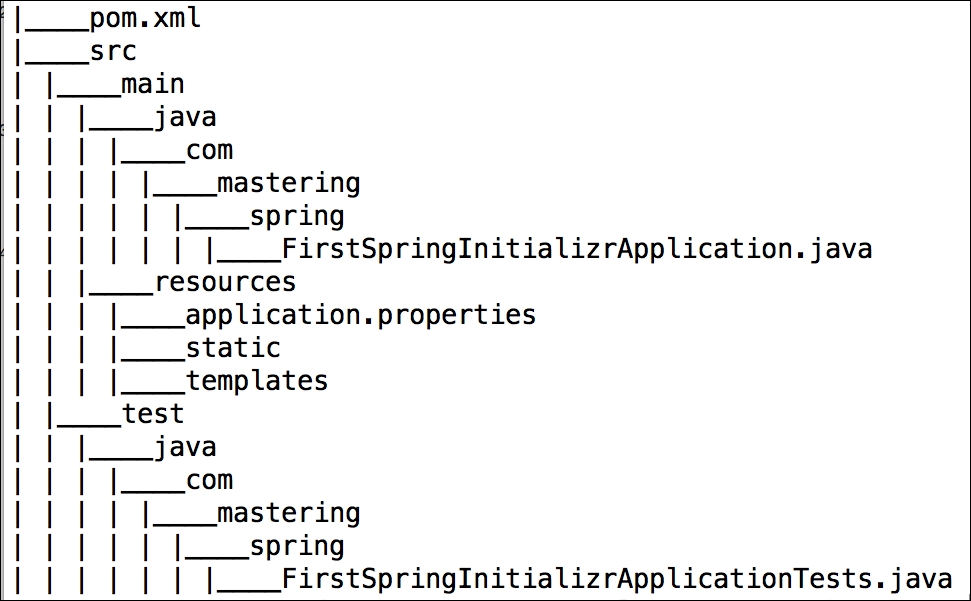
The following screenshot shows the structure of the project created:

Creating Your First Spring Initializr Project

We will now import this project into your IDE. In Eclipse, you can perform the following steps:

  1. Launch Eclipse.
  2. Navigate to File | Import.
  3. Choose the existing Maven projects.
  4. Browse and select the folder that is the root of the Maven project (the one containing the pom.xml file).
  5. Proceed with the defaults and click on Finish.

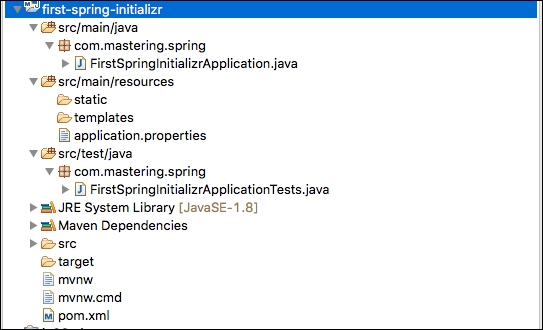
This will import the project into Eclipse. The following screenshot shows the structure of the project in Eclipse:

Creating Your First Spring Initializr Project

Let's look at some of the important files from the generated project.

pom.xml

The following snippet shows the dependencies that are declared:

<dependencies> <dependency> <groupId>org.springframework.boot</groupId> <artifactId>spring-boot-starter-web</artifactId> </dependency> <dependency> <groupId>org.springframework.boot</groupId> <artifactId>spring-boot-starter-data-jpa</artifactId> </dependency> <dependency> <groupId>org.springframework.boot</groupId> <artifactId>spring-boot-starter-actuator</artifactId> </dependency> <dependency> <groupId>org.springframework.boot</groupId> <artifactId>spring-boot-devtools</artifactId> <scope>runtime</scope> </dependency> <dependency> <groupId>org.springframework.boot</groupId> <artifactId>spring-boot-starter-test</artifactId> <scope>test</scope> </dependency> </dependencies>

A few other important observations are as follows:

  • The packaging for this component is .jar
  • org.springframework.boot:spring-boot-starter-parent is declared as the parent POM
  • <java.version>1.8</java.version>: The Java version is 1.8
  • Spring Boot Maven Plugin (org.springframework.boot:spring-boot-maven-plugin) is configured as a plugin

FirstSpringInitializrApplication.java Class

FirstSpringInitializrApplication.java is the launcher for Spring Boot:

    package com.mastering.spring;
    import org.springframework.boot.SpringApplication;
    import org.springframework.boot.autoconfigure
    .SpringBootApplication;

    @SpringBootApplication
    public class FirstSpringInitializrApplication {
       public static void main(String[] args) {
        SpringApplication.run(FirstSpringInitializrApplication.class,   
        args);
      }
    }

FirstSpringInitializrApplicationTests Class

FirstSpringInitializrApplicationTests contains the basic context that can be used to start writing the tests as we start developing the application:

    package com.mastering.spring;
    import org.junit.Test;
    import org.junit.runner.RunWith;
    import org.springframework.boot.test.context.SpringBootTest;
    import org.springframework.test.context.junit4.SpringRunner;

    @RunWith(SpringRunner.class)
    @SpringBootTest
    public class FirstSpringInitializrApplicationTests {

      @Test
      public void contextLoads() {
      }
   }
Visually different images
CONTINUE READING
83
Tech Concepts
36
Programming languages
73
Tech Tools
Icon Unlimited access to the largest independent learning library in tech of over 8,000 expert-authored tech books and videos.
Icon Innovative learning tools, including AI book assistants, code context explainers, and text-to-speech.
Icon 50+ new titles added per month and exclusive early access to books as they are being written.
Spring: Microservices with Spring Boot
notes
bookmark Notes and Bookmarks search Search in title playlist Add to playlist font-size Font size

Change the font size

margin-width Margin width

Change margin width

day-mode Day/Sepia/Night Modes

Change background colour

Close icon Search
Country selected

Close icon Your notes and bookmarks

Confirmation

Modal Close icon
claim successful

Buy this book with your credits?

Modal Close icon
Are you sure you want to buy this book with one of your credits?
Close
YES, BUY

Submit Your Feedback

Modal Close icon
Modal Close icon
Modal Close icon