
Sign In Start Free Trial
Account

Add to playlist

Create a Playlist

Modal Close icon
You need to login to use this feature.
  • Book Overview & Buying Hands-On RESTful Web Services with ASP.NET Core 3
  • Table Of Contents Toc
  • Feedback & Rating feedback
Hands-On RESTful Web Services with ASP.NET Core 3

Hands-On RESTful Web Services with ASP.NET Core 3

By : Resca
3.5 (8)
close
close
Hands-On RESTful Web Services with ASP.NET Core 3

Hands-On RESTful Web Services with ASP.NET Core 3

3.5 (8)
By: Resca

Overview of this book

In recent times, web services have evolved to play a prominent role in web development. Applications are now designed to be compatible with any device and platform, and web services help us keep their logic and UI separate. Given its simplicity and effectiveness in creating web services, the RESTful approach has gained popularity, and this book will help you build RESTful web services using ASP.NET Core. This REST book begins by introducing you to the basics of the REST philosophy, where you'll study the different stages of designing and implementing enterprise-grade RESTful web services. You'll also gain a thorough understanding of ASP.NET Core's middleware approach and learn how to customize it. The book will later guide you through improving API resilience, securing your service, and applying different design patterns and techniques to achieve a scalable web service. In addition to this, you'll learn advanced techniques for caching, monitoring, and logging, along with implementing unit and integration testing strategies. In later chapters, you will deploy your REST web services on Azure and document APIs using Swagger and external tools such as Postman. By the end of this book, you will have learned how to design RESTful web services confidently using ASP.NET Core with a focus on code testability and maintainability.
Table of Contents (26 chapters)
close
close
Lock Free Chapter
1
Section 1: Getting Started
3
Section 2: Overview of ASP.NET Core
10
Section 3: Building a Real-World RESTful API
19
Section 4: Advanced Concepts for Building Services

Setting up our .NET Core project

This chapter assumes that you have already installed .NET Core version 3.1 or higher on your machine. First of all, let's start by launching the following command in our console:

dotnet new

The output will appear as follows:
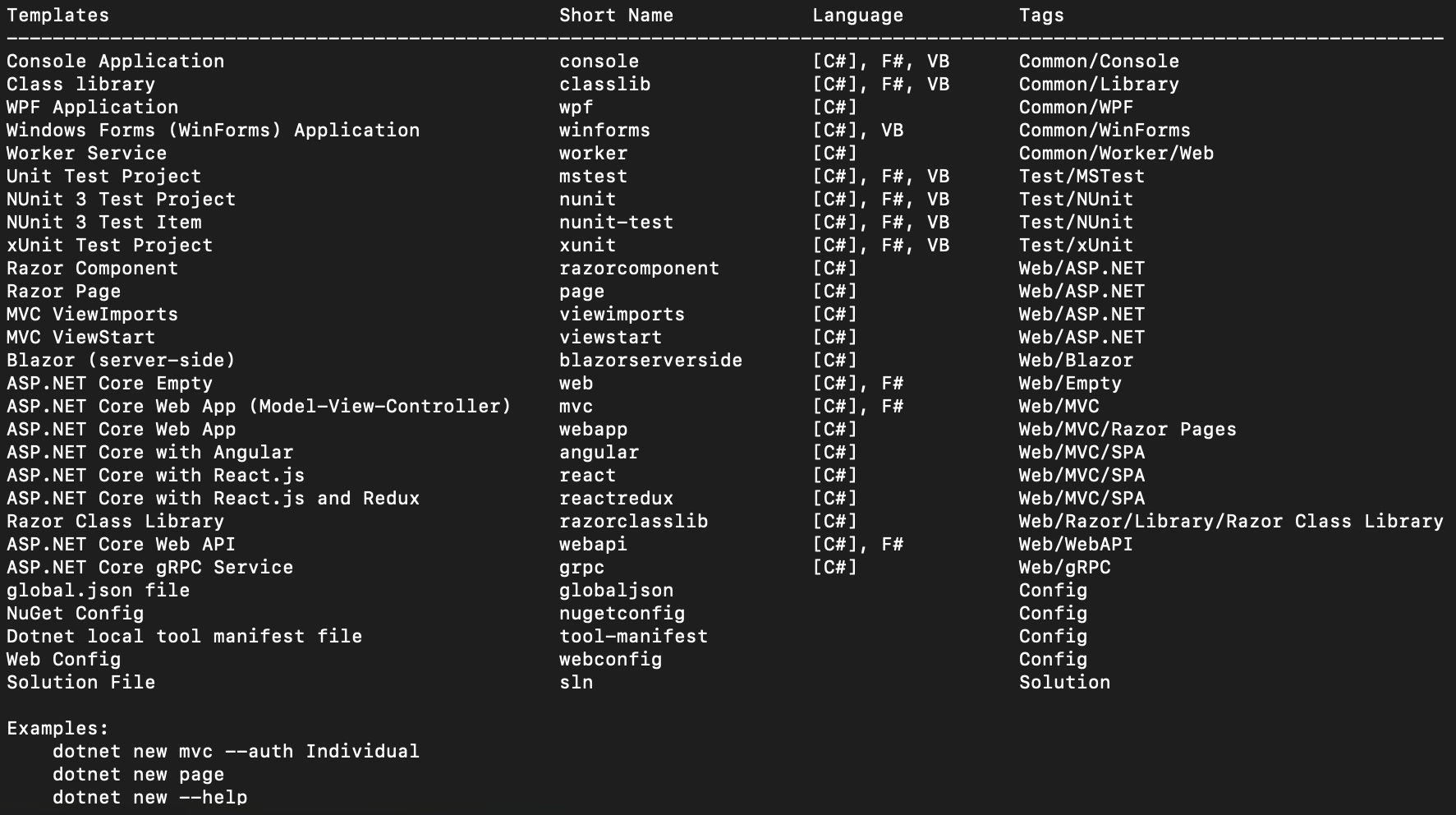
The result of the dotnet new instruction

The preceding output shows all the .NET Core project templates available on the local machine. Each of these has a user-friendly name, a short name, and tags. They are available in C#, F# and VB; the default is C#.

To create a new template, we'll use the short name. For example, in order to create a console application, we should run the following instruction:

dotnet new console -n HelloWorld

The preceding instruction will create a new project in the current folder, with the following tree structure:

.
├── HelloWorld.csproj
├── Program...

Visually different images
CONTINUE READING
83
Tech Concepts
36
Programming languages
73
Tech Tools
Icon Unlimited access to the largest independent learning library in tech of over 8,000 expert-authored tech books and videos.
Icon Innovative learning tools, including AI book assistants, code context explainers, and text-to-speech.
Icon 50+ new titles added per month and exclusive early access to books as they are being written.
Hands-On RESTful Web Services with ASP.NET Core 3
notes
bookmark Notes and Bookmarks search Search in title playlist Add to playlist download Download options font-size Font size

Change the font size

margin-width Margin width

Change margin width

day-mode Day/Sepia/Night Modes

Change background colour

Close icon Search
Country selected

Close icon Your notes and bookmarks

Confirmation

Modal Close icon
claim successful

Buy this book with your credits?

Modal Close icon
Are you sure you want to buy this book with one of your credits?
Close
YES, BUY

Submit Your Feedback

Modal Close icon
Modal Close icon
Modal Close icon