
Sign In Start Free Trial
Account

Add to playlist

Create a Playlist

Modal Close icon
You need to login to use this feature.
  • Book Overview & Buying C# 8 and .NET Core 3 Projects Using Azure
  • Table Of Contents Toc
C# 8 and .NET Core 3 Projects Using Azure

C# 8 and .NET Core 3 Projects Using Azure - Second Edition

By : Michaels, Strauss, Rademeyer
close
close
C# 8 and .NET Core 3 Projects Using Azure

C# 8 and .NET Core 3 Projects Using Azure

By: Michaels, Strauss, Rademeyer

Overview of this book

.NET Core is a general-purpose, modular, cross-platform, and opensource implementation of .NET. The latest release of .NET Core 3 comes with improved performance and security features, along with support for desktop applications. .NET Core 3 is not only useful for new developers looking to start learning the framework, but also for legacy developers interested in migrating their apps. Updated with the latest features and enhancements, this updated second edition is a step-by-step, project-based guide. The book starts with a brief introduction to the key features of C# 8 and .NET Core 3. You'll learn to work with relational data using Entity Framework Core 3, before understanding how to use ASP.NET Core. As you progress, you’ll discover how you can use .NET Core to create cross-platform applications. Later, the book will show you how to upgrade your old WinForms apps to .NET Core 3. The concluding chapters will then help you use SignalR effectively to add real-time functionality to your applications, before demonstrating how to implement MongoDB in your apps. Finally, you'll delve into serverless computing and how to build microservices using Docker and Kubernetes. By the end of this book, you'll be proficient in developing applications using .NET Core 3.
Table of Contents (13 chapters)
close
close

Building logic apps in the Azure portal

Throughout this chapter, we'll be using Visual Studio and the logic apps functionality (provided as an extension) to create and test our application. However, before we do, we'll have a quick look at where you would build this if you choose to do it directly in the Azure portal.


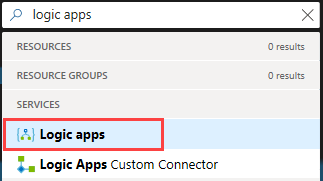
In the Azure portal, search for logic apps, and then pick the Logic apps service as follows:

Remember that once the blade has launched, you can pin it to your dashboard using the pin icon on the top right-hand corner.

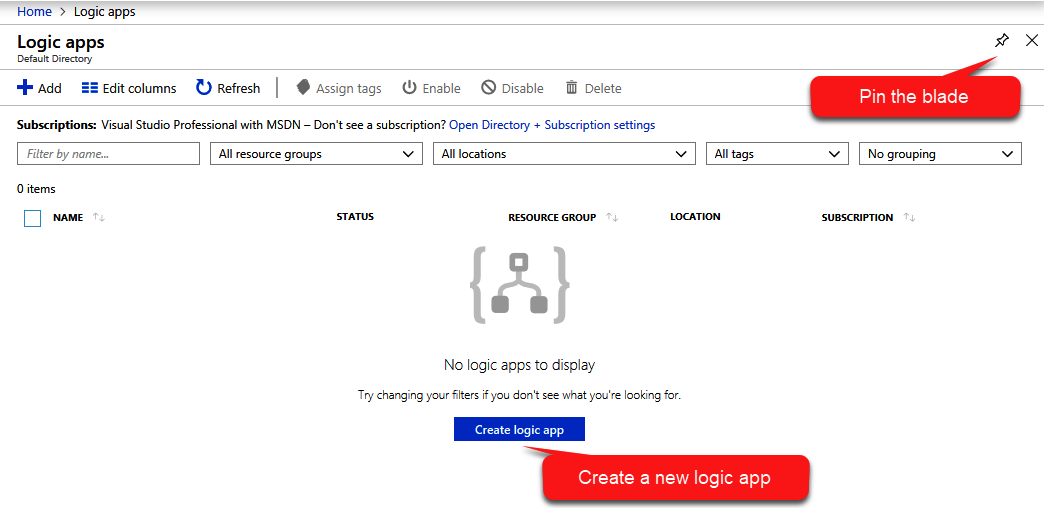
When the blade launches, you'll see any logic apps that you currently have in your subscription; if you have none, then you'll simply see a button inviting you to create one as shown in the following screenshot:

From this point on, the process of creating the logic app in the Azure portal is basically the same as with Visual...

CONTINUE READING
83
Tech Concepts
36
Programming languages
73
Tech Tools
Icon Unlimited access to the largest independent learning library in tech of over 8,000 expert-authored tech books and videos.
Icon Innovative learning tools, including AI book assistants, code context explainers, and text-to-speech.
Icon 50+ new titles added per month and exclusive early access to books as they are being written.
C# 8 and .NET Core 3 Projects Using Azure
notes
bookmark Notes and Bookmarks search Search in title playlist Add to playlist download Download options font-size Font size

Change the font size

margin-width Margin width

Change margin width

day-mode Day/Sepia/Night Modes

Change background colour

Close icon Search
Country selected

Close icon Your notes and bookmarks

Confirmation

Modal Close icon
claim successful

Buy this book with your credits?

Modal Close icon
Are you sure you want to buy this book with one of your credits?
Close
YES, BUY

Submit Your Feedback

Modal Close icon
Modal Close icon
Modal Close icon