Sign In Start Free Trial
Account

Add to playlist

Create a Playlist

Modal Close icon
You need to login to use this feature.
  • Book Overview & Buying Git for Programmers
  • Table Of Contents Toc
Git for Programmers

Git for Programmers

By : Jesse Liberty
4.1 (13)
close
close
Git for Programmers

Git for Programmers

4.1 (13)
By: Jesse Liberty

Overview of this book

Whether you’re looking for a book to deepen your understanding of Git or a refresher, this book is the ultimate guide to Git. Git for Programmers comprehensively equips you with actionable insights on advanced Git concepts in an engaging and straightforward way. As you progress through the chapters, you’ll gain expertise (and confidence) on Git with lots of practical use cases. After a quick refresher on git history and installation, you’ll dive straight into the creation and cloning of your repository. You’ll explore Git places, branching, and GUIs to get familiar with the fundamentals. Then you’ll learn how to handle merge conflicts, rebase, amend, interactive rebase, and use the log, as well as explore important Git commands for managing your repository. The troubleshooting part of this Git book will include detailed instructions on how to bisect, blame, and several other problem handling techniques that will complete your newly acquired Git arsenal. By the end of this book, you’ll be using Git with confidence. Saving, sharing, managing files as well as undoing mistakes and basically rewriting history will be a breeze.
Table of Contents (16 chapters)
close
close
11
Finding a Broken Commit: Bisect and Blame
13
Next Steps
14
Other Books You May Enjoy
15
Index

Clean

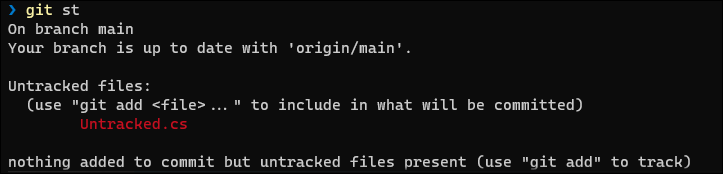
From time to time, you'll find that there are untracked files listed in your status. 99% of the time these will be files you created and you'll want them to be tracked, which you do by adding them to the index (as shown previously). There are times, however, when you may find untracked files that you don't want:

Figure 10.15: Untracked files

In this case, we have a couple choices. We can add Untracked.cs to the index or we can get rid of it. To do so, we try git clean:

Figure 10.16: Using clean to remove untracked files (fails)

Because git clean is one of the few truly destructive commands—once called, the untracked files are gone, never to be seen again—Git comes back with the snarky reply that it is "refusing to clean." To actually clean, Git requires that you tell it you really mean it by using the -f (force) flag:

Figure 10.17: Using clean as above, but with the force flag (succeeds)

The -f flag...

CONTINUE READING
83
Tech Concepts
36
Programming languages
73
Tech Tools
Icon Unlimited access to the largest independent learning library in tech of over 8,000 expert-authored tech books and videos.
Icon Innovative learning tools, including AI book assistants, code context explainers, and text-to-speech.
Icon 50+ new titles added per month and exclusive early access to books as they are being written.
Git for Programmers
notes
bookmark Notes and Bookmarks search Search in title playlist Add to playlist font-size Font size

Change the font size

margin-width Margin width

Change margin width

day-mode Day/Sepia/Night Modes

Change background colour

Close icon Search
Country selected

Close icon Your notes and bookmarks

Confirmation

Modal Close icon
claim successful

Buy this book with your credits?

Modal Close icon
Are you sure you want to buy this book with one of your credits?
Close
YES, BUY

Submit Your Feedback

Modal Close icon
Modal Close icon
Modal Close icon