Sign In Start Free Trial
Account

Add to playlist

Create a Playlist

Modal Close icon
You need to login to use this feature.
  • Book Overview & Buying ASP.NET 3.5 Social Networking
  • Table Of Contents Toc
ASP.NET 3.5 Social Networking

ASP.NET 3.5 Social Networking

By : Andrew Siemer
4.1 (10)
close
close
ASP.NET 3.5 Social Networking

ASP.NET 3.5 Social Networking

4.1 (10)
By: Andrew Siemer

Overview of this book

Each chapter starts by showing the user experience we are going to create in the chapter. It then has a section discussing the major design decisions we face in building these features, and finally presents the 'solution' – including the overall architecture and highlighting the most important code elements. The book presents a lot of real-world code, with comprehensive explanation and discussion. The full social network application is available for download from the Packt website, for you to examine, study, and modify. This book is written for ASP.NET and C# developers who want to build an enterprise-grade Social Network, either for their own business purposes or as a contract job for another company. The book assumes you have prior experience of developing web applications using ASP.NET 3.5, C# 3.0, SQL Server 2005/2008, and Visual Studio .NET 2008; it focuses on topics that will be of interest to existing developers – not on providing step-by-step examples for each detail.
Table of Contents (15 chapters)
close
close

Solution

Now let's take a look at our solution.

Implementing the database

Let's take a look at what we need to implement the database.

Groups

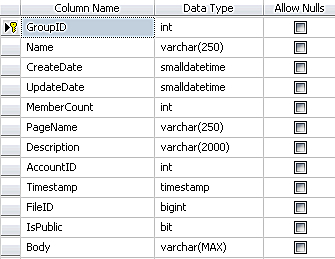
Here is the Groups table structure:

Groups

The majority of this table is self-explanatory. However, one thing to be very aware of is the Body field, which is varchar(MAX) here. This means that people could technically put any amount of text that they want here. If this is not the functionality that you want to provide, either make this field smaller or put some form of client-side validation on this field to restrict its size.

You may also be wondering why we have a large Description field and an even larger Body field. The primary reason for this is so that we have public and private fields of text. A description could simply be the first paragraph of the Groups' page text, or it could be a brief synopsis. This totally depends on how you structure your output. I have set it up so that the description and body show up together, with the description...

CONTINUE READING
83
Tech Concepts
36
Programming languages
73
Tech Tools
Icon Unlimited access to the largest independent learning library in tech of over 8,000 expert-authored tech books and videos.
Icon Innovative learning tools, including AI book assistants, code context explainers, and text-to-speech.
Icon 50+ new titles added per month and exclusive early access to books as they are being written.
ASP.NET 3.5 Social Networking
notes
bookmark Notes and Bookmarks search Search in title playlist Add to playlist font-size Font size

Change the font size

margin-width Margin width

Change margin width

day-mode Day/Sepia/Night Modes

Change background colour

Close icon Search
Country selected

Close icon Your notes and bookmarks

Confirmation

Modal Close icon
claim successful

Buy this book with your credits?

Modal Close icon
Are you sure you want to buy this book with one of your credits?
Close
YES, BUY

Submit Your Feedback

Modal Close icon
Modal Close icon
Modal Close icon