Sign In Start Free Trial
Account

Add to playlist

Create a Playlist

Modal Close icon
You need to login to use this feature.
  • Book Overview & Buying Drupal for Education and E-Learning
  • Table Of Contents Toc
Drupal for Education and E-Learning

Drupal for Education and E-Learning

By : Bill Fitzgerald
4.1 (7)
close
close
Drupal for Education and E-Learning

Drupal for Education and E-Learning

4.1 (7)
By: Bill Fitzgerald

Overview of this book

The book focuses around creating educational activities in Drupal, with lots of examples of realistic courses and classroom ideas – and how to implement them. This book is for anybody looking to use Drupal to support teaching and learning; more generally, the examples given in this book can also be used by anybody looking to use Drupal to publish social media. This book is not a developer's manual; you do NOT need to know code, or HTML, or CSS, to benefit from this book. People new to Drupal will find clear examples describing how to set up their site. More experienced Drupallers will find tips and tricks for extending their site, and step-by-step instructions on how to make the most out of Drupal's flexibility.
Table of Contents (18 chapters)
close
close
17
Index

Assign Rights to the Audio Module


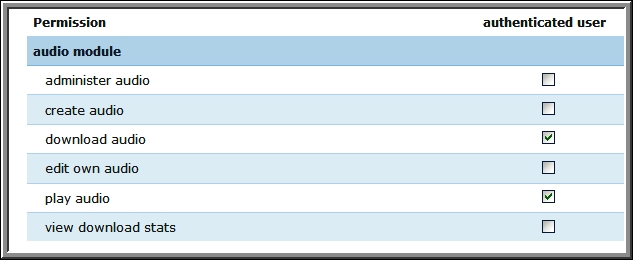
Now that we have installed, enabled, and configured the audio module, we need to assign rights to it. Click the Administer | User management | Roles link, or navigate to admin/user/roles.

The possible rights that can be assigned are shown in the following figure:

We will need to assign rights for the teacher role, the student role, the authenticated user role, and possibly the anonymous user role.

For the authenticated user role, assign rights to download audio and play audio.

For the student role, assign rights to create audio and edit own audio.

For the teacher role, assign rights to create audio, edit own audio, and view download stats.

For the anonymous user role, assign the rights you think are appropriate. In most cases, if you are allowing anonymous users to see content, allowing them the rights to download audio and play audio is appropriate.

Each time you assign rights to an individual roles, click the Save permissions button to save the rights for the...

CONTINUE READING
83
Tech Concepts
36
Programming languages
73
Tech Tools
Icon Unlimited access to the largest independent learning library in tech of over 8,000 expert-authored tech books and videos.
Icon Innovative learning tools, including AI book assistants, code context explainers, and text-to-speech.
Icon 50+ new titles added per month and exclusive early access to books as they are being written.
Drupal for Education and E-Learning
notes
bookmark Notes and Bookmarks search Search in title playlist Add to playlist font-size Font size

Change the font size

margin-width Margin width

Change margin width

day-mode Day/Sepia/Night Modes

Change background colour

Close icon Search
Country selected

Close icon Your notes and bookmarks

Confirmation

Modal Close icon
claim successful

Buy this book with your credits?

Modal Close icon
Are you sure you want to buy this book with one of your credits?
Close
YES, BUY

Submit Your Feedback

Modal Close icon
Modal Close icon
Modal Close icon