Sign In Start Free Trial
Account

Add to playlist

Create a Playlist

Modal Close icon
You need to login to use this feature.
  • Book Overview & Buying Liferay Beginner's Guide
  • Table Of Contents Toc
Liferay Beginner's Guide

Liferay Beginner's Guide

By : Xinsheng Robert Chen, Gaurav Barot, Samir Bhatt, Sandeep Nair, Mahipalsinh Rana
3.8 (5)
close
close
Liferay Beginner's Guide

Liferay Beginner's Guide

3.8 (5)
By: Xinsheng Robert Chen, Gaurav Barot, Samir Bhatt, Sandeep Nair, Mahipalsinh Rana

Overview of this book

Part of Packt’s Beginner’s Guide series, each chapter follows the creation of a fictional neighbourhood site to demonstrate an aspect of Liferay portal with practical examples, screenshots, and step-by-step instructions. All you need in order to benefit from the Liferay Beginner’s Guide is programming experience. No prior knowledge of Liferay is required, although experienced Liferay portal programmers who need to get up to speed with its latest features will also find this book useful.
Table of Contents (14 chapters)
close
close
11
A. PayPal Test Account Configuration
13
Index

Time for action – uploading an image file


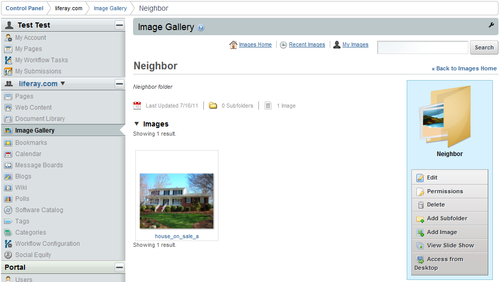
Suppose that a house is on sale in the neighborhood. As the portal administrator, you need to upload the image of this house to the neighborhood site to facilitate its sale. You can take the following steps for the neighborhood site:

  1. Log in as portal administrator.

  2. Hover over the Manage link and click on the Control Panel link.

  3. Click on the Image Gallery link to open the portlet.

  4. Click on the Add Folder link on the right-hand side and create a Neighbor folder.

  5. Open the Neighbor folder and click on the Add Image link.

  6. Follow the on-screen instructions to upload a house_on_sale.png file on your local computer into the Neighbor folder.

  7. Click on the <<Back link.

Here is what you get:

What just happened?

You have just uploaded a house image with the image gallery portlet to Liferay Portal. That image is saved in a Neighbor folder. Next time you can just navigate to this folder and use this image in a piece of web content.

Pop quiz

Which of the following statements...

CONTINUE READING
83
Tech Concepts
36
Programming languages
73
Tech Tools
Icon Unlimited access to the largest independent learning library in tech of over 8,000 expert-authored tech books and videos.
Icon Innovative learning tools, including AI book assistants, code context explainers, and text-to-speech.
Icon 50+ new titles added per month and exclusive early access to books as they are being written.
Liferay Beginner's Guide
notes
bookmark Notes and Bookmarks search Search in title playlist Add to playlist font-size Font size

Change the font size

margin-width Margin width

Change margin width

day-mode Day/Sepia/Night Modes

Change background colour

Close icon Search
Country selected

Close icon Your notes and bookmarks

Confirmation

Modal Close icon
claim successful

Buy this book with your credits?

Modal Close icon
Are you sure you want to buy this book with one of your credits?
Close
YES, BUY

Submit Your Feedback

Modal Close icon
Modal Close icon
Modal Close icon