Sign In Start Free Trial
Account

Add to playlist

Create a Playlist

Modal Close icon
You need to login to use this feature.
  • Book Overview & Buying Building Websites with e107
  • Table Of Contents Toc
Building Websites with e107

Building Websites with e107

By : Tad Boomer
close
close
Building Websites with e107

Building Websites with e107

By: Tad Boomer

Overview of this book

e107 is a PHP-based content management system that uses the popular open source MySQL database system for content storage. e107 is released under the terms of the GNU General Public License and is completely free, totally customizable and in constant development. It is an ideal tool for developing small to large dynamic community websites, intra company portals, corporate portals, weblogs and much more. It has a large, enthusiastic, and helpful community of users.If you want to create a powerful, fully-featured website in no time, this book is for you. This book will help you explore e107, putting you in the picture of what it offers, and how to go about building a site with the system. The book covers all the core features of e107, and it is thorough and incremental tutorial approach it gives you the understanding to experiment with advanced features and customization.
Table of Contents (12 chapters)
close
close
9
9. Maintenance, Optimization, and Security
10
A. Resources
11
Index

The Poll Plugin

The Poll plugin is another core plugin. It is not only a fun way to garner participation on our site but a valuable tool in collecting information. You will see in this chapter and in Chapter 7 that it can be integrated into other plugins like the Forums Plugin and Content Management. Since this is a core plugin, which was loaded as part of the e107 upload, the installation is easy.

  1. Log in as administrator.
  2. Select the Plugin Manager from the main menu (top left) or by the Plugin Manager icon.
  3. Scroll down to Poll and select Install.
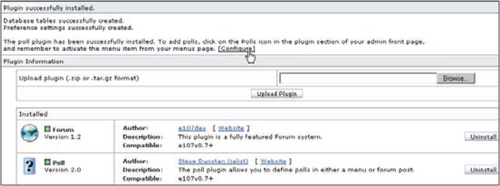
  4. Select Configure as shown below:
    The Poll Plugin

Now we can configure our first poll. When you have clicked Configure a screen as shown in the screenshot on the next page appears.

  • Poll Question: This field allows you to enter the poll question. We will enter, What Type of Pet Do You Own?.
  • In the Options field enter the following:
    • Dog
    • Cat
    • Bird
    • Reptile
    • Other
  • Allow multiple choices: This field will enable you to add multiple choices since some people might have different...
CONTINUE READING
83
Tech Concepts
36
Programming languages
73
Tech Tools
Icon Unlimited access to the largest independent learning library in tech of over 8,000 expert-authored tech books and videos.
Icon Innovative learning tools, including AI book assistants, code context explainers, and text-to-speech.
Icon 50+ new titles added per month and exclusive early access to books as they are being written.
Building Websites with e107
notes
bookmark Notes and Bookmarks search Search in title playlist Add to playlist font-size Font size

Change the font size

margin-width Margin width

Change margin width

day-mode Day/Sepia/Night Modes

Change background colour

Close icon Search
Country selected

Close icon Your notes and bookmarks

Confirmation

Modal Close icon
claim successful

Buy this book with your credits?

Modal Close icon
Are you sure you want to buy this book with one of your credits?
Close
YES, BUY

Submit Your Feedback

Modal Close icon
Modal Close icon
Modal Close icon