Sign In Start Free Trial
Account

Add to playlist

Create a Playlist

Modal Close icon
You need to login to use this feature.
  • Book Overview & Buying Learning AWS
  • Table Of Contents Toc
Learning AWS

Learning AWS

3.1 (9)
close
close
Learning AWS

Learning AWS

3.1 (9)

Overview of this book

With the increasing global interest in leveraging cloud infrastructure, AWS Cloud from Amazon offers a cutting-edge platform for architecting, building, and deploying web-scale cloud applications. The variety of features available within AWS can reduce overall infrastructure costs and accelerate the development process for both large enterprises and startups alike. Beginning with basic cloud concepts, you'll learn about the various cloud services models and the design implications of multi-tenant applications. You'll then design, implement, and deploy a multi-tier, scalable, highly-available and secure application on the AWS platform. At every step, we explain the key guiding principles driving real-world production-ready application architectures. Finally, you will learn how to automate your cloud infrastructure, set up operations, application monitoring, and DevOps pipeline.
Table of Contents (9 chapters)
close
close
8
Index

The AWS management console

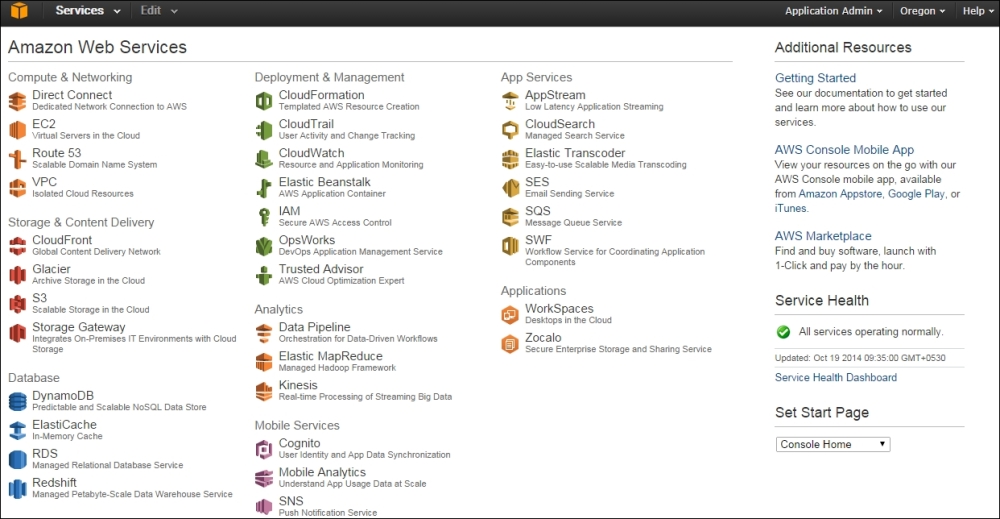
The AWS management console is the central location from where you can access all the Amazon services. The management console has links to the following:

  • Amazon Web Services: This is a dashboard view that lists all the AWS services currently available in a specific Amazon region. Clicking on any one of these launches the dashboard for the selected service, as shown in the following screenshot:
    The AWS management console
  • Shortcuts for Amazon Web Services: On the console management screen, you can create shortcuts of frequently accessed services via the Edit option, as shown in the following screenshot:
    The AWS management console
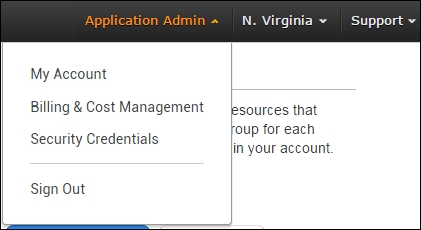
  • Account related information: This allows you to access your account-related data. This includes security credentials needed to access the AWS resources by your application. The Billing & Cost Management option gives you real-time information on your current month's billing; this helps in managing costs, as shown in the following screenshot:
    The AWS management console
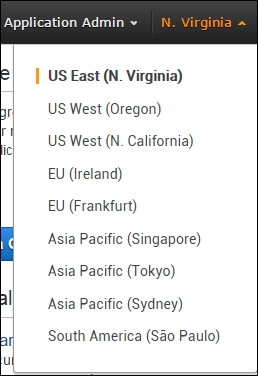
  • Amazon regions: This option allows you to access the AWS in a specific region. In the following screenshot, all the Amazon Web Services are located in the US East (N. Virginia) region:
    The AWS management console
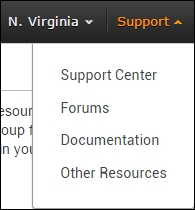
  • Support: You can navigate to the Help, Forums, and support pages:
    The AWS management console
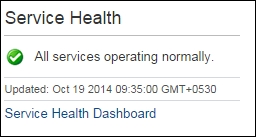
  • Service Health: Launches the health dashboard of all the Amazon Web Services across all regions, and not of your deployed service:
    The AWS management console
CONTINUE READING
83
Tech Concepts
36
Programming languages
73
Tech Tools
Icon Unlimited access to the largest independent learning library in tech of over 8,000 expert-authored tech books and videos.
Icon Innovative learning tools, including AI book assistants, code context explainers, and text-to-speech.
Icon 50+ new titles added per month and exclusive early access to books as they are being written.
Learning AWS
notes
bookmark Notes and Bookmarks search Search in title playlist Add to playlist font-size Font size

Change the font size

margin-width Margin width

Change margin width

day-mode Day/Sepia/Night Modes

Change background colour

Close icon Search
Country selected

Close icon Your notes and bookmarks

Confirmation

Modal Close icon
claim successful

Buy this book with your credits?

Modal Close icon
Are you sure you want to buy this book with one of your credits?
Close
YES, BUY

Submit Your Feedback

Modal Close icon
Modal Close icon
Modal Close icon