Sign In Start Free Trial
Account

Add to playlist

Create a Playlist

Modal Close icon
You need to login to use this feature.
  • Book Overview & Buying Learning Nagios
  • Table Of Contents Toc
  • Feedback & Rating feedback
Learning Nagios

Learning Nagios - Third Edition

By : Wojciech Kocjan, Beltowski
5 (3)
close
close
Learning Nagios

Learning Nagios

5 (3)
By: Wojciech Kocjan, Beltowski

Overview of this book

Nagios, a powerful and widely used IT monitoring and management software for problem -solving. It detects problems related to your organizations infrastructure and helps in resolving the issue before it impacts the business. Following the success of the previous edition, this book will continue to help you monitor the status of network devices and also notify the system administrators of network problems. Starting with the fundamentals, the book will teach you how to install and configure Nagios for your environment. The book helps you learn how to end downtimes, adding comments and generating reports using the built-in Web interface of Nagios. Moving on, you will be introduced to the third-party web interfaces and applications for checking the status and report specific information. As you progress further in Learning Nagios, you will focus on the standard set of Nagios plugins and also focus on teach you how to efficiently manage large configurations and using templates. Once you are up to speed with this, you will get to know the concept and working of notifications and events in Nagios. The book will then uncover the concept of passive check and shows how to use NRDP (Nagios Remote Data Processor). The focus then shifts to how Nagios checks can be run on remote machines and SNMP (Simple Network Management Protocol) can be used from Nagios. Lastly, the book will demonstrate how to extend Nagios by creating custom check commands, custom ways of notifying users and showing how passive checks and NRDP can be used to integrate your solutions with Nagios. By the end of the book, you will be a competent system administrator who could monitor mid-size businesses or even large scale enterprises.
Table of Contents (14 chapters)
close
close

Managing downtimes


Nagios allows the use of the web interface to manage scheduled downtimes for hosts and services. This includes listing, adding, and deleting downtimes for both hosts and services.

Checking downtimes statuses

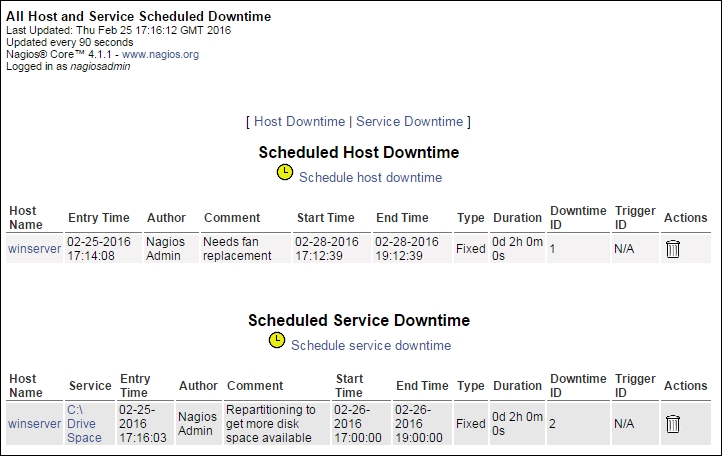
The Nagios web interface lists of all the scheduled downtimes. This page can be accessed by clicking on the Downtime link from the menu on the left. The following is a screenshot of the page:

The page consists of two pages of all the scheduled downtimes, separately for hosts and services. You can delete a downtime by clicking the trash icon on the right in the row that describes this particular downtime entry.

Downtimes can be triggered by other downtimes. When a host downtime is scheduled, Nagios automatically adds downtimes for all child hosts.

Scheduling downtimes

In order to schedule a downtime, open a Host Information or Service Information page and use the Schedule downtime for this host or Schedule downtime for this service option. It is also possible to use the...

Visually different images
CONTINUE READING
83
Tech Concepts
36
Programming languages
73
Tech Tools
Icon Unlimited access to the largest independent learning library in tech of over 8,000 expert-authored tech books and videos.
Icon Innovative learning tools, including AI book assistants, code context explainers, and text-to-speech.
Icon 50+ new titles added per month and exclusive early access to books as they are being written.
Learning Nagios
notes
bookmark Notes and Bookmarks search Search in title playlist Add to playlist font-size Font size

Change the font size

margin-width Margin width

Change margin width

day-mode Day/Sepia/Night Modes

Change background colour

Close icon Search
Country selected

Close icon Your notes and bookmarks

Confirmation

Modal Close icon
claim successful

Buy this book with your credits?

Modal Close icon
Are you sure you want to buy this book with one of your credits?
Close
YES, BUY

Submit Your Feedback

Modal Close icon
Modal Close icon
Modal Close icon