Sign In Start Free Trial
Account

Add to playlist

Create a Playlist

Modal Close icon
You need to login to use this feature.
  • Book Overview & Buying pfSense 2.x Cookbook
  • Table Of Contents Toc
pfSense 2.x Cookbook

pfSense 2.x Cookbook - Second Edition

By : David Zientara
5 (1)
close
close
pfSense 2.x Cookbook

pfSense 2.x Cookbook

5 (1)
By: David Zientara

Overview of this book

pfSense is an open source distribution of the FreeBSD-based firewall that provides a platform for ?exible and powerful routing and firewalling. The versatility of pfSense presents us with a wide array of configuration options, which makes determining requirements a little more difficult and a lot more important compared to other offerings. pfSense 2.x Cookbook – Second Edition starts by providing you with an understanding of how to complete the basic steps needed to render a pfSense firewall operational. It starts by showing you how to set up different forms of NAT entries and firewall rules and use aliases and scheduling in firewall rules. Moving on, you will learn how to implement a captive portal set up in different ways (no authentication, user manager authentication, and RADIUS authentication), as well as NTP and SNMP configuration. You will then learn how to set up a VPN tunnel with pfSense. The book then focuses on setting up traffic shaping with pfSense, using either the built-in traffic shaping wizard, custom ?oating rules, or Snort. Toward the end, you will set up multiple WAN interfaces, load balancing and failover groups, and a CARP failover group. You will also learn how to bridge interfaces, add static routing entries, and use dynamic routing protocols via third-party packages.
Table of Contents (13 chapters)
close
close

Bridging interfaces


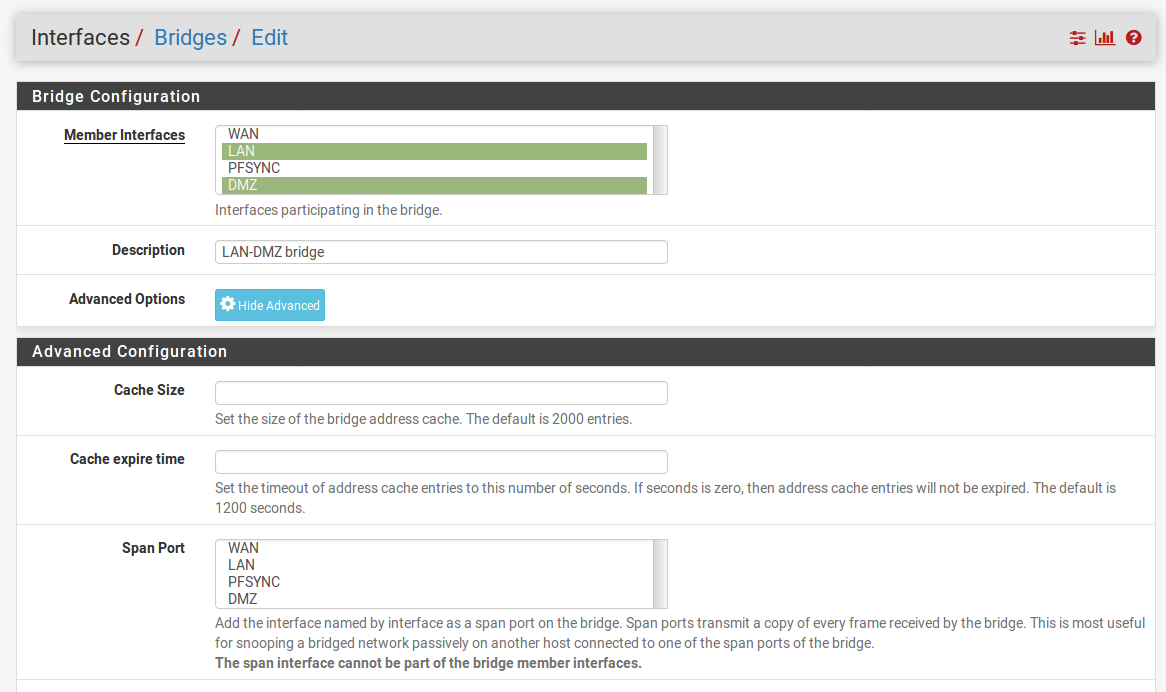
This recipe will demonstrate how to bridge two interfaces on a pfSense firewall—the LAN and DMZ interfaces.

How to do it...

  1. Navigate to Interfaces | Assignments.
  2. Click on the Bridges tab.
  3. Click on the Add button.
  4. In the Member Interfaces list box, select LAN and DMZ:
  1. Enter a brief description in the Description text field (for example, LAN-DMZ bridge).
  2. Click on the Save button.
  1. We now have bridged the two interfaces, but unless the firewall rules allow traffic to flow between them, traffic will be blocked. Therefore, we will add firewall rules to allow traffic to flow between LAN and DMZ:
    1. Navigate to Firewall | Rules.
    2. Click on the LAN tab.
    3. Find the IPv4 default allow LAN to any rule and click on the Copy icon for this rule.
    4. Change Interface to DMZ.
    5. Change Source to DMZ net.
    6. Change the description in the Description text field (for example, Allow DMZ to any rule).
    7. Click on the Save button.
    8. Click on the LAN tab again.
    9. Find the IPv6 default allow LAN to any rule and repeat the process to...
CONTINUE READING
83
Tech Concepts
36
Programming languages
73
Tech Tools
Icon Unlimited access to the largest independent learning library in tech of over 8,000 expert-authored tech books and videos.
Icon Innovative learning tools, including AI book assistants, code context explainers, and text-to-speech.
Icon 50+ new titles added per month and exclusive early access to books as they are being written.
pfSense 2.x Cookbook
notes
bookmark Notes and Bookmarks search Search in title playlist Add to playlist font-size Font size

Change the font size

margin-width Margin width

Change margin width

day-mode Day/Sepia/Night Modes

Change background colour

Close icon Search
Country selected

Close icon Your notes and bookmarks

Confirmation

Modal Close icon
claim successful

Buy this book with your credits?

Modal Close icon
Are you sure you want to buy this book with one of your credits?
Close
YES, BUY

Submit Your Feedback

Modal Close icon
Modal Close icon
Modal Close icon