Sign In Start Free Trial
Account

Add to playlist

Create a Playlist

Modal Close icon
You need to login to use this feature.
  • Book Overview & Buying  Google Cloud Associate Cloud Engineer Certification and Implementation Guide
  • Table Of Contents Toc
 Google Cloud Associate Cloud Engineer Certification and Implementation Guide

Google Cloud Associate Cloud Engineer Certification and Implementation Guide

By : Agnieszka Koziorowska, Wojciech Marusiak
5 (8)
close
close
 Google Cloud Associate Cloud Engineer Certification and Implementation Guide

Google Cloud Associate Cloud Engineer Certification and Implementation Guide

5 (8)
By: Agnieszka Koziorowska, Wojciech Marusiak

Overview of this book

Google Cloud Platform (GCP) is a leading cloud provider, helping companies and users worldwide to solve the most challenging business issues. This book will teach cloud engineers working with GCP how to implement, configure, and secure cloud environment, and help students gain confidence in utilizing various GCP services. The book begins by introducing you to Google Cloud and the ACE exam, including various resources that can help you pass. The next set of chapters will help you explore the various compute options in Google Cloud, such as Google Kubernetes Engine and Google Compute Engine. As you advance, you'll gain a clear understanding of the essence of the cloud, including networking and storage, as well as the data analytics products that Google Cloud provides. The chapters also cover key topics such as monitoring, logging, diagnostics, and price estimation along with the most crucial of subjects, security, with a particular focus on identity and access management. Finally, you'll be given the chance to test your newfound knowledge with the help of two mock exams. By the end of this book, you’ll have learned the difference between various Google Cloud Platform services, along with specific use cases, and be able to implement these services with the GCP console and command-line utilities.
Table of Contents (20 chapters)
close
close
1
Part 1:Overview of Google Cloud Platform and Associate Cloud Engineer Certification
4
Part 2:Configuring and Implementing Google Cloud
6
Chapter 4: Implementing Compute Solutions – Google Compute Engine
12
Part 3:Data Analytics, Security, Operations, and Cost Estimation in Google Cloud
16
Mock Test 1
17
Mock Test 2

Exam registration

Google Cloud uses an external company, Kryterion, to proctor exams. Using the https://webassessor.com/googlecloud website, we will create an account required to take an exam. Kryterion allows taking the Associate Cloud Engineer exam onsite and online.

Account creation

Regardless of where and how the exam will be taken, account creation is necessary. To register, you will require just an email address.

Once you are ready to create an account, visit https://www.webassessor.com/wa.do?page=createAccount&branding=GOOGLE and provide all the necessary details.

Onsite exam

During an onsite exam, the candidate needs to present two different forms of identification. At least one of the documents must be a government-issued ID with a photograph.

The following documents can be used as primary identification:

  • Government-issued (local, state, province, or country) driver’s license or identification card
  • Passport
  • Military identification
  • National identification card

The following documents can be used as secondary identification:

  • Student identification from an accredited school
  • Credit card
  • Check-cashing card
  • Bank debit card
  • Employee identification card
  • Retail membership card
  • Wholesale membership card
  • Health insurance card
  • Green card/Visa

Those requirements might change over time, so it is essential to double-check the provider’s website before the exam.

To find the nearest test center, you can use this link: https://www.kryteriononline.com/locate-test-center.

Online exam

For those who prefer an online certification, Kryterion allows them to do this. One of the main requirements is to install software that Kryterion secures. We have a critical hint from our online exam taking. Please use your personal laptop and not a business one. The main reason is that some additional security software might be installed on many business laptops, and you might not be able to run Kryterion software at all.

Before the exam, installing the software and testing whether it will run is recommended. This allows you to save some time and reduce stress.

System readiness check

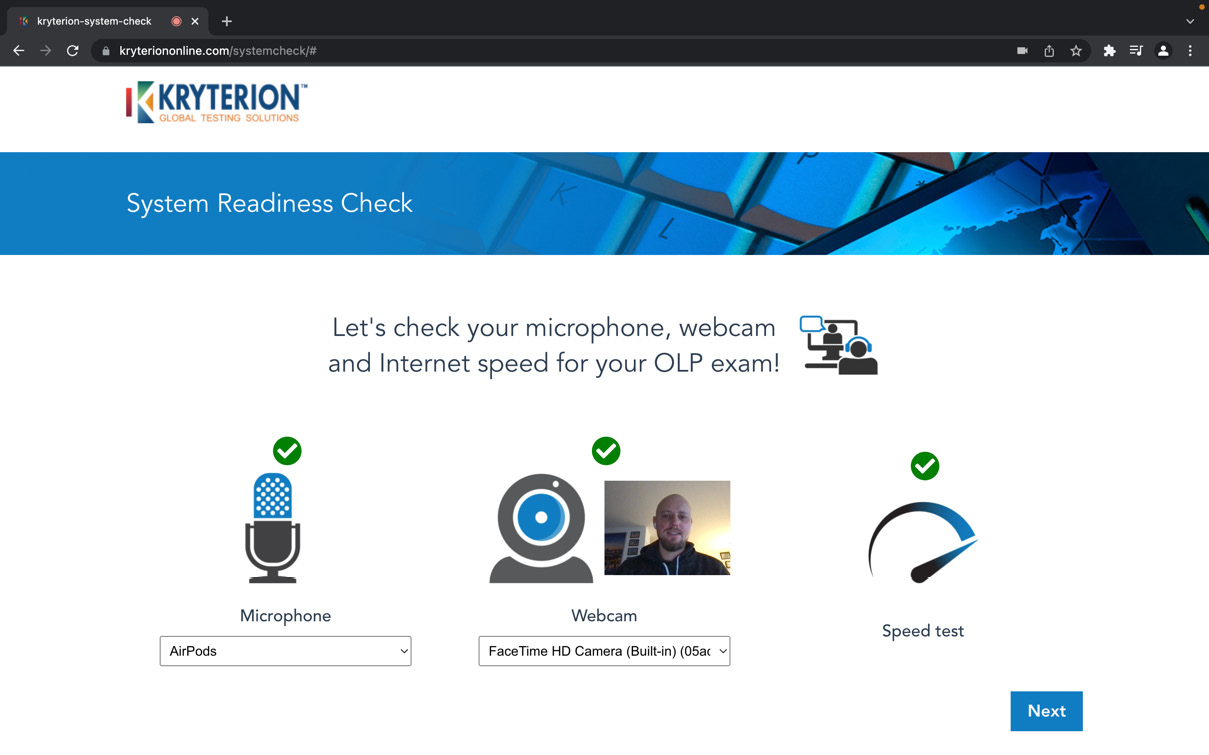
A system readiness checker can be found at the following link: https://www.kryteriononline.com/systemcheck/. It tests your operating system, microphone, webcam, and Internet speed. Once everything is checked, it informs you about possible problems.

Figure 1.1 – Kryterion System Readiness Check

Figure 1.1 – Kryterion System Readiness Check

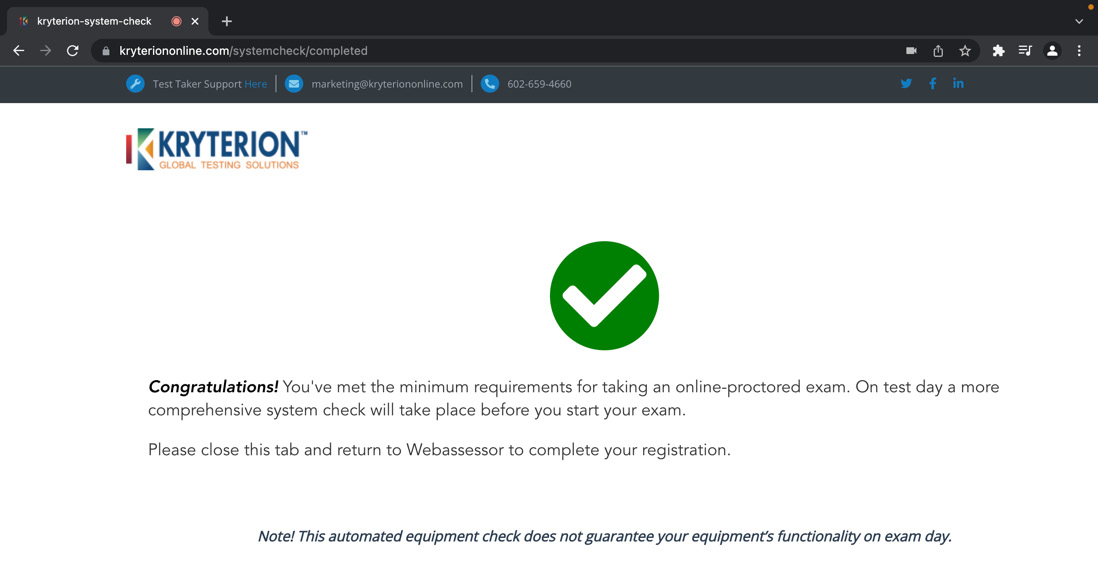
Once the test is performed and you click Next, you will see the web page displaying a Congratulations! message:

Figure 1.2 – Successful pass of the system readiness check

Figure 1.2 – Successful pass of the system readiness check

This confirms that your device is ready to be used during the exam, and you shouldn’t face any issues.

If your test wasn’t successful, or you faced some issues, you can check the minimum system requirements, which can help you narrow down the issue.

System requirements

Your computer needs to fulfill the following requirements before you run Sentinel Secure, the Kryterion software:

System Requirements for OLP Exams

Windows

Mac

Hardware

Minimum 50 MB available space

Minimum 50 MB available space

Screen Resolution

1024 x 768 or greater

1024 x 768 or greater

Webcam and Mic

Internal or external USB

Internal or external USB

Internet Access

Recommended minimum of 1.0 Mbps upload / 1.0 Mbps download (ping must be below 200 ms)

Recommended minimum of 1.0 Mbps upload / 1.0 Mbps download (ping must be below 200 ms)

Operating System

Windows 8.1 or 10

(Touch screens require the use of a mouse and keyboard)

OS X

10.13 High Sierra

10.14 Mojave

10.15 Catalina

11.1 Big Sur

Browser

The latest version of Google Chrome or Firefox

The latest version of Safari, Google Chrome, or Firefox

Additional Considerations

Local Administrator rights

You must disable all software that might interfere with your online proctored exam. This includes, but is not limited to, pop-up blockers, antivirus software, firewalls, VMware/Bootcamp, Skype, Photobooth, and TeamViewer.

On Windows 10 systems, you can disable active applications in the Task Manager | Startup tab. Right-click the item and select Disable from the local menu.

Local Administrator rights

You must disable all software that might interfere with your online proctored exam. This includes, but is not limited to, pop-up blockers, antivirus software, firewalls, VMware/Bootcamp, Skype, Photobooth, and TeamViewer.

Chromebooks are not supported at this time.

Table 1.1

The requirements mentioned in the preceding table can be found here: https://www.webassessor.com/wa.do?page=certInfo&branding=GOOGLECLOUD&tabs=13#OLPSysReqs.

Installation process

Kryterion provides a detailed installation guide for Windows and macOS operating systems which can be found here: https://kryterion.force.com/support/s/article/Installing-Sentinel-Secure?language=en_US.

Test-taker checklist

Once you have checked and prepared your computer, review the following requirements about the place in which you will take the exam and its surroundings, as follows:

  • Review and meet all system requirements as mentioned in the System requirements section.
  • Review and meet all requirements for the testing environment.
  • Secure a quiet, well-lit room to take the exam.
  • Bring a reflective surface (for example, a phone or mirror) to perform a room scan.
  • No person other than the test taker is allowed in the testing area.
  • No item other than your computer is allowed in the test area. This includes all papers, writing instruments, and different devices.
  • Disconnect external computer monitors from your laptop and close all applications.
  • Food and drink, and headphones/earbuds are not permitted during the exam.
  • Be prepared to sit for the entire length of the exam. You cannot take a break or step away from the camera’s view. A good idea is to use the restroom prior to the test.
  • Have your government-issued photo identification ready for verification (must match the legal first and last name in Webassessor).

As you see, those requirements are quite strict and must be adhered to. Otherwise, your exam might be stopped and graded as failed.

Retake policy

Google clearly states what happens if you do not pass the exam (if you read this book carefully, you most certainly won’t fail), and it is valid across all Google Cloud exams.

After the first failure, you must wait 14 days; after the second failure, you must wait 60 days, and 365 days after the third failure before retaking the exam.

The retake policy is valid for both onsite and online Google Cloud exams.

Available languages

As of writing this book, the Associate Cloud Engineer certification is only available in English.

In the next section, we’ll look at some helpful tips to follow while taking the exam.

CONTINUE READING
83
Tech Concepts
36
Programming languages
73
Tech Tools
Icon Unlimited access to the largest independent learning library in tech of over 8,000 expert-authored tech books and videos.
Icon Innovative learning tools, including AI book assistants, code context explainers, and text-to-speech.
Icon 50+ new titles added per month and exclusive early access to books as they are being written.
 Google Cloud Associate Cloud Engineer Certification and Implementation Guide
notes
bookmark Notes and Bookmarks search Search in title playlist Add to playlist download Download options font-size Font size

Change the font size

margin-width Margin width

Change margin width

day-mode Day/Sepia/Night Modes

Change background colour

Close icon Search
Country selected

Close icon Your notes and bookmarks

Confirmation

Modal Close icon
claim successful

Buy this book with your credits?

Modal Close icon
Are you sure you want to buy this book with one of your credits?
Close
YES, BUY

Submit Your Feedback

Modal Close icon
Modal Close icon
Modal Close icon