Sign In Start Free Trial
Account

Add to playlist

Create a Playlist

Modal Close icon
You need to login to use this feature.
  • Book Overview & Buying The Ultimate Docker Container Book
  • Table Of Contents Toc
  • Feedback & Rating feedback
The Ultimate Docker Container Book

The Ultimate Docker Container Book - Third Edition

By : Dr. Gabriel N. Schenker
4 (8)
close
close
The Ultimate Docker Container Book

The Ultimate Docker Container Book

4 (8)
By: Dr. Gabriel N. Schenker

Overview of this book

The Ultimate Docker Container Book, 3rd edition enables you to leverage Docker containers for streamlined software development. You’ll uncover Docker fundamentals and how containers improve software supply chain efficiency and enhance security. You’ll start by learning practical skills such as setting up Docker environments, handling stateful components, running and testing code within containers, and managing Docker images. You’ll also explore how to adapt legacy applications for containerization and understand distributed application architecture. Next, you’ll delve into Docker's networking model, software-defined networks for secure applications, and Docker compose for managing multi-service applications along with tools for log analysis and metrics. You’ll further deepen your understanding of popular orchestrators like Kubernetes and Docker swarmkit, exploring their key concepts, and deployment strategies for resilient applications. In the final sections, you’ll gain insights into deploying containerized applications on major cloud platforms, including Azure, AWS, and GCE and discover techniques for production monitoring and troubleshooting. By the end of this book, you’ll be well-equipped to manage and scale containerized applications effectively.
Table of Contents (26 chapters)
close
close
1
Part 1:Introduction
4
Part 2:Containerization Fundamentals
11
Part 3:Orchestration Fundamentals
19
Part 4:Docker, Kubernetes, and the Cloud

Container architecture

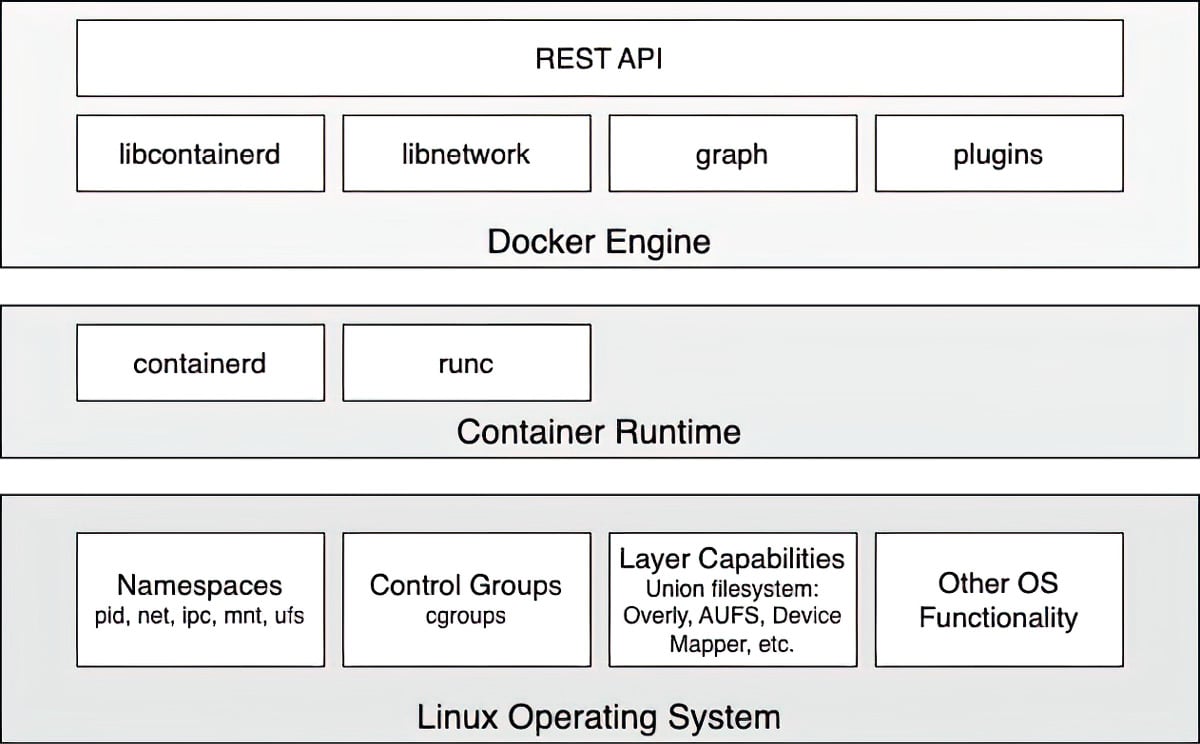
Now, let us discuss how a system that can run Docker containers is designed at a high level. The following diagram illustrates what a computer that Docker has been installed on looks like. Note that a computer that has Docker installed on it is often called a Docker host because it can run or host Docker containers:

Figure 1.3 – High-level architecture diagram of Docker Engine

Figure 1.3 – High-level architecture diagram of Docker Engine

In the preceding diagram, we can see three essential parts:

  • At the bottom, we have the Linux Operating System
  • In the middle, we have the Container Runtime
  • At the top, we have Docker Engine

Containers are only possible because the Linux OS supplies some primitives, such as namespaces, control groups, layer capabilities, and more, all of which are used in a specific way by the container runtime and Docker Engine. Linux kernel namespaces, such as process ID (pid) namespaces or network (net) namespaces, allow Docker to encapsulate or sandbox processes that run inside the container. Control groups make sure that containers do not suffer from noisy-neighbor syndrome, where a single application running in a container can consume most or all the available resources of the whole Docker host. Control groups allow Docker to limit the resources, such as CPU time or the amount of RAM, that each container is allocated. The container runtime on a Docker host consists of containerd and runc. runc is the low-level functionality of the container runtime such as container creation or management, while containerd, which is based on runc, provides higher-level functionality such as image management, networking capabilities, or extensibility via plugins. Both are open source and have been donated by Docker to the CNCF. The container runtime is responsible for the whole life cycle of a container. It pulls a container image (which is the template for a container) from a registry, if necessary, creates a container from that image, initializes and runs the container, and eventually stops and removes the container from the system when asked. Docker Engine provides additional functionality on top of the container runtime, such as network libraries or support for plugins. It also provides a REST interface over which all container operations can be automated. The Docker command-line interface that we will use often in this book is one of the consumers of this REST interface.

Visually different images
CONTINUE READING
83
Tech Concepts
36
Programming languages
73
Tech Tools
Icon Unlimited access to the largest independent learning library in tech of over 8,000 expert-authored tech books and videos.
Icon Innovative learning tools, including AI book assistants, code context explainers, and text-to-speech.
Icon 50+ new titles added per month and exclusive early access to books as they are being written.
The Ultimate Docker Container Book
notes
bookmark Notes and Bookmarks search Search in title playlist Add to playlist download Download options font-size Font size

Change the font size

margin-width Margin width

Change margin width

day-mode Day/Sepia/Night Modes

Change background colour

Close icon Search
Country selected

Close icon Your notes and bookmarks

Confirmation

Modal Close icon
claim successful

Buy this book with your credits?

Modal Close icon
Are you sure you want to buy this book with one of your credits?
Close
YES, BUY

Submit Your Feedback

Modal Close icon
Modal Close icon
Modal Close icon