Sign In Start Free Trial
Account

Add to playlist

Create a Playlist

Modal Close icon
You need to login to use this feature.
  • Book Overview & Buying Mastering PowerShell Scripting
  • Table Of Contents Toc
Mastering PowerShell Scripting

Mastering PowerShell Scripting - Fifth Edition

By : Chris Dent
5 (26)
close
close
Mastering PowerShell Scripting

Mastering PowerShell Scripting

5 (26)
By: Chris Dent

Overview of this book

Mastering PowerShell Scripting, Fifth Edition, is your comprehensive guide to harnessing PowerShell’s full potential. This edition introduces new chapters on debugging, troubleshooting, and creating GUIs while covering the latest enhancements in PowerShell 7.3, including parameters, objects, and .NET classes. The book takes you from foundational concepts to advanced techniques, covering asynchronous processing, desired state configuration, and managing large datasets. You'll explore PowerShell’s automation features, error-handling strategies, and integration with external services. Additionally, this guide provides practical insights into working with regular expressions, Windows Management Instrumentation, and complex scripting methods. By the end of this book, you’ll have the skills to efficiently automate tasks, troubleshoot scripts, and leverage PowerShell’s advanced capabilities for real-world scenarios. Be sure to explore the online bonus chapters 8, 9, and 20, where we dive into Strings, Numbers, and Dates, Regular Expressions, and Building Modules.
Table of Contents (23 chapters)
close
close
21
Other Books You May Enjoy
22
Index

PowerShell editors

While PowerShell scripts can be written using the Notepad application alone, it is rarely desirable. Using an editor that was designed to work with PowerShell can save a lot of time.

Editors with explicit support for PowerShell, such as Visual Studio Code (VS Code with the PowerShell extension) and the PowerShell Studio editor offer automatic completion (IntelliSense). IntelliSense reduces the amount of cross-referencing help content required while writing code. Finding a comfortable editor early on is a good way to ease into PowerShell; memorizing commands and parameters is not necessary.

In addition to VS Code and PowerShell Studio, Windows PowerShell comes with the PowerShell ISE. The PowerShell ISE has not been updated for PowerShell 6 and higher and will only function correctly for the Windows PowerShell Desktop edition.

PowerShell Studio is not free but includes graphical user interface development features.

VS Code is a highly recommended editor for PowerShell as it is free and supports a wide variety of different languages. VS Code is an open-source editor that was published by Microsoft and can be downloaded from http://code.visualstudio.com. VS Code tends to be the editor of choice for many in the PowerShell community.

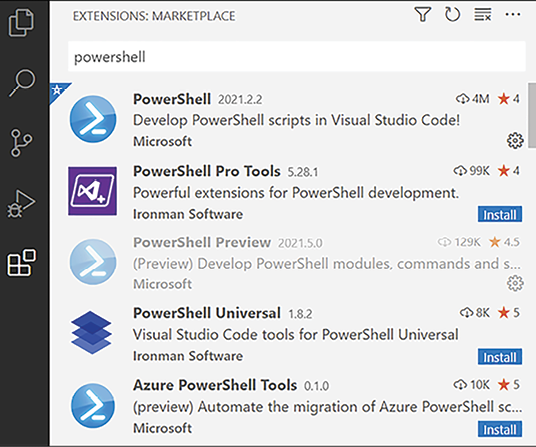
The functionality of VS Code can be enhanced by using extensions from the marketplace: https://marketplace.visualstudio.com/VSCode. The Extension installer is part of the VS Code user interface, and the types of available extensions are shown in Figure 1.3:

Figure 1.3: PowerShell extensions in VS Code

The icons available on the left-hand side change depending on the extensions installed. A new installation of VS Code will show fewer icons than Figure 1.3.

The PowerShell Extension should be installed. Other popular extensions include:

  • Bracket Pair Colorizer 2
  • Blockman
  • Chocolatey
  • Error Lens
  • Live Share
  • Prettify JSON

Paid-for extensions, such as PowerShell Pro Tools, offer us the ability to design user interfaces in VS Code.

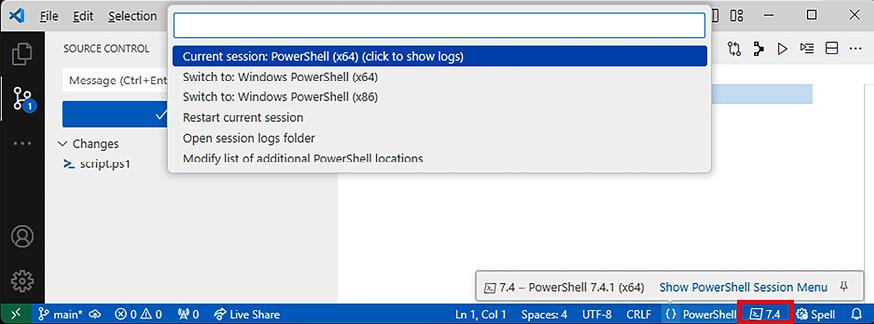
The integrated console in VS Code can be used with all installed versions of PowerShell. The following screenshot shows how to change the version of PowerShell used when editing a script. Note the clickable version in the bottom-right corner:

Figure 1.4: Choosing a PowerShell version

The IntelliSense version provided by the editor will list and hint at the possible commands and parameters available. Help content is available to fill in the details.

Visually different images
CONTINUE READING
83
Tech Concepts
36
Programming languages
73
Tech Tools
Icon Unlimited access to the largest independent learning library in tech of over 8,000 expert-authored tech books and videos.
Icon Innovative learning tools, including AI book assistants, code context explainers, and text-to-speech.
Icon 50+ new titles added per month and exclusive early access to books as they are being written.
Mastering PowerShell Scripting
notes
bookmark Notes and Bookmarks search Search in title playlist Add to playlist download Download options font-size Font size

Change the font size

margin-width Margin width

Change margin width

day-mode Day/Sepia/Night Modes

Change background colour

Close icon Search
Country selected

Close icon Your notes and bookmarks

Confirmation

Modal Close icon
claim successful

Buy this book with your credits?

Modal Close icon
Are you sure you want to buy this book with one of your credits?
Close
YES, BUY

Submit Your Feedback

Modal Close icon
Modal Close icon
Modal Close icon