Sign In Start Free Trial
Account

Add to playlist

Create a Playlist

Modal Close icon
You need to login to use this feature.
  • Book Overview & Buying Practical Serverless and Microservices with C#
  • Table Of Contents Toc
Practical Serverless and Microservices with C#

Practical Serverless and Microservices with C#

By : Gabriel Baptista, Francesco Abbruzzese
5 (1)
close
close
Practical Serverless and Microservices with C#

Practical Serverless and Microservices with C#

5 (1)
By: Gabriel Baptista, Francesco Abbruzzese

Overview of this book

From the authors of the Software Architecture with C# and .NET series comes this practical and grounded showcase of microservices using the .NET stack. Written for .NET developers entering the world of modern cloud and distributed applications, it shows you when microservices and serverless architectures are the right choice for building scalable enterprise solutions and when they’re not. You’ll gain a realistic understanding of their use cases and limitations. Rather than promoting microservices as a one-size-fits-all solution, it encourages thoughtful adoption based on real-world needs. Following a brief introduction and important setup, the book helps you prepare for practical application through examples such as a ride-sharing website. You’ll work with Docker, Kubernetes, Azure Container Apps, and the new .NET Aspire with considerations for security, observability, and cost management. The book culminates in a complete event-driven application that brings together everything you've covered. By the end of this microservices book, you’ll have a well-rounded understanding of cloud and distributed .NET—through the lens of two industry veterans. *Email sign-up and proof of purchase required
Table of Contents (16 chapters)
close
close
14
Other Books You May Enjoy
15
Index

Coding Azure functions using Visual Studio

Visual Studio is one of the best options for developing Azure functions. To do so, you must set Azure Development Workload, which will help enable Azure functions development natively on the platform.

Once you have done this, the same project you created using VS Code will be available for you to use at Visual Studio. The difference between VS Code and Visual Studio in this case is that Visual Studio will provide an easier setup environment for debugging and a lot of visual dialogs that can facilitate your decisions.

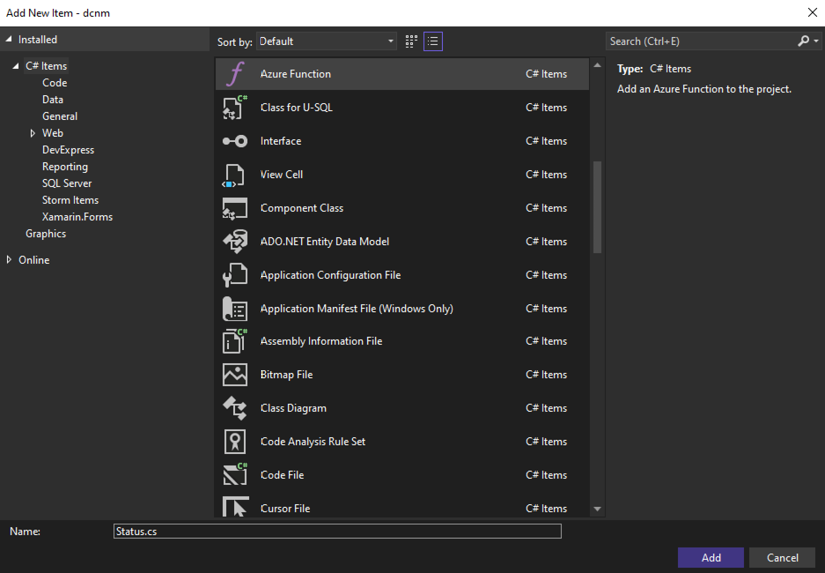
Figure 1.16: Creating a new Azure function for the function app

Figure 1.16: Creating a new Azure function for the function app

These dialogs simplify the development process, so if you have the opportunity to use Visual Studio, this will be the best option.

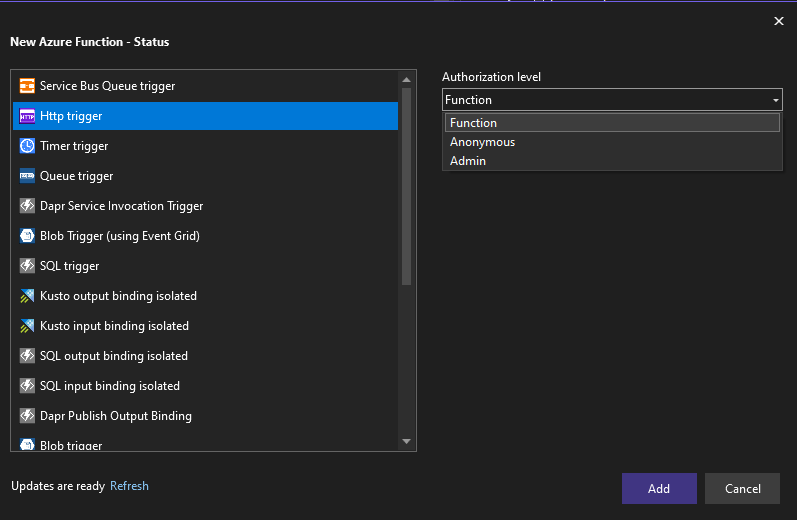
Figure 1.17: Defining the Azure function trigger type

Figure 1.17: Defining the Azure function trigger type

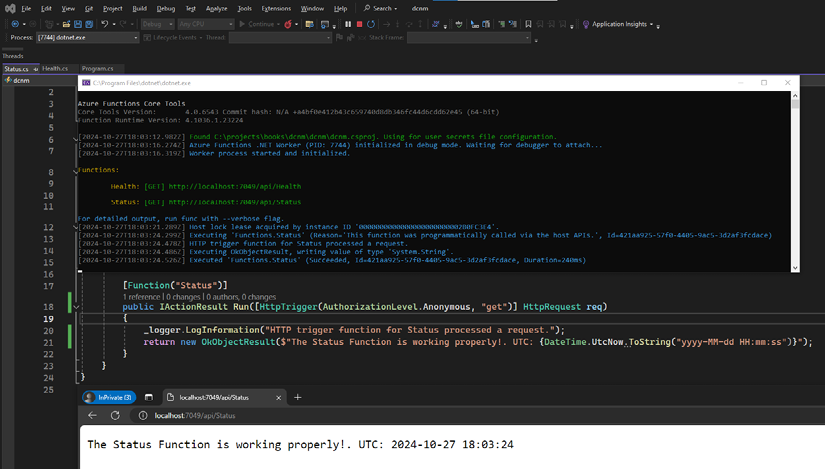
Once again, when you create a Function Apps project, you can add more than one function to this project, which is extremely useful for microservices solutions. In the following example, we have added a second HTTP trigger function called Status to help you understand this possibility and to let you see how these functions work together in a single function app.

Figure 1.18: Function app with more than one function

Figure 1.18: Function app with more than one function

It is important to mention that the same code developed initially using VS Code can continue to be maintained using Visual Studio, and vice versa. This is great because you can have different developers in the same team using the two environments and this will not cause a problem, at least not with Function Apps projects.

Visual Studio is an excellent option for developing Azure functions due to its comprehensive setup environment for debugging and integrated visual dialogs, which make development easier. Developers can switch between VS Code and Visual Studio without compatibility issues, facilitating team collaboration. Multiple functions, such as HTTP triggers, can be in a single Function Apps project, supporting microservices solutions.

CONTINUE READING
83
Tech Concepts
36
Programming languages
73
Tech Tools
Icon Unlimited access to the largest independent learning library in tech of over 8,000 expert-authored tech books and videos.
Icon Innovative learning tools, including AI book assistants, code context explainers, and text-to-speech.
Icon 50+ new titles added per month and exclusive early access to books as they are being written.
Practical Serverless and Microservices with C#
notes
bookmark Notes and Bookmarks search Search in title playlist Add to playlist download Download options font-size Font size

Change the font size

margin-width Margin width

Change margin width

day-mode Day/Sepia/Night Modes

Change background colour

Close icon Search
Country selected

Close icon Your notes and bookmarks

Confirmation

Modal Close icon
claim successful

Buy this book with your credits?

Modal Close icon
Are you sure you want to buy this book with one of your credits?
Close
YES, BUY

Submit Your Feedback

Modal Close icon
Modal Close icon
Modal Close icon