Sign In Start Free Trial
Account

Add to playlist

Create a Playlist

Modal Close icon
You need to login to use this feature.
  • Book Overview & Buying Mastering Python for Networking and Security
  • Table Of Contents Toc
  • Feedback & Rating feedback
Mastering Python for Networking and Security

Mastering Python for Networking and Security - Second Edition

By : José Manuel Ortega
5 (3)
close
close
Mastering Python for Networking and Security

Mastering Python for Networking and Security

5 (3)
By: José Manuel Ortega

Overview of this book

It’s now more apparent than ever that security is a critical aspect of IT infrastructure, and that devastating data breaches can occur from simple network line hacks. As shown in this book, combining the latest version of Python with an increased focus on network security can help you to level up your defenses against cyber attacks and cyber threats. Python is being used for increasingly advanced tasks, with the latest update introducing new libraries and packages featured in the Python 3.7.4 recommended version. Moreover, most scripts are compatible with the latest versions of Python and can also be executed in a virtual environment. This book will guide you through using these updated packages to build a secure network with the help of Python scripting. You’ll cover a range of topics, from building a network to the procedures you need to follow to secure it. Starting by exploring different packages and libraries, you’ll learn about various ways to build a network and connect with the Tor network through Python scripting. You will also learn how to assess a network's vulnerabilities using Python security scripting. Later, you’ll learn how to achieve endpoint protection by leveraging Python packages, along with writing forensic scripts. By the end of this Python book, you’ll be able to use Python to build secure apps using cryptography and steganography techniques.
Table of Contents (22 chapters)
close
close
1
Section 1: The Python Environment and System Programming Tools
4
Section 2: Network Scripting and Extracting Information from the Tor Network with Python
8
Section 3: Server Scripting and Port Scanning with Python
12
Section 4: Server Vulnerabilities and Security in Python Modules
16
Section 5: Python Forensics

Development environments for Python scripting

In this section, we will review PyCharm and Python IDLE as development environments for Python scripting.

Setting up a development environment

In order to rapidly develop and debug Python applications, it is absolutely necessary to use an Integrated Development Environment (IDE). If you want to try different options, we recommend you check out the list that is on the official site of Python, where you can see the tools according to your operating systems and needs:

https://wiki.python.org/moin/IntegratedDevelopmentEnvironments

Between all the environments, the following two are what we will look at:

PyCharm

PyCharm is an IDE developed by Jetbrains, based on the company’s IntelliJ IDEA, the same company’s IDE, but focused on Java, and is the Android Studio base.

PyCharm is multi-platform and we can find binaries for operating systems running Windows, Linux, and macOS X. There are two versions of PyCharm – community and technical, with variations in functionality relating to web framework integration and support for databases. In the following URL, we can see a comparison between both editions:

http://www.jetbrains.com/pycharm

The main advantages of this development environment are as follows:

  • Autocomplete, syntax highlighter, analysis tool, and refactoring
  • Integration with web frameworks such as Django and Flask
  • An advanced debugger
  • Connection with version-control systems, such as Git, CVS, and SVN

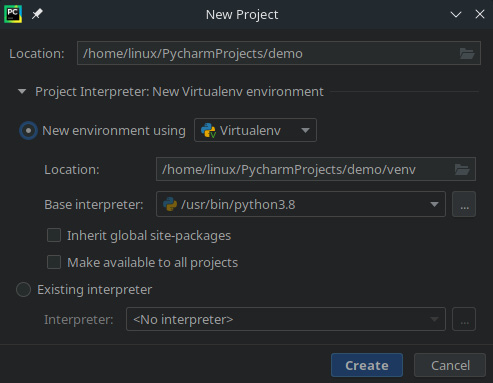
In the following screenshot, we can see how to configure virtualenv in PyCharm:

Figure 1.1 – Configuring virtualenv in PyCharm

Figure 1.1 – Configuring virtualenv in PyCharm

In the preceding screenshot, we are setting the configuration related to establishing a new environment for the project using virtualenv.

Debugging with PyCharm

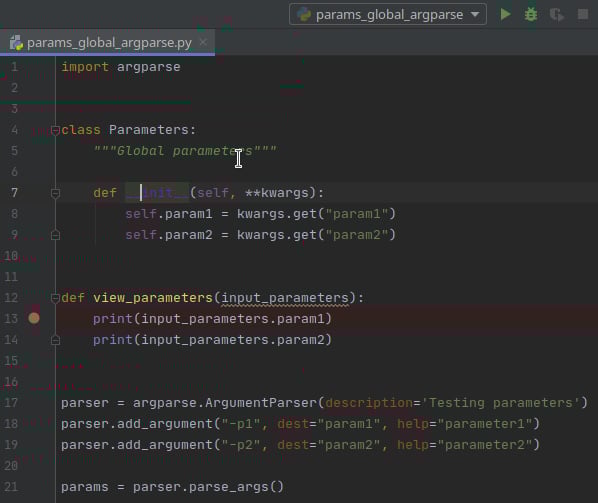
In this example, we are debugging a Python script that accepts two input parameters. An interesting topic is the possibility of adding a breakpoint to our script.

In the following screenshot, we are setting a breakpoint in the view_parameters method:

Figure 1.2 – Setting a breakpoint in PyCharm

Figure 1.2 – Setting a breakpoint in PyCharm

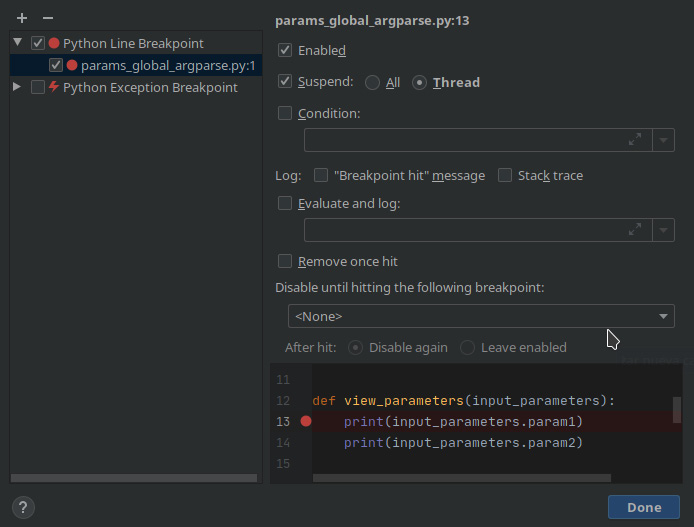
With the View Breakpoint option, we can see the breakpoint established in the script:

Figure 1.3 – Viewing breakpoints in PyCharm

Figure 1.3 – Viewing breakpoints in PyCharm

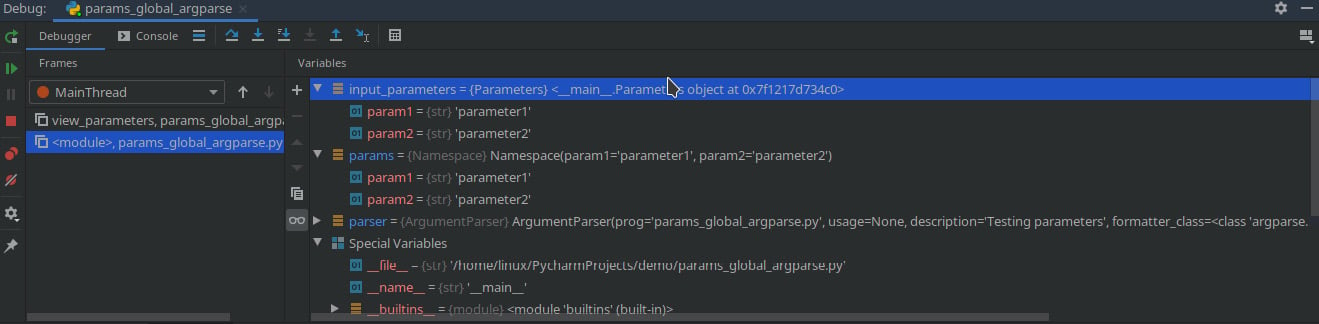
In the following screenshot, we can visualize the values of the parameters that contain the values we are debugging:

Figure 1.4 – Debugging variables in PyCharm

Figure 1.4 – Debugging variables in PyCharm

In this way, we can know the state of each of the variables at runtime, as well as modify their values to change the logic of our script.

Debugging with Python IDLE

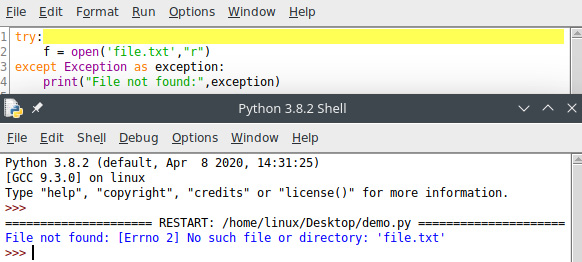
Python IDLE is the default IDE that comes installed by default when you install Python in your operating system. When executing Python IDLE, it offers the possibility to debug your script and see errors and exceptions in the Python shell console:

Figure 1.5 – Running a script in the Python shell

Figure 1.5 – Running a script in the Python shell

In the preceding screenshot, we can see the output in the Python shell and the exception is related to File not found.

Visually different images
CONTINUE READING
83
Tech Concepts
36
Programming languages
73
Tech Tools
Icon Unlimited access to the largest independent learning library in tech of over 8,000 expert-authored tech books and videos.
Icon Innovative learning tools, including AI book assistants, code context explainers, and text-to-speech.
Icon 50+ new titles added per month and exclusive early access to books as they are being written.
Mastering Python for Networking and Security
notes
bookmark Notes and Bookmarks search Search in title playlist Add to playlist download Download options font-size Font size

Change the font size

margin-width Margin width

Change margin width

day-mode Day/Sepia/Night Modes

Change background colour

Close icon Search
Country selected

Close icon Your notes and bookmarks

Confirmation

Modal Close icon
claim successful

Buy this book with your credits?

Modal Close icon
Are you sure you want to buy this book with one of your credits?
Close
YES, BUY

Submit Your Feedback

Modal Close icon
Modal Close icon
Modal Close icon