Sign In Start Free Trial
Account

Add to playlist

Create a Playlist

Modal Close icon
You need to login to use this feature.
  • Book Overview & Buying pfSense 2 Cookbook
  • Table Of Contents Toc
pfSense 2 Cookbook

pfSense 2 Cookbook

3.5 (17)
close
close
pfSense 2 Cookbook

pfSense 2 Cookbook

3.5 (17)

Overview of this book

pfSense is an open source distribution of FreeBSD-based firewall that provides a platform for flexible and powerful routing and firewalling. The versatility of pfSense presents us with a wide array of configuration options, which makes determining requirements a little more difficult and a lot more important, compared to other offerings. Through this book you will see that pfSense offers numerous alternatives to fit any environment's security needs. pfSense 2.0 Cookbook is the first and only book to explore all the features of pfSense, including those released in the latest 2.0 version. With the help of step-by-step instructions and detailed screenshots of the pfSense interface you will be able to configure every general and advanced feature from creating a firewall rule to configuring multi-WAN failover. Each recipe includes tips and offers advice on variations of the topic or references to other related recipes and additional information that can be found from other sources. pfSense 2.0 Cookbook covers the gamut of available features and functionality. The first three chapters will take you from a non-existent system to a basic pfSense firewall. The next chapter focuses on configuring any number of the VPN services available, a very important and sought-after feature for anyone implementing a firewall. The following two chapters describe how to configure the most advanced features available in pfSense; features that may only be relevant to the most experienced network admins. Chapter 7 is dedicated to understanding and configuring the "grab-bag" of features that are available in pfSense, but are often stand-alone options and unrelated to each other. The first appendix explains how to use the status monitoring tools available for many of the features. The second appendix wraps up with helping you to decide how and where pfSense may be incorporated into your system and what type of hardware is required based on your throughput needs.
Table of Contents (16 chapters)
close
close
pfSense 2 Cookbook
Credits
About the Author
About the Reviewers
www.PacktPub.com
Preface
3
Index

Configuring the WAN interface


This recipe describes how to configure the Wide Area Network (WAN) on the external interface of our firewall.

Getting ready

The WAN interface is your connection to the outside world. You'll need a properly configured WAN interface (as described in the previous chapter) and an Internet connection. In this example, a cable modem provides the Internet connection from our local Internet Service Provider (ISP), but pfSense will support every other major connection method.

How to do it...

  1. Browse to Interfaces | WAN.

  2. Check Enable Interface.

  3. Choose an address configuration Type.

  4. Leave MAC address blank. Manually entering a MAC address here is known as "spoofing". Your ISP has no way of verifying MAC addresses, so you can simply make one up. This can be helpful if you're trying to force your ISP to hand you a new IP address or a different set of DNS servers.

  5. Leave MTU, MSS, Hostname, and Alias IP address blank.

  6. Check Block private networks. This setting is usually only checked on a WAN interface.

  7. Check Block bogon networks. This setting is usually only checked on a WAN interface.

  8. Save changes.

How it works...

We must first establish our connection to the Internet before we can configure pfSense to allow our other networks to access it. The example we've performed is typical of many SOHO environments. By placing our firewall as the only machine with direct access to the Internet, we are securing our environment by establishing complete control over the traffic that flows in and out of our networks. All traffic must now pass through our firewall and abide by our rules.

There's more...

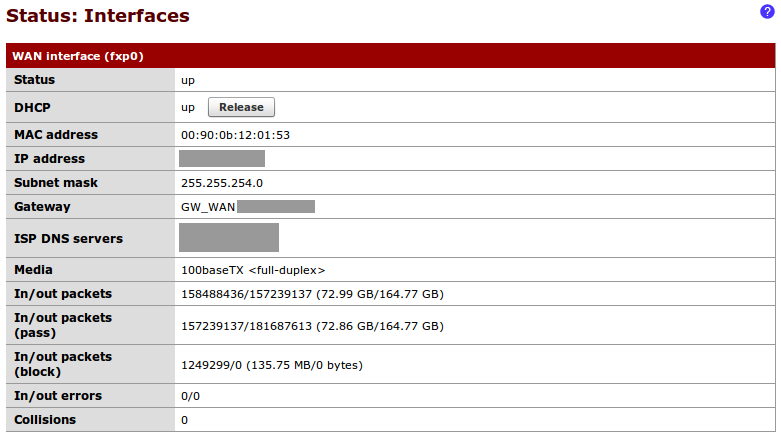
We can now connect our WAN device (cable modem) to the WAN Ethernet port we've defined on our pfSense box. Once the connection has been established, we can check the status of our WAN port from Status | Interfaces:

See also

  • The Identifying and assigning interfaces recipe

  • The Configuring the LAN interface recipe

  • The Configuring optional interfaces recipe

Visually different images
CONTINUE READING
83
Tech Concepts
36
Programming languages
73
Tech Tools
Icon Unlimited access to the largest independent learning library in tech of over 8,000 expert-authored tech books and videos.
Icon Innovative learning tools, including AI book assistants, code context explainers, and text-to-speech.
Icon 50+ new titles added per month and exclusive early access to books as they are being written.
pfSense 2 Cookbook
notes
bookmark Notes and Bookmarks search Search in title playlist Add to playlist font-size Font size

Change the font size

margin-width Margin width

Change margin width

day-mode Day/Sepia/Night Modes

Change background colour

Close icon Search
Country selected

Close icon Your notes and bookmarks

Confirmation

Modal Close icon
claim successful

Buy this book with your credits?

Modal Close icon
Are you sure you want to buy this book with one of your credits?
Close
YES, BUY

Submit Your Feedback

Modal Close icon
Modal Close icon
Modal Close icon