Sign In Start Free Trial
Account

Add to playlist

Create a Playlist

Modal Close icon
You need to login to use this feature.
  • Book Overview & Buying pfSense 2 Cookbook
  • Table Of Contents Toc
pfSense 2 Cookbook

pfSense 2 Cookbook

3.5 (17)
close
close
pfSense 2 Cookbook

pfSense 2 Cookbook

3.5 (17)

Overview of this book

pfSense is an open source distribution of FreeBSD-based firewall that provides a platform for flexible and powerful routing and firewalling. The versatility of pfSense presents us with a wide array of configuration options, which makes determining requirements a little more difficult and a lot more important, compared to other offerings. Through this book you will see that pfSense offers numerous alternatives to fit any environment's security needs. pfSense 2.0 Cookbook is the first and only book to explore all the features of pfSense, including those released in the latest 2.0 version. With the help of step-by-step instructions and detailed screenshots of the pfSense interface you will be able to configure every general and advanced feature from creating a firewall rule to configuring multi-WAN failover. Each recipe includes tips and offers advice on variations of the topic or references to other related recipes and additional information that can be found from other sources. pfSense 2.0 Cookbook covers the gamut of available features and functionality. The first three chapters will take you from a non-existent system to a basic pfSense firewall. The next chapter focuses on configuring any number of the VPN services available, a very important and sought-after feature for anyone implementing a firewall. The following two chapters describe how to configure the most advanced features available in pfSense; features that may only be relevant to the most experienced network admins. Chapter 7 is dedicated to understanding and configuring the "grab-bag" of features that are available in pfSense, but are often stand-alone options and unrelated to each other. The first appendix explains how to use the status monitoring tools available for many of the features. The second appendix wraps up with helping you to decide how and where pfSense may be incorporated into your system and what type of hardware is required based on your throughput needs.
Table of Contents (16 chapters)
close
close
pfSense 2 Cookbook
Credits
About the Author
About the Reviewers
www.PacktPub.com
Preface
3
Index

Configuring optional interfaces


This recipe describes how to create and assign optional network interfaces to our firewall.

Getting ready

The optional network you'll create in this is example is commonly referred to as a DMZ. The idea is taken from the military concept of a de-militarized zone, in which some traffic is allowed to pass and some traffic isn't. The idea is that the area is controlled and clearly separate from your other areas. When applied to networking, a DMZ network follows this pattern:

Internet Traffic | ← DMZ ← LAN Traffic

Unsafe Internet traffic is allowed to enter the DMZ, to access a webserver for example. LAN traffic can also enter the DMZ; it wants to access the webserver too. However, the key lies in the last rule—no DMZ traffic is allowed to enter the LAN.

The DMZ network is our less secure network we'll allow certain external access to. To configure a DMZ, or any other optional network, we'll need an available interface.

How to do it...

  1. Browse to an available interface, Interfaces | OPT1.

  2. Check Enable Interface.

  3. Set Description to DMZ.

  4. Choose an address configuration Type, Static for our example.

  5. Enter an IP address and the subnet mask. We'll use 192.168.2.1 and select 24 from the drop-down list.

  6. Leave Gateway set to None.

  7. Ensure Block private networks and Block bogon networks are unchecked.

  8. Save the changes.

  9. Apply changes.

How it works...

Your DMZ network will allow external (WAN) access. Your DMZ will also allow access from the LAN, but it won't be permitted to send traffic to the LAN. This will allow devices on the Internet to access your DMZ resources (websites, e-mail, and so on) without being able to access any part of your private LAN network.

There's more...

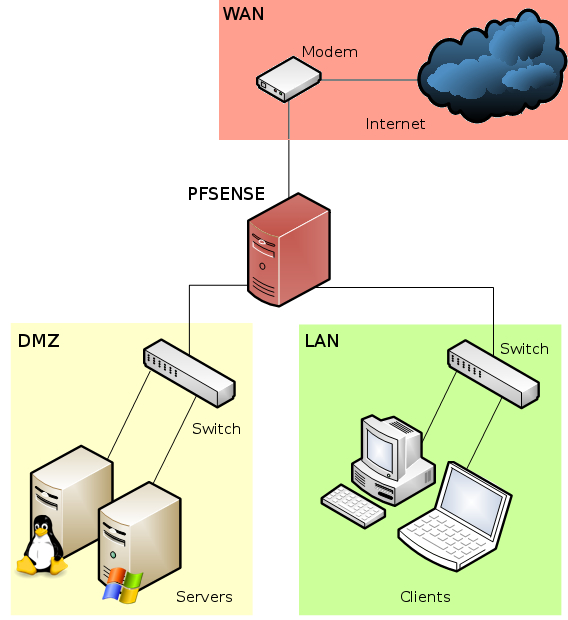
You could now attach a switch to your DMZ interface to connect multiple machines. If you've been following these recipes in order, a diagram of your network would look something like this:

See also

  • The Identifying and assigning interfaces recipe

  • The Configuring the WAN interface recipe

  • The Configuring the LAN interface recipe

CONTINUE READING
83
Tech Concepts
36
Programming languages
73
Tech Tools
Icon Unlimited access to the largest independent learning library in tech of over 8,000 expert-authored tech books and videos.
Icon Innovative learning tools, including AI book assistants, code context explainers, and text-to-speech.
Icon 50+ new titles added per month and exclusive early access to books as they are being written.
pfSense 2 Cookbook
notes
bookmark Notes and Bookmarks search Search in title playlist Add to playlist font-size Font size

Change the font size

margin-width Margin width

Change margin width

day-mode Day/Sepia/Night Modes

Change background colour

Close icon Search
Country selected

Close icon Your notes and bookmarks

Confirmation

Modal Close icon
claim successful

Buy this book with your credits?

Modal Close icon
Are you sure you want to buy this book with one of your credits?
Close
YES, BUY

Submit Your Feedback

Modal Close icon
Modal Close icon
Modal Close icon