Sign In Start Free Trial
Account

Add to playlist

Create a Playlist

Modal Close icon
You need to login to use this feature.
  • Book Overview & Buying Python Business Intelligence Cookbook
  • Table Of Contents Toc
  • Feedback & Rating feedback
Python Business Intelligence Cookbook

Python Business Intelligence Cookbook

By : Dempsey
3.6 (9)
close
close
Python Business Intelligence Cookbook

Python Business Intelligence Cookbook

3.6 (9)
By: Dempsey

Overview of this book

The amount of data produced by businesses and devices is going nowhere but up. In this scenario, the major advantage of Python is that it's a general-purpose language and gives you a lot of flexibility in data structures. Python is an excellent tool for more specialized analysis tasks, and is powered with related libraries to process data streams, to visualize datasets, and to carry out scientific calculations. Using Python for business intelligence (BI) can help you solve tricky problems in one go. Rather than spending day after day scouring Internet forums for “how-to” information, here you’ll find more than 60 recipes that take you through the entire process of creating actionable intelligence from your raw data, no matter what shape or form it’s in. Within the first 30 minutes of opening this book, you’ll learn how to use the latest in Python and NoSQL databases to glean insights from data just waiting to be exploited. We’ll begin with a quick-fire introduction to Python for BI and show you what problems Python solves. From there, we move on to working with a predefined data set to extract data as per business requirements, using the Pandas library and MongoDB as our storage engine. Next, we will analyze data and perform transformations for BI with Python. Through this, you will gather insightful data that will help you make informed decisions for your business. The final part of the book will show you the most important task of BI—visualizing data by building stunning dashboards using Matplotlib, PyTables, and iPython Notebook.
Table of Contents (7 chapters)
close
close
6
Index

Importing a CSV file into MongoDB

Importing data from a CSV file into MongoDB is one of the fastest methods of import available. It is also one of the easiest. With almost every database system exporting to CSV, the following recipe is sure to come in handy.

Getting ready

The UK Road Safety Data comprises three CSV files: accidents7904.csv, casualty7904.csv, and vehicles7904.csv. Use this recipe to import the Accidents7904.csv file into MongoDB.

How to do it…

Run the following command at the command line:

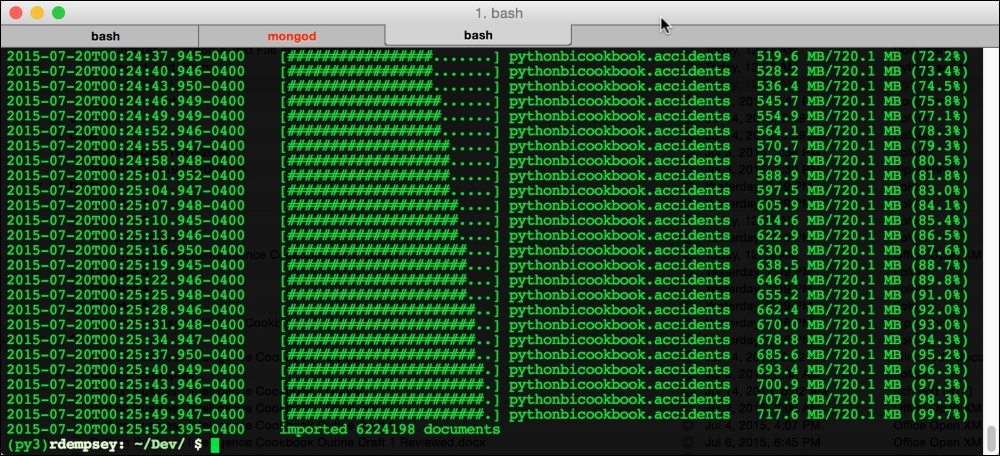
./Applications/mongodb-3.0.4/bin/mongoimport --db pythonbicookbook --collection accidents --type csv --headerline --file '/Data/Stats19-Data1979-2004/Accidents7904.csv' --numInsertionWorkers 5

After running that command, you should see something similar to the following screenshot:

How to do it…

The following command is what you would use for Windows:

C:\Program Files\MongoDB\Server\3.0\bin\mongoimport --db pythonbicookbook --collection accidents --type csv --headerline --file C:\Data\Stats19...
Visually different images
CONTINUE READING
83
Tech Concepts
36
Programming languages
73
Tech Tools
Icon Unlimited access to the largest independent learning library in tech of over 8,000 expert-authored tech books and videos.
Icon Innovative learning tools, including AI book assistants, code context explainers, and text-to-speech.
Icon 50+ new titles added per month and exclusive early access to books as they are being written.
Python Business Intelligence Cookbook
notes
bookmark Notes and Bookmarks search Search in title playlist Add to playlist font-size Font size

Change the font size

margin-width Margin width

Change margin width

day-mode Day/Sepia/Night Modes

Change background colour

Close icon Search
Country selected

Close icon Your notes and bookmarks

Confirmation

Modal Close icon
claim successful

Buy this book with your credits?

Modal Close icon
Are you sure you want to buy this book with one of your credits?
Close
YES, BUY

Submit Your Feedback

Modal Close icon
Modal Close icon
Modal Close icon