Sign In Start Free Trial
Account

Add to playlist

Create a Playlist

Modal Close icon
You need to login to use this feature.
  • Book Overview & Buying Mastering IPython 4.0
  • Table Of Contents Toc
Mastering IPython 4.0

Mastering IPython 4.0

By : Bitterman, Dipanjan Deb
3 (3)
close
close
Mastering IPython 4.0

Mastering IPython 4.0

3 (3)
By: Bitterman, Dipanjan Deb

Overview of this book

IPython is an interactive computational environment in which you can combine code execution, rich text, mathematics, plots, and rich media. This book will get IPython developers up to date with the latest advancements in IPython and dive deep into interactive computing with IPython. This an advanced guide on interactive and parallel computing with IPython will explore advanced visualizations and high-performance computing with IPython in detail. You will quickly brush up your knowledge of IPython kernels and wrapper kernels, then we'?ll move to advanced concepts such as testing, Sphinx, JS events, interactive work, and the ZMQ cluster. The book will cover topics such as IPython Console Lexer, advanced configuration, and third-party tools. By the end of this book, you will be able to use IPython for interactive and parallel computing in a high-performance computing environment.
Table of Contents (13 chapters)
close
close
6
6. Works Well with Others – IPython and Third-Party Tools
7
7. Seeing Is Believing– Visualization
12
Index

Starting out with the terminal


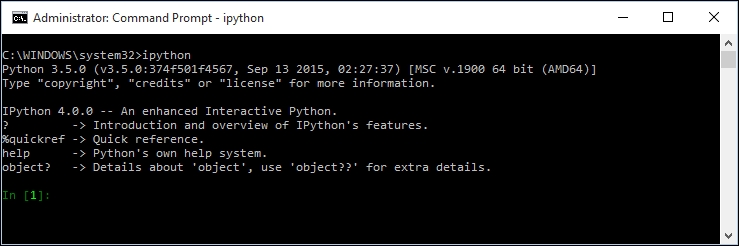
Typing ipython into your command line should present you with a window that resembles this:

This is the (somewhat underwhelming) IPython command line. Do not be deceived by its plain looks.

The primary language used with IPython is, not surprisingly, Python. As a convenience, the help command provides access to Python's help documents. The help(<object>) will display the help page for <object> (for example, help(string)), while help( ) will open up an interactive help prompt.

For help with IPython itself, use the ? command. It displays a lot of text outlining functionality available through the terminal.

In addition, either prepending or appending ? to an object or command will display information about it. For example, to display information about the built-in Python type list:

In [9]: ?list
Type: type
String form: <type 'list'>
Namespace: Python builtin
Docstring:
list() -> new empty list
list(iterable) -> new list initialized from iterable...
Visually different images
CONTINUE READING
83
Tech Concepts
36
Programming languages
73
Tech Tools
Icon Unlimited access to the largest independent learning library in tech of over 8,000 expert-authored tech books and videos.
Icon Innovative learning tools, including AI book assistants, code context explainers, and text-to-speech.
Icon 50+ new titles added per month and exclusive early access to books as they are being written.
Mastering IPython 4.0
notes
bookmark Notes and Bookmarks search Search in title playlist Add to playlist download Download options font-size Font size

Change the font size

margin-width Margin width

Change margin width

day-mode Day/Sepia/Night Modes

Change background colour

Close icon Search
Country selected

Close icon Your notes and bookmarks

Confirmation

Modal Close icon
claim successful

Buy this book with your credits?

Modal Close icon
Are you sure you want to buy this book with one of your credits?
Close
YES, BUY

Submit Your Feedback

Modal Close icon
Modal Close icon
Modal Close icon