Sign In Start Free Trial
Account

Add to playlist

Create a Playlist

Modal Close icon
You need to login to use this feature.
  • Book Overview & Buying Mastering Kibana 6.x
  • Table Of Contents Toc
Mastering Kibana 6.x

Mastering Kibana 6.x

5 (1)
close
close
Mastering Kibana 6.x

Mastering Kibana 6.x

5 (1)

Overview of this book

Kibana is one of the popular tools among data enthusiasts for slicing and dicing large datasets and uncovering Business Intelligence (BI) with the help of its rich and powerful visualizations. To begin with, Mastering Kibana 6.x quickly introduces you to the features of Kibana 6.x, before teaching you how to create smart dashboards in no time. You will explore metric analytics and graph exploration, followed by understanding how to quickly customize Kibana dashboards. In addition to this, you will learn advanced analytics such as maps, hits, and list analytics. All this will help you enhance your skills in running and comparing multiple queries and filters, influencing your data visualization skills at scale. With Kibana’s Timelion feature, you can analyze time series data with histograms and stats analytics. By the end of this book, you will have created a speedy machine learning job using X-Pack capabilities.
Table of Contents (16 chapters)
close
close

Machine learning jobs


In Kibana in order to run any machine learning analysis, we used to create the machine learning job and execute that in order to get the result. A job contains the configuration and meta-data information needed to perform the machine learning task. There are one or more detectors for each job that applies the analytical function to specific fields of our data. The job also has properties that affect the anomaly consideration through types of events or entities. For example, we can specify that entities are analyzed based on other entities in data, or relative to their own previous behavior.

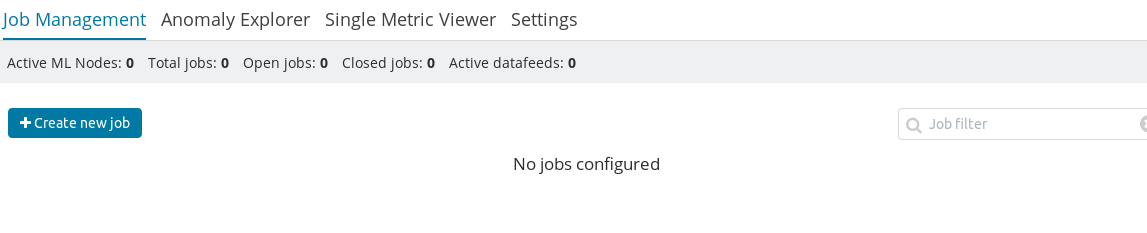
For running machine learning jobs, we have a UI in Kibana through which we can execute different types of machine learning jobs. We need to click on the machine learning link on the left-hand, which will open the following screen:

In this screenshot, we can see an empty page with a button because we have not created any job yet. By clicking on Create new job, we can open the index...

CONTINUE READING
83
Tech Concepts
36
Programming languages
73
Tech Tools
Icon Unlimited access to the largest independent learning library in tech of over 8,000 expert-authored tech books and videos.
Icon Innovative learning tools, including AI book assistants, code context explainers, and text-to-speech.
Icon 50+ new titles added per month and exclusive early access to books as they are being written.
Mastering Kibana 6.x
notes
bookmark Notes and Bookmarks search Search in title playlist Add to playlist font-size Font size

Change the font size

margin-width Margin width

Change margin width

day-mode Day/Sepia/Night Modes

Change background colour

Close icon Search
Country selected

Close icon Your notes and bookmarks

Confirmation

Modal Close icon
claim successful

Buy this book with your credits?

Modal Close icon
Are you sure you want to buy this book with one of your credits?
Close
YES, BUY

Submit Your Feedback

Modal Close icon
Modal Close icon
Modal Close icon