Sign In Start Free Trial
Account

Add to playlist

Create a Playlist

Modal Close icon
You need to login to use this feature.
  • Book Overview & Buying Getting Started with Tableau 2018.x
  • Table Of Contents Toc
Getting Started with Tableau 2018.x

Getting Started with Tableau 2018.x

By : Tristan Guillevin
4 (3)
close
close
Getting Started with Tableau 2018.x

Getting Started with Tableau 2018.x

4 (3)
By: Tristan Guillevin

Overview of this book

Tableau is one of the leading business intelligence tools used worldwide, in organizations of every scale. In its latest release, Tableau 2018 promises richer and more useful features related to visual analytics, reporting, dashboarding, and a host of other data visualization aspects. Getting Started with Tableau 2018.x will get you up and running with these features. The book starts with all the new functionalities of the different Tableau 2018 versions, along with concrete examples of how to use them. However, if you're new to Tableau, don't worry! The rest of the book will guide you through each major aspect of Tableau with examples. You'll learn how to connect to data, build a data source, visualize your data, build a dashboard, and share it online. In the final chapters, you'll also learn advanced techniques such as creating a cross-database join, data blending, and more. By the end of the book, you will have a firm understanding of how to effectively use Tableau to create quick, cost-effective, and business-efficient business intelligence solutions.
Table of Contents (16 chapters)
close
close
Lock Free Chapter
1
Catching Up with Tableau 2018

How to work with Parameters


Parameters are a particular element in Tableau, as with Dimensions, Measures, and Sets. They can be Continuous or Discrete depending on the data type in use. The three major aspects of Parameters are:

  • They are not linked to the Data Source (they don't rely on any field)
  • They only return one value at a time
  • They are, by default, static, so there is no built-in way to refresh the values automatically

Note

For the last point, you can use external Extensions, to create dynamic Parameters.

Let's start with how to create a Parameter.

Creating a Parameter

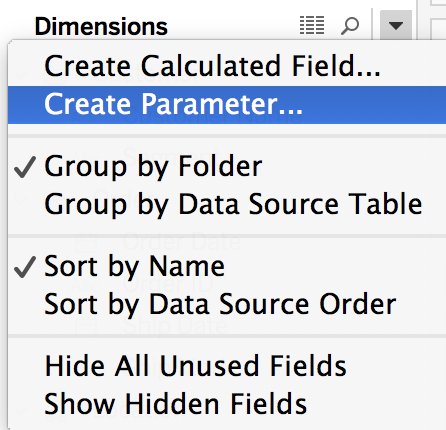
To create a Parameter, you can use the small arrow next to Dimensions as highlighted in the following screenshot: 

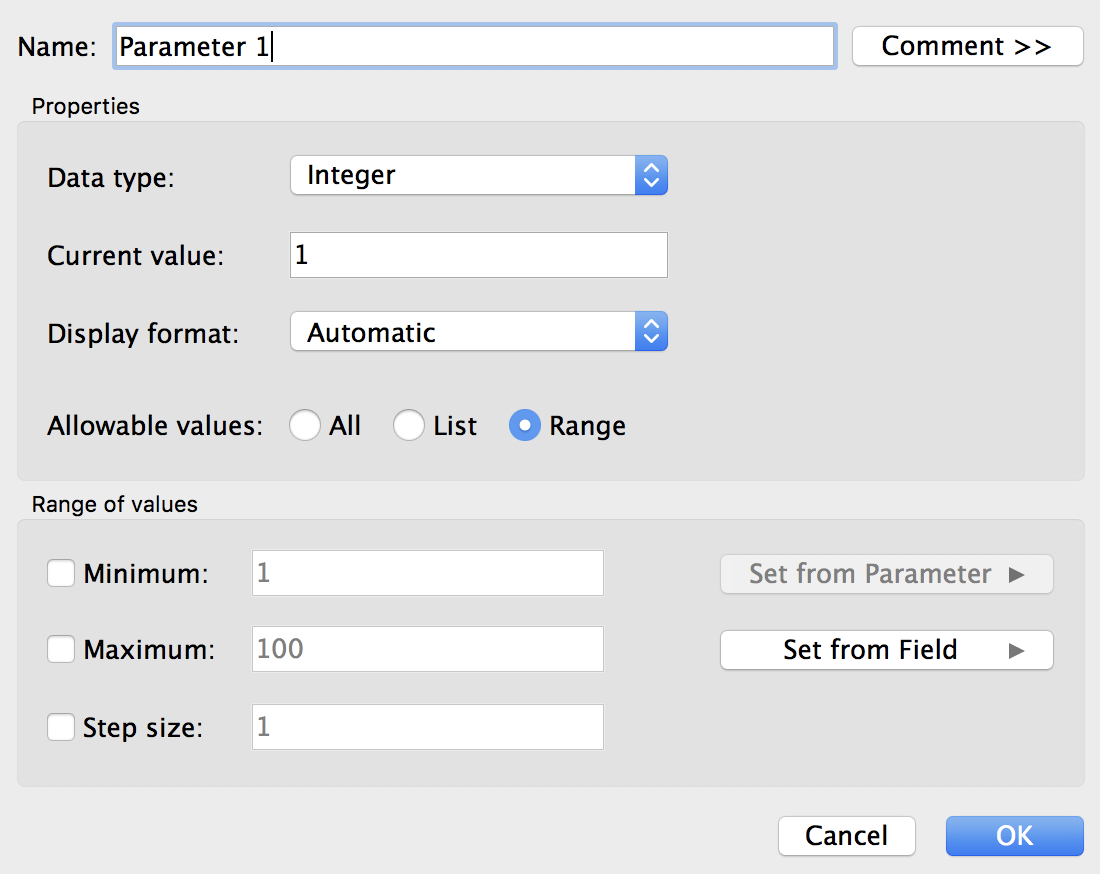
When you create a Parameter, Tableau automatically opens the Edit Parameter window, as illustrated in the following screenshot:

This window is the only place where you can change or configure a Parameter. On the top, you can specify its Name and add a Comment (visible when you hover over it). You can also change...

CONTINUE READING
83
Tech Concepts
36
Programming languages
73
Tech Tools
Icon Unlimited access to the largest independent learning library in tech of over 8,000 expert-authored tech books and videos.
Icon Innovative learning tools, including AI book assistants, code context explainers, and text-to-speech.
Icon 50+ new titles added per month and exclusive early access to books as they are being written.
Getting Started with Tableau 2018.x
notes
bookmark Notes and Bookmarks search Search in title playlist Add to playlist download Download options font-size Font size

Change the font size

margin-width Margin width

Change margin width

day-mode Day/Sepia/Night Modes

Change background colour

Close icon Search
Country selected

Close icon Your notes and bookmarks

Confirmation

Modal Close icon
claim successful

Buy this book with your credits?

Modal Close icon
Are you sure you want to buy this book with one of your credits?
Close
YES, BUY

Submit Your Feedback

Modal Close icon
Modal Close icon
Modal Close icon