
Sign In Start Free Trial
Account

Add to playlist

Create a Playlist

Modal Close icon
You need to login to use this feature.
  • Book Overview & Buying Hands-On GPU Computing with Python
  • Table Of Contents Toc
Hands-On GPU Computing with Python

Hands-On GPU Computing with Python

By : Avimanyu Bandyopadhyay
2 (1)
close
close
Hands-On GPU Computing with Python

Hands-On GPU Computing with Python

2 (1)
By: Avimanyu Bandyopadhyay

Overview of this book

GPUs are proving to be excellent general purpose-parallel computing solutions for high-performance tasks such as deep learning and scientific computing. This book will be your guide to getting started with GPU computing. It begins by introducing GPU computing and explaining the GPU architecture and programming models. You will learn, by example, how to perform GPU programming with Python, and look at using integrations such as PyCUDA, PyOpenCL, CuPy, and Numba with Anaconda for various tasks such as machine learning and data mining. In addition to this, you will get to grips with GPU workflows, management, and deployment using modern containerization solutions. Toward the end of the book, you will get familiar with the principles of distributed computing for training machine learning models and enhancing efficiency and performance. By the end of this book, you will be able to set up a GPU ecosystem for running complex applications and data models that demand great processing capabilities, and be able to efficiently manage memory to compute your application effectively and quickly.
Table of Contents (17 chapters)
close
close
Lock Free Chapter
1
Section 1: Computing with GPUs Introduction, Fundamental Concepts, and Hardware
5
Section 2: Hands-On Development with GPU Programming
11
Section 3: Containerization and Machine Learning with GPU-Powered Python

Configuring CuPy on your Python IDE

The following steps are specific to the PyCharm IDE. But if you prefer a different IDE, you can still use these steps as a reference for setting up CuPy, because the procedure is very similar. To configure CuPy with PyCharm, we focus on our Conda-based installation:

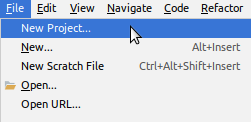
  1. First, let's create a virtual environment with Conda as a new PyCharm pure Python project. Choose New Project... from the PyCharm main menu:
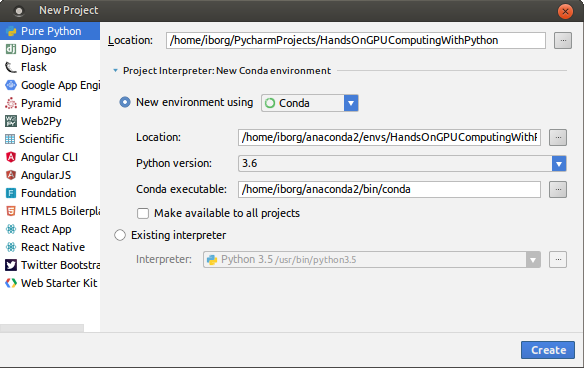
  1. Create a Pure Python project within a new local Conda environment, as shown in the following screenshot:
  1. Wait for the environment to be created, as shown:

  1. After creating the Conda environment, you will have a ready-to-use CuPy development environment, as shown in the following screenshot:
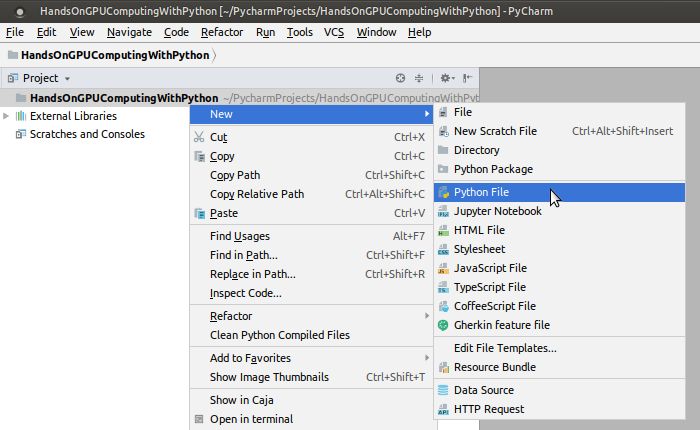
Now you can import cupy within your Python programs. As you can see, PyCharm Edu detects and recommends this as you begin to type import cupy...

CONTINUE READING
83
Tech Concepts
36
Programming languages
73
Tech Tools
Icon Unlimited access to the largest independent learning library in tech of over 8,000 expert-authored tech books and videos.
Icon Innovative learning tools, including AI book assistants, code context explainers, and text-to-speech.
Icon 50+ new titles added per month and exclusive early access to books as they are being written.
Hands-On GPU Computing with Python
notes
bookmark Notes and Bookmarks search Search in title playlist Add to playlist download Download options font-size Font size

Change the font size

margin-width Margin width

Change margin width

day-mode Day/Sepia/Night Modes

Change background colour

Close icon Search
Country selected

Close icon Your notes and bookmarks

Confirmation

Modal Close icon
claim successful

Buy this book with your credits?

Modal Close icon
Are you sure you want to buy this book with one of your credits?
Close
YES, BUY

Submit Your Feedback

Modal Close icon
Modal Close icon
Modal Close icon