
Sign In Start Free Trial
Account

Add to playlist

Create a Playlist

Modal Close icon
You need to login to use this feature.
  • Book Overview & Buying Hands-On Deep Learning for Images with TensorFlow
  • Table Of Contents Toc
Hands-On Deep Learning for Images with TensorFlow

Hands-On Deep Learning for Images with TensorFlow

By : Ballard
1 (2)
close
close
Hands-On Deep Learning for Images with TensorFlow

Hands-On Deep Learning for Images with TensorFlow

1 (2)
By: Ballard

Overview of this book

TensorFlow is Google’s popular offering for machine learning and deep learning, quickly becoming a favorite tool for performing fast, efficient, and accurate deep learning tasks. Hands-On Deep Learning for Images with TensorFlow shows you the practical implementations of real-world projects, teaching you how to leverage TensorFlow’s capabilities to perform efficient image processing using the power of deep learning. With the help of this book, you will get to grips with the different paradigms of performing deep learning such as deep neural nets and convolutional neural networks, followed by understanding how they can be implemented using TensorFlow. By the end of this book, you will have mastered all the concepts of deep learning and their implementation with TensorFlow and Keras.
Table of Contents (7 chapters)
close
close

Installing Docker

We'll need to download Docker to get it installed, and in this section, you'll see how we install Docker on Windows and use a script that's suitable for installation on Linux.

Let's install Docker from https://www.docker.com/. The quickest way to get this done is to head up to the menu. Here, we'll choose to download the version for Windows. Give it a click, which will take you right over to the Docker store, where you can download the specific installer for your platform, as shown in the following screenshot:
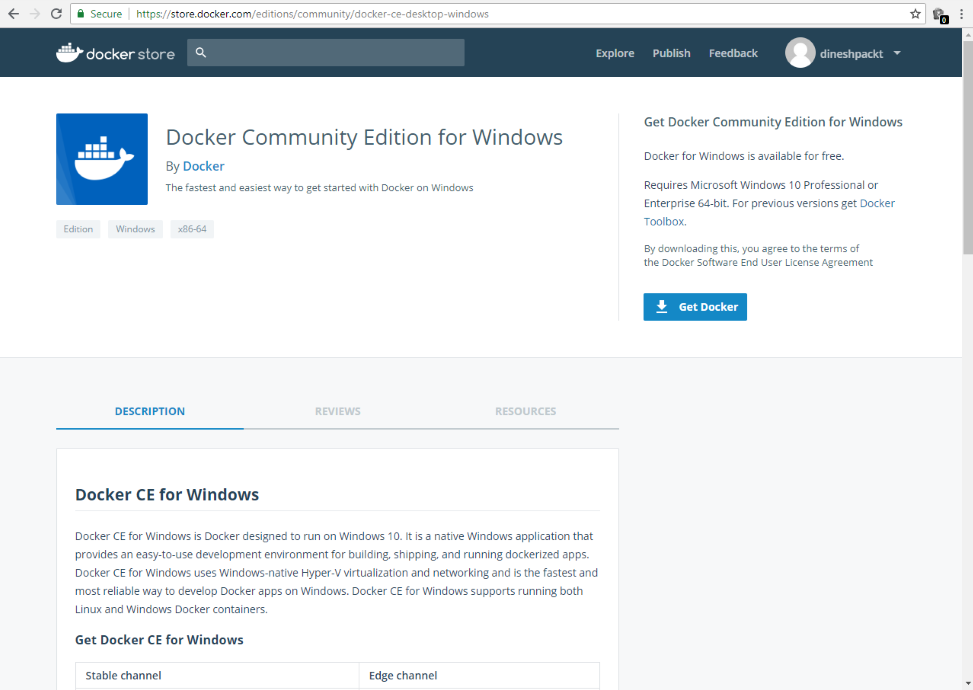
Docker installer window

All the platforms are available here. We'll just download the MSI for Windows. It downloads relatively quickly, and once it's on your PC, you can just click the MSI installer and it will quickly continue.

Installing on Ubuntu is best done with a script. So, I've provided a sample installation script (install-docker.sh) that will update your local package manager pointing to the official Docker distribution repositories, and then simply use apps to get the installation completed.

Getting Docker installed on Linux is pretty straightforward: you just run the install-docker shell script I've provided. The packages will update, download, and then install. When you get to the end of it, you just have to type docker --help to make sure that everything is installed:
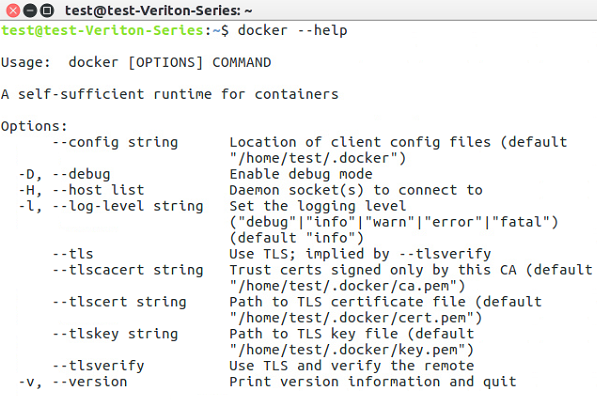
Output—docker --help command

Now, for GPU support, which will make your Keras and TensorFlow models run faster, there is a special version called nvidia-docker, which exposes devices on Ubuntu to your Docker containers to allow GPU acceleration. There's an install script for this as well (install-nvidia-docker.sh). Now, assuming that you do have an actual NVIDIA graphics card, you can use NVIDIA Docker in place of Docker.

Here, we're running a test command that uses the NVIDIA SMI, which is really the status program that shows you the GPU status on your machine:
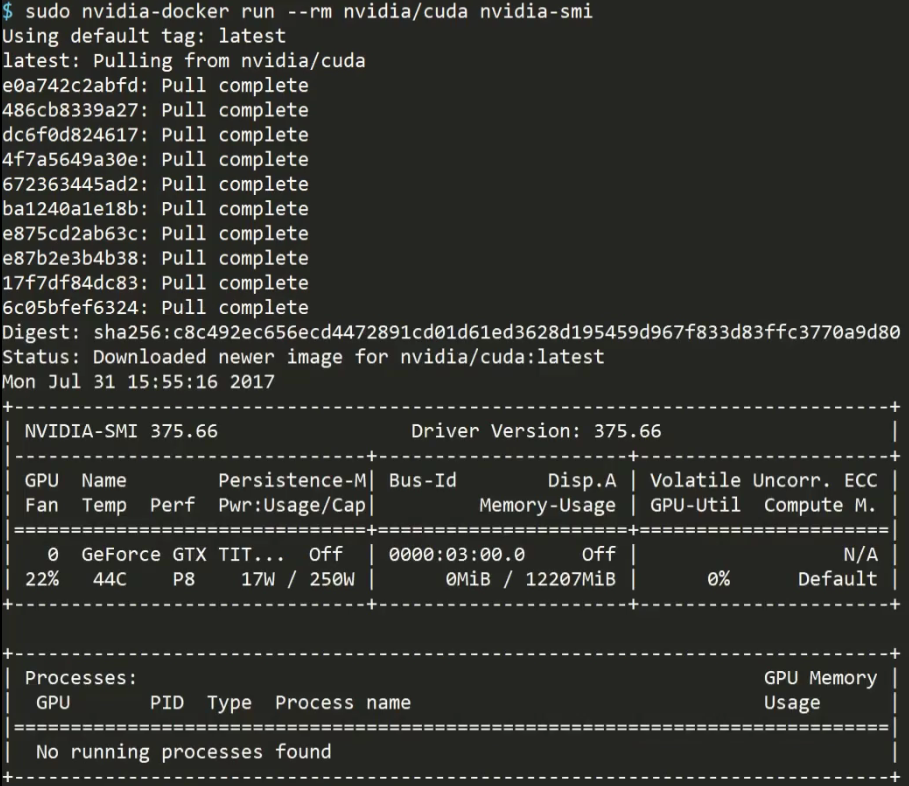
GPU status

And you can see, our TITAN X is fully exposed to Docker. Getting Docker installed is a relatively easy operation.

In the next section, we're going to take a look at authoring a Docker file to set up a complete machine learning environment.

CONTINUE READING
83
Tech Concepts
36
Programming languages
73
Tech Tools
Icon Unlimited access to the largest independent learning library in tech of over 8,000 expert-authored tech books and videos.
Icon Innovative learning tools, including AI book assistants, code context explainers, and text-to-speech.
Icon 50+ new titles added per month and exclusive early access to books as they are being written.
Hands-On Deep Learning for Images with TensorFlow
notes
bookmark Notes and Bookmarks search Search in title playlist Add to playlist download Download options font-size Font size

Change the font size

margin-width Margin width

Change margin width

day-mode Day/Sepia/Night Modes

Change background colour

Close icon Search
Country selected

Close icon Your notes and bookmarks

Confirmation

Modal Close icon
claim successful

Buy this book with your credits?

Modal Close icon
Are you sure you want to buy this book with one of your credits?
Close
YES, BUY

Submit Your Feedback

Modal Close icon
Modal Close icon
Modal Close icon