Sign In Start Free Trial
Account

Add to playlist

Create a Playlist

Modal Close icon
You need to login to use this feature.
  • Book Overview & Buying Hands-On One-shot Learning with Python
  • Table Of Contents Toc
Hands-On One-shot Learning with Python

Hands-On One-shot Learning with Python

By : Jadon, Garg
4 (7)
close
close
Hands-On One-shot Learning with Python

Hands-On One-shot Learning with Python

4 (7)
By: Jadon, Garg

Overview of this book

One-shot learning has been an active field of research for scientists trying to develop a cognitive machine that mimics human learning. With this book, you'll explore key approaches to one-shot learning, such as metrics-based, model-based, and optimization-based techniques, all with the help of practical examples. Hands-On One-shot Learning with Python will guide you through the exploration and design of deep learning models that can obtain information about an object from one or just a few training samples. The book begins with an overview of deep learning and one-shot learning and then introduces you to the different methods you can use to achieve it, such as deep learning architectures and probabilistic models. Once you've got to grips with the core principles, you'll explore real-world examples and implementations of one-shot learning using PyTorch 1.x on datasets such as Omniglot and MiniImageNet. Finally, you'll explore generative modeling-based methods and discover the key considerations for building systems that exhibit human-level intelligence. By the end of this book, you'll be well-versed with the different one- and few-shot learning methods and be able to use them to build your own deep learning models.
Table of Contents (11 chapters)
close
close
1
Section 1: One-shot Learning Introduction
3
Section 2: Deep Learning Architectures
7
Section 3: Other Methods and Conclusion

Coding exercise

In this section, we will explore a basic one-shot learning approach. As humans, we have a hierarchical way of thinking. For example, if we see something unknown to us, we look for its similarity to objects we already know. Similarly, in this exercise, we will use a nonparametric kNN approach to find classes. We will also compare its performance to the basic neural network architecture.

kNN – basic one-shot learning

In this exercise, we will compare kNN to neural networks where we have a small dataset. We will be using the iris dataset imported from the scikit-learn library.

To begin, we will first discuss the basics of kNN. The kNN classifier is a nonparametric classifier that simply stores the training data, D, and classifies each new instance using a majority vote over its set of k nearest neighbors, computed using any distance function. For a kNN, we need to choose the distance function, d, and the number of neighbors, k:

Follow these steps to compare kNN with a neural network:

  1. Import all the libraries required for this exercise using the following code:
import numpy as np
import matplotlib.pyplot as plt
from sklearn import datasets
from sklearn.neighbors import KNeighborsClassifier
from sklearn.model_selection import train_test_split
from sklearn.metrics import confusion_matrix, accuracy_score
from sklearn.model_selection import cross_val_score
from sklearn.neural_network import MLPClassifier
  1. Import the iris dataset:
# import small dataset
iris = datasets.load_iris()
X = iris.data
y = iris.target
  1. To ensure we are using a very small dataset, we will randomly choose 30 points and print them using the following code:
indices=np.random.choice(len(X), 30)
X=X[indices]
y=y[indices]
print (y)

This will be the resultant output:

[2 1 2 1 2 0 1 0 0 0 2 1 1 0 0 0 2 2 1 2 1 0 0 1 2 0 0 2 0 0]
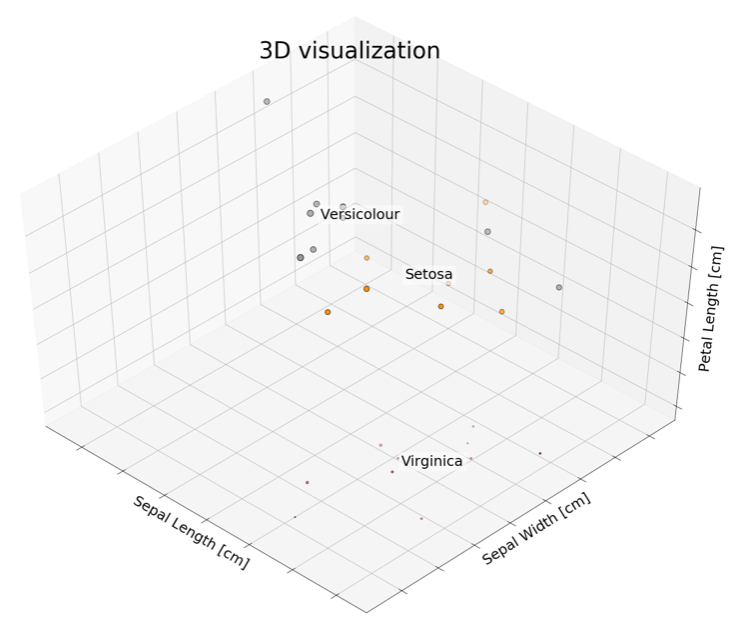
  1. To understand our features, we will try to plot them in 3D as a scatterplot:
from mpl_toolkits.mplot3d import Axes3D
fig = plt.figure(1, figsize=(20, 15))
ax = Axes3D(fig, elev=48, azim=134)
ax.scatter(X[:, 0], X[:, 1], X[:, 2], c=y,
         cmap=plt.cm.Set1, edgecolor='k', s = X[:, 3]*50)

for name, label in [('Virginica', 0), ('Setosa', 1), ('Versicolour', 2)]:
    ax.text3D(X[y == label, 0].mean(),
              X[y == label, 1].mean(),
              X[y == label, 2].mean(), name,
              horizontalalignment='center',
              bbox=dict(alpha=.5, edgecolor='w', facecolor='w'),size=25)

ax.set_title("3D visualization", fontsize=40)
ax.set_xlabel("Sepal Length [cm]", fontsize=25)
ax.w_xaxis.set_ticklabels([])
ax.set_ylabel("Sepal Width [cm]", fontsize=25)
ax.w_yaxis.set_ticklabels([])
ax.set_zlabel("Petal Length [cm]", fontsize=25)
ax.w_zaxis.set_ticklabels([])

plt.show()

The following plot is the output. As we can see in the 3D visualization, data points are usually found in groups:

  1. To begin with, we will first split the dataset into training and testing sets using an 80:20 split. We will be using k=3 as the nearest neighbor:
X_train, X_test, y_train, y_test = train_test_split(X, y, test_size = 0.2, random_state = 0)
# Instantiate learning model (k = 3)
classifier = KNeighborsClassifier(n_neighbors=3)

# Fitting the model
classifier.fit(X_train, y_train)

# Predicting the Test set results
y_pred = classifier.predict(X_test)

cm = confusion_matrix(y_test, y_pred)

accuracy = accuracy_score(y_test, y_pred)*100 print('Accuracy of our model is equal ' + str(round(accuracy, 2)) + ' %.')

This will result in the following output:

Accuracy of our model is equal 83.33 %.
  1. Initialize the hidden layers' sizes and the number of iterations:
mlp = MLPClassifier(hidden_layer_sizes=(13,13,13),max_iter=10)
mlp.fit(X_train,y_train)
You might get some warnings, depending on the version of scikit-learn, such as /sklearn/neural_network/multilayer_perceptron.py:562:ConvergenceWarning: Stochastic Optimizer: Maximum iterations (10) reached and the optimization hasn't converged yet. % self.max_iter, ConvergenceWarning). It's just an indication that your model isn't converged yet.
  1. We will predict our test dataset for both kNN and a neural network and then compare the two:
predictions = mlp.predict(X_test)

accuracy = accuracy_score(y_test, predictions)*100 print('Accuracy of our model is equal ' + str(round(accuracy, 2)) + ' %.')

The following is the resultant output:

Accuracy of our model is equal 50.0 %.

For our current scenario, we can see that the neural network is less accurate than the kNN. This could be due to a lot of reasons, including the randomness of the dataset, the choice of neighbors, and the number of layers. But if we run it enough times, we will observe that a kNN is more likely to give a better output as it always stores data points, instead of learning parameters as neural networks do. Therefore, a kNN can be called a one-shot learning method.

CONTINUE READING
83
Tech Concepts
36
Programming languages
73
Tech Tools
Icon Unlimited access to the largest independent learning library in tech of over 8,000 expert-authored tech books and videos.
Icon Innovative learning tools, including AI book assistants, code context explainers, and text-to-speech.
Icon 50+ new titles added per month and exclusive early access to books as they are being written.
Hands-On One-shot Learning with Python
notes
bookmark Notes and Bookmarks search Search in title playlist Add to playlist download Download options font-size Font size

Change the font size

margin-width Margin width

Change margin width

day-mode Day/Sepia/Night Modes

Change background colour

Close icon Search
Country selected

Close icon Your notes and bookmarks

Confirmation

Modal Close icon
claim successful

Buy this book with your credits?

Modal Close icon
Are you sure you want to buy this book with one of your credits?
Close
YES, BUY

Submit Your Feedback

Modal Close icon
Modal Close icon
Modal Close icon