Sign In Start Free Trial
Account

Add to playlist

Create a Playlist

Modal Close icon
You need to login to use this feature.
  • Book Overview & Buying Mastering Android Game Development with Unity
  • Table Of Contents Toc
Mastering Android Game Development with Unity

Mastering Android Game Development with Unity

By : Siddharth Shekar
close
close
Mastering Android Game Development with Unity

Mastering Android Game Development with Unity

By: Siddharth Shekar

Overview of this book

Game engines such as Unity are the power-tools behind the games we know and love. Unity is one of the most widely-used and best loved packages for game development and is used by everyone, from hobbyists to large studios, to create games and interactive experiences for the Web, desktop, mobile, and console. With Unity's intuitive, easy-to-learn toolset and this book, it's never been easier to become a game developer. You will begin with the basic concepts of Android game development, a brief history of Android games, the building blocks of Android games in Unity 5, and the basic flow of games. You will configure an empty project for the Jetpack Joyride Clone Game, add an environment and characters, and control them. Next you will walk through topics such as particle systems, camera management, prefabs, animations, triggers, colliders, and basic GUI systems. You will then cover the basic setup for 3D action fighting games, importing models, textures and controlling them with a virtual on-screen joystick. Later you will set up Scene for 3D Configuration, create basic gameplays, and manage input controls. Next you will learn to create the interface for the main menu, gameplay, game over, achievements, and high score screens. Finally you will polish your game with stats, sounds, and Social Networking, followed by testing the game on Android devices and then publishing it on Google Play, Amazon, and OUYA Stores.
Table of Contents (9 chapters)
close
close

Adding achievements in the game


In the Developer Console, click on the GAME SERVICES tab:

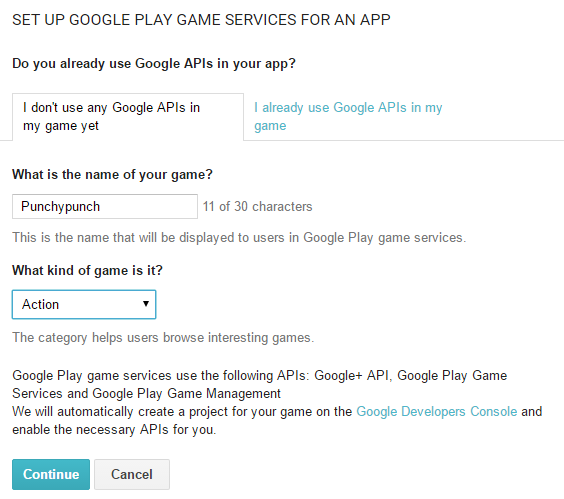
Here click on + Add new game on the top right. Type in the game name and the genre and click on the Continue button at the bottom of the screen:

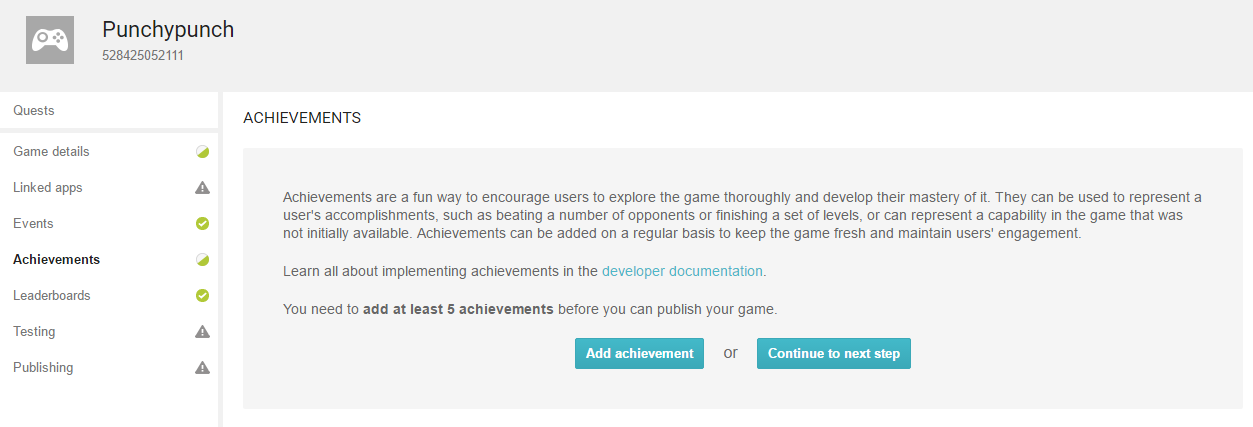
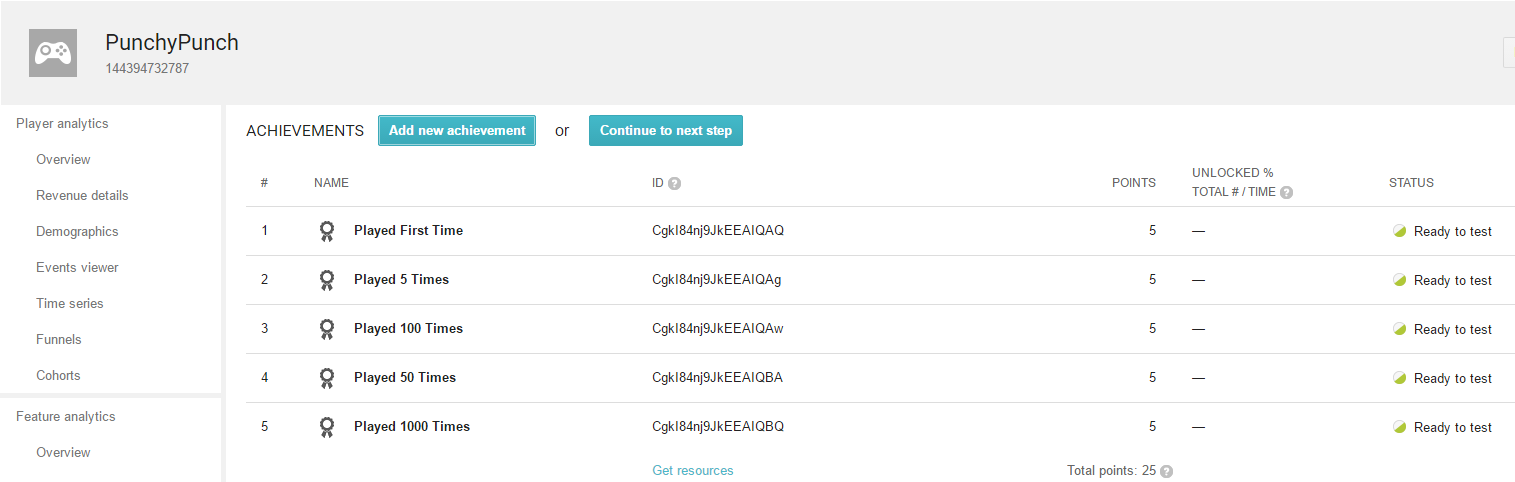
Click on the ACHIEVEMENTS tab, and then click Add achievement tab. You need to add at least five achievements for it to work.

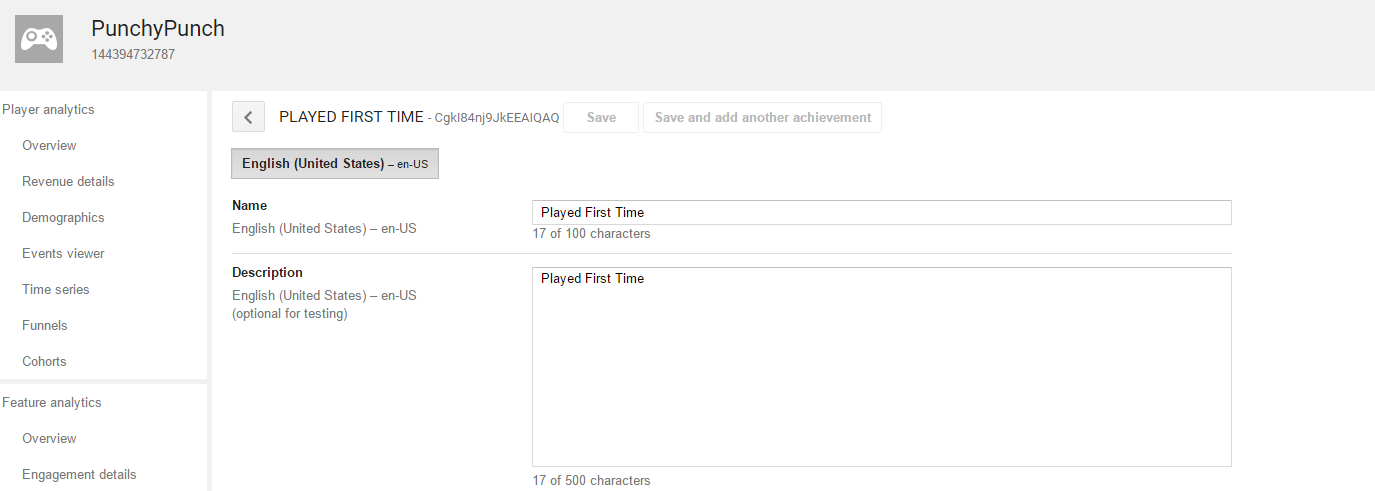
Type in a name and add a small description. For our example, I am going to add achievements for the number of times the user has played the game. So for playing the game the 1st time, 5th time, 50th, 100th, and 1000th time, I want an achievement to pop up each time:

Next, add a new achievement and all the achievements in:

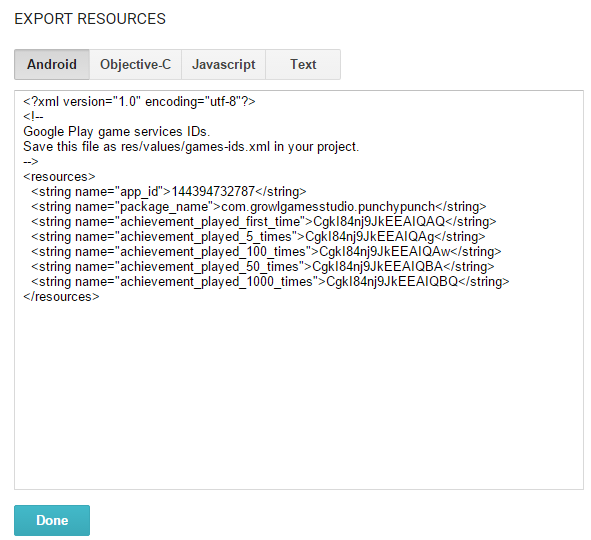
Click on the Get Resources button on the bottom and select the Android tab in the window. Now, copy all the data:

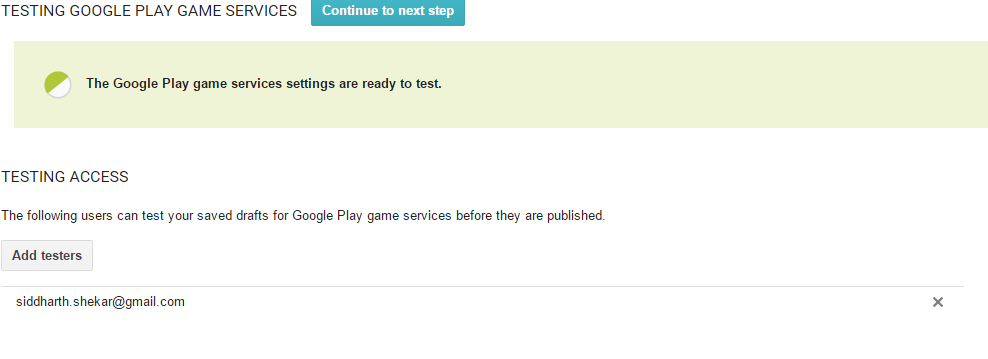
Next go to the Testing tab and click on the Add testers button. Here add in the e-mail address that you will be using to log in to your device:

Now you are ready to test the achievements on the device. Go to Unity...

CONTINUE READING
83
Tech Concepts
36
Programming languages
73
Tech Tools
Icon Unlimited access to the largest independent learning library in tech of over 8,000 expert-authored tech books and videos.
Icon Innovative learning tools, including AI book assistants, code context explainers, and text-to-speech.
Icon 50+ new titles added per month and exclusive early access to books as they are being written.
Mastering Android Game Development with Unity
notes
bookmark Notes and Bookmarks search Search in title playlist Add to playlist download Download options font-size Font size

Change the font size

margin-width Margin width

Change margin width

day-mode Day/Sepia/Night Modes

Change background colour

Close icon Search
Country selected

Close icon Your notes and bookmarks

Confirmation

Modal Close icon
claim successful

Buy this book with your credits?

Modal Close icon
Are you sure you want to buy this book with one of your credits?
Close
YES, BUY

Submit Your Feedback

Modal Close icon
Modal Close icon
Modal Close icon