Sign In Start Free Trial
Account

Add to playlist

Create a Playlist

Modal Close icon
You need to login to use this feature.
  • Book Overview & Buying Learning Unreal Engine Game Development
  • Table Of Contents Toc
Learning Unreal Engine Game Development

Learning Unreal Engine Game Development

By : Lee
3.7 (10)
close
close
Learning Unreal Engine Game Development

Learning Unreal Engine Game Development

3.7 (10)
By: Lee

Overview of this book

Unreal Engine 4 is a powerful game development engine that provides rich functionalities to create 2D and 3D games across multiple platforms. Many people know what a game is and they play games every day, but how many of them know how to create a game? Unreal Engine technology powers hundreds of games, and thousands of individuals have built careers and companies around skills developed using this engine. Learning Unreal Engine 4 Game Development starts with small, simple game ideas and playable projects that you can actually finish. The book first teaches you the basics of using Unreal Engine to create a simple game level. Then, you'll learn how to add details such as actors, animation, effects, and so on to the game. The complexity will increase over the chapters and the examples chosen will help you learn a wide variety of game development techniques. This book aims to equip you with the confidence and skills to design and build your own games using Unreal Engine 4. By the end of this book, you'll have learnt about the entire Unreal suite and know how to successfully create fun, simple games.
Table of Contents (9 chapters)
close
close
8
Index

Navigating the viewport


Using the loaded example level, you should get yourself familiarized with the mouse and keyboard controls in order to navigate in the viewport. You might consider bookmarking this section until you can navigate the viewport to zoom in/out or view any object from all angles easily.

Views

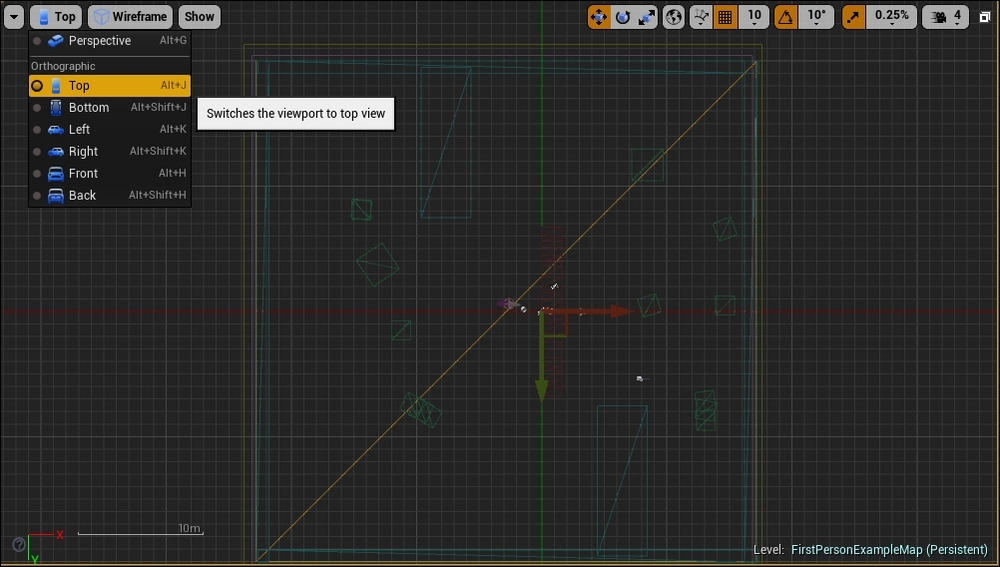
Here is some quick information on the different views in 3D modeling creation: the example map is loaded by default in the Perspective view. Other than having the map in the Perspective view, you can change what you see in the viewport in the top, side, or front views, respectively. The option to switch to any of these is in the left-hand corner of the viewport. The following screenshot shows the location of the button to press so that you can switch views:

If you wish to see more than one view concurrently, navigate to Windows | Viewports and then select any of the viewports (The default viewport uses Viewport 1.).

The selected viewport number will pop up. You can drag and dock this Viewport...

Visually different images
CONTINUE READING
83
Tech Concepts
36
Programming languages
73
Tech Tools
Icon Unlimited access to the largest independent learning library in tech of over 8,000 expert-authored tech books and videos.
Icon Innovative learning tools, including AI book assistants, code context explainers, and text-to-speech.
Icon 50+ new titles added per month and exclusive early access to books as they are being written.
Learning Unreal Engine Game Development
notes
bookmark Notes and Bookmarks search Search in title playlist Add to playlist font-size Font size

Change the font size

margin-width Margin width

Change margin width

day-mode Day/Sepia/Night Modes

Change background colour

Close icon Search
Country selected

Close icon Your notes and bookmarks

Confirmation

Modal Close icon
claim successful

Buy this book with your credits?

Modal Close icon
Are you sure you want to buy this book with one of your credits?
Close
YES, BUY

Submit Your Feedback

Modal Close icon
Modal Close icon
Modal Close icon