Sign In Start Free Trial
Account

Add to playlist

Create a Playlist

Modal Close icon
You need to login to use this feature.
  • Book Overview & Buying Buildbox 2.x Game Development
  • Table Of Contents Toc
Buildbox 2.x Game Development

Buildbox 2.x Game Development

By : Audronis
2.8 (4)
close
close
Buildbox 2.x Game Development

Buildbox 2.x Game Development

2.8 (4)
By: Audronis

Overview of this book

Buildbox is an “any skill level” development platform to develop video games with no coding experience. It also exports these games to be compiled for any platform (from Windows to Mac to iOS to Android and Blackberry) all using the same graphic user interface. Using an example as a tutorial, we will relate the driving principles and you’ll see how you can implement these principles to develop any games on the platform. We begin by setting expectations and providing a brief overview of the software. But it’s not long before you “dive in” to creating your first video game. You will actually have a playable level (“world”) by the end of the second chapter. Later on, you’ll learn everything from basic graphics creation to advanced world design while you refine your first game, called “Ramblin’ Rover.” All along the way, you will see how certain functions could be used in tandem to create other types of games; hoping to spark imagination. We will follow the principles and process of monetization through ads and in-game rewards. Lastly, we will go through the process of exporting, compiling, and preparing your storefront to sell the games you will eventually create.
Table of Contents (10 chapters)
close
close

Creating the game structure

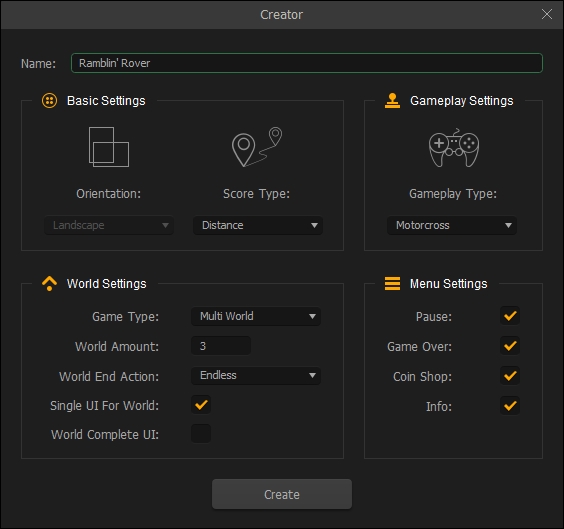
Finally, you're probably saying to yourself right now. Yes, it's been a journey just to start creating our game. But hopefully, all of this prologue has helped you understand that preparation is a key ingredient to a good game. Let's begin with the Creator window in Buildbox. Open Buildbox and click the Create New button:

Creating the game structure

The preceding image shows what you should set the creator to. Let's take a look at these settings one by one.

We could get by using all the default settings. But using the Creator screen to set up the template will let the software do most of the hard work of creating the game and save a ton of time.

Of course, first we're going to name our game in a simple English way. As this has no bearing on filenames or even the final text for the app, it is just a way to help you later, so we'll use plain English (rather than our naming conventions).

Ramblin' Rover is going to be a driving game, and the direction will...

CONTINUE READING
83
Tech Concepts
36
Programming languages
73
Tech Tools
Icon Unlimited access to the largest independent learning library in tech of over 8,000 expert-authored tech books and videos.
Icon Innovative learning tools, including AI book assistants, code context explainers, and text-to-speech.
Icon 50+ new titles added per month and exclusive early access to books as they are being written.
Buildbox 2.x Game Development
notes
bookmark Notes and Bookmarks search Search in title playlist Add to playlist download Download options font-size Font size

Change the font size

margin-width Margin width

Change margin width

day-mode Day/Sepia/Night Modes

Change background colour

Close icon Search
Country selected

Close icon Your notes and bookmarks

Confirmation

Modal Close icon
claim successful

Buy this book with your credits?

Modal Close icon
Are you sure you want to buy this book with one of your credits?
Close
YES, BUY

Submit Your Feedback

Modal Close icon
Modal Close icon
Modal Close icon