
Sign In Start Free Trial
Account

Add to playlist

Create a Playlist

Modal Close icon
You need to login to use this feature.
  • Book Overview & Buying Hands-On Internet of Things with Blynk
  • Table Of Contents Toc
Hands-On Internet of Things with Blynk

Hands-On Internet of Things with Blynk

By : Seneviratne
close
close
Hands-On Internet of Things with Blynk

Hands-On Internet of Things with Blynk

By: Seneviratne

Overview of this book

Blynk, known as the most user-friendly IoT platform, provides a way to build mobile applications in minutes. With the Blynk drag-n-drop mobile app builder, anyone can build amazing IoT applications with minimal resources and effort, on hardware ranging from prototyping platforms such as Arduino and Raspberry Pi 3 to industrial-grade ESP8266, Intel, Sierra Wireless, Particle, Texas Instruments, and a few others. This book uses Raspberry Pi as the main hardware platform and C/C++ to write sketches to build projects. The first part of this book shows how to set up a development environment with various hardware combinations and required software. Then you will build your first IoT application with Blynk using various hardware combinations and connectivity types such as Ethernet and Wi-Fi. Then you'll use and configure various widgets (control, display, notification, interface, time input, and some advanced widgets) with Blynk App Builder to build applications. Towards the end, you will learn how to connect with and use built-in sensors on Android and iOS mobile devices. Finally you will learn how to build a robot that can be controlled with a Blynk app through the Blynk cloud and personal server. By the end of this book, you will have hands-on experience building IoT applications using Blynk.
Table of Contents (10 chapters)
close
close

Connecting Raspberry Pi with Blynk Cloud

After completing the building process, you can run the sample C++ code to connect your Raspberry Pi with the Blynk Cloud through Wi-Fi:

  1. Run the default source code file, which is main.cpp, with the following command:
pi@raspberrypi:~/blynk-library/linux $sudo ./blynk --token=da999e8ef4ac42148f9f e8427d482451
  1. When you run the command sudo ./blynk --token=da999e8ef4ac42148f9fe8427d482451, the main.cpp file residing in the blynk-library/linux directory gets executed. The sample code only connects to the Blynk server at https://www.blynk.cc/. The output should look something like this:
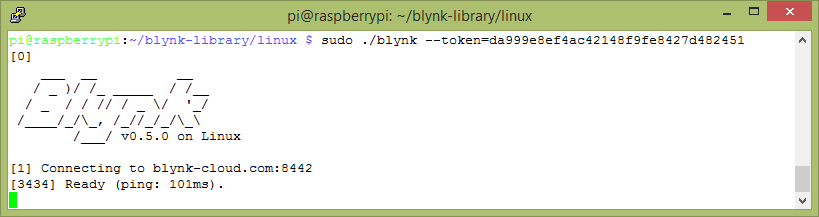
Output for default file main.cpp
  1. You can find the sample code for main.cpp in the blynk-library/linux directory. You can read the content of the file with the following command:
pi@raspberrypi:~/blynk-library/linux $ cat main.cpp
  1. The output should look something similar to what is on this link: https://github.com/PacktPublishing/Hands-On-Internet-of-Things-with-Blynk/blob/master/Chapter%201/Listing%201-1/main.cpp.
  2. Go through the code and see whether you can understand the key functions. Don't worry, you will learn how to write C++ code for the Blynk application in Chapter 3, Using Controller Widgets.
  3. Now exit from the nano editor by pressing Ctrl + X with your keyboard. The editor will prompt you asking if you want to save the file; type Y in response.
CONTINUE READING
83
Tech Concepts
36
Programming languages
73
Tech Tools
Icon Unlimited access to the largest independent learning library in tech of over 8,000 expert-authored tech books and videos.
Icon Innovative learning tools, including AI book assistants, code context explainers, and text-to-speech.
Icon 50+ new titles added per month and exclusive early access to books as they are being written.
Hands-On Internet of Things with Blynk
notes
bookmark Notes and Bookmarks search Search in title playlist Add to playlist download Download options font-size Font size

Change the font size

margin-width Margin width

Change margin width

day-mode Day/Sepia/Night Modes

Change background colour

Close icon Search
Country selected

Close icon Your notes and bookmarks

Confirmation

Modal Close icon
claim successful

Buy this book with your credits?

Modal Close icon
Are you sure you want to buy this book with one of your credits?
Close
YES, BUY

Submit Your Feedback

Modal Close icon
Modal Close icon
Modal Close icon