Sign In Start Free Trial
Account

Add to playlist

Create a Playlist

Modal Close icon
You need to login to use this feature.
  • Book Overview & Buying .NET MAUI Cross-Platform Application Development
  • Table Of Contents Toc
.NET MAUI Cross-Platform Application Development

.NET MAUI Cross-Platform Application Development

By : Roger Ye
4.6 (14)
close
close
.NET MAUI Cross-Platform Application Development

.NET MAUI Cross-Platform Application Development

4.6 (14)
By: Roger Ye

Overview of this book

An evolution of Xamarin.Forms, .NET Multi-platform App UI (.NET MAUI) is a cross-platform framework for creating native mobile and desktop apps with C# and XAML. Using .NET MAUI, you can develop apps that’ll run on Android, iOS, macOS, and Windows from a single shared code-base. This step-by-step guide provides a comprehensive introduction to those who are new to .NET MAUI that will have you up to speed with app development using .NET MAUI in no time. The book begins by showing you how to develop a cross-platform application using .NET MAUI and then helps you build an app throughout the chapters. You’ll gain all the knowledge needed to create a cross-platform application for Android, iOS, the mac OS, and Windows from a single shared code-base using .NET MAUI. As you advance, you’ll get to grips with the entire application development lifecycle, from design and implementation through to deployment to the app store through the development of a password manager app using KeePassLib. The concluding chapters will teach you how to integrate the latest frontend technology into your app through .NET MAUI Blazor. By the end of this book, you’ll have learned how to develop your own cross-platform applications using .NET MAUI.
Table of Contents (18 chapters)
close
close
1
Part 1: Exploring .NET MAUI
8
Part 2: Implementing .NET MAUI Blazor
13
Part 3: Testing and Deployment

Development environment setup

Both Windows and macOS can be used for .NET MAUI development, but you won’t be able to build all targets with only one of them. You will need both Windows and Mac computers to build all targets. In this book, the Windows environment is used to build and test Android and Windows targets. iOS and macOS targets are built on a Mac computer.

.NET MAUI app can target the following platforms:

  • Android 5.0 (API 21) or higher
  • iOS 10 or higher
  • macOS 10.13 or higher, using Mac Catalyst
  • Windows 11 and Windows 10 version 1809 or higher, using Windows UI Library (WinUI) 3

.NET MAUI Blazor apps use the platform-specific WebView control, so they have the following additional requirements:

  • Android 7.0 (API 24) or higher
  • iOS 14 or higher
  • macOS 11 or higher, using Mac Catalyst

.NET MAUI build targets of Android, iOS, macOS, and Windows can be built using Visual Studio on a Windows computer. In this environment, a networked Mac is required to build iOS and macOS targets. Xcode must be installed on the paired Mac to debug and test an iOS MAUI app in a Windows development environment.

.NET MAUI targets of Android, iOS, and macOS can be built and tested on macOS.

Target platform

Windows

macOS

Windows

Yes

No

Android

Yes

Yes

iOS

Yes (pair to Mac)

Yes

macOS

Build only (pair to Mac)

Yes

Table 1.6: The development environment of .NET MAUI

Please refer to Table 1.6 to find out the build configurations on Windows and macOS.

Installing .NET MAUI on Windows

.NET MAUI can be installed as part of Visual Studio 2022. The Visual Studio Community edition is free, and we can download it from the Microsoft website at https://visualstudio.microsoft.com/vs/community/.

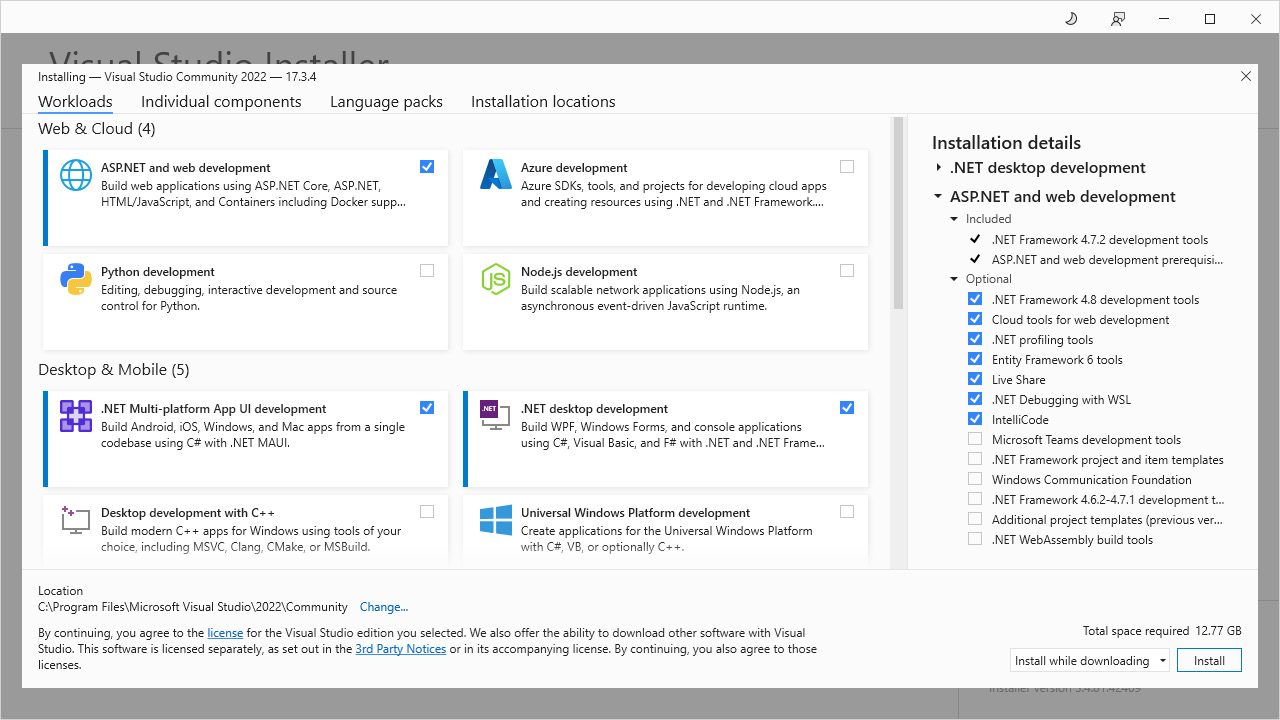
After launching Visual Studio Installer, we will see a screen similar to the one shown in Figure 1.3. Please select .NET Multi-platform App UI development and .NET desktop development in the list of options. We also need to select ASP.NET and web development for the .NET MAUI Blazor app, which will be covered in Part 2 of this book.

Figure 1.3: Visual Studio 2022 installation

Figure 1.3: Visual Studio 2022 installation

After the installation is completed, we can check the installation from the command line using the following dotnet command:

C:\>dotnet workload list
Installed Workload Ids  Manifest Version    Installation Source
--------------------------------------------------------------------
maui-windows          6.0.486/6.0.400       VS 17.3.32811.315
maui-maccatalyst      6.0.486/6.0.400       VS 17.3.32811.315
maccatalyst           15.4.446-ci.-release-6-0-4xx.446/6.0.400      VS 17.3.32811.315
maui-ios              6.0.486/6.0.400         VS 17.3.32811.315
ios                    15.4.446-ci.-release-6-0-4xx.446/6.0.400      VS 17.3.32811.315
maui-android          6.0.486/6.0.400         VS 17.3.32811.315
android               32.0.448/6.0.400        VS 17.3.32811.315
Use `dotnet workload search` to find additional workloads to install.

We are ready to create, build, and run a .NET MAUI app on Windows.

Installing .NET MAUI on macOS

The installation of the Visual Studio Community edition is similar to what we have done on Windows. The installation package can be downloaded from the same link.

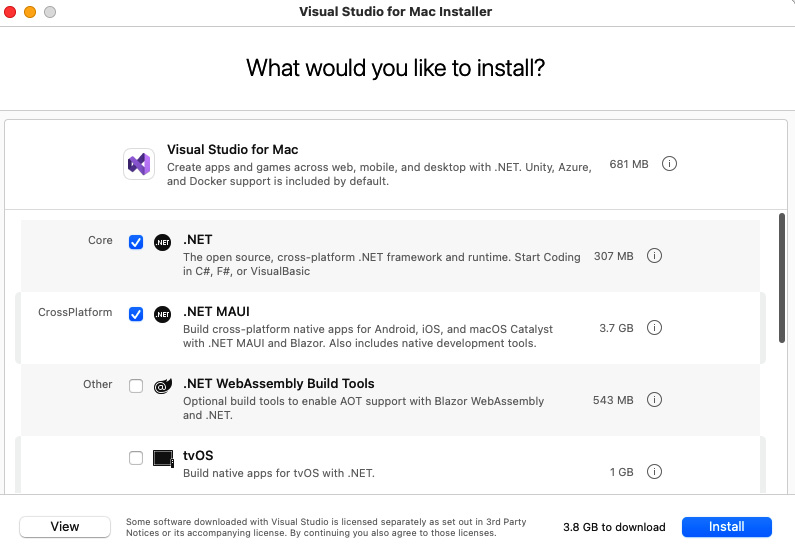
After launching Visual Studio Installer, we can see a screen similar to the one shown in Figure 1.4.

Figure 1.4: Visual Studio for Mac 2022 installation

Figure 1.4: Visual Studio for Mac 2022 installation

Please select .NET and .NET MAUI from the list of options in Figure 1.4.

After the installation is completed, we can check the installation from the command line using the following dotnet command:

% dotnet workload list
Installed Workload Ids      Manifest Version      Installation Source
--------------------------------------------------------------------
wasm-tools                  6.0.9/6.0.400         SDK 6.0.400
macos                       12.3.453/6.0.400      SDK 6.0.400
maui-maccatalyst            6.0.536/6.0.400       SDK 6.0.400
maui-ios                    6.0.536/6.0.400       SDK 6.0.400
maui-android                6.0.536/6.0.400       SDK 6.0.400
ios                         15.4.453/6.0.400      SDK 6.0.400
maccatalyst                 15.4.453/6.0.400      SDK 6.0.400
maui                        6.0.536/6.0.400       SDK 6.0.400
tvos                        15.4.453/6.0.400      SDK 6.0.400
android                     32.0.465/6.0.400      SDK 6.0.400
Use `dotnet workload search` to find additional workloads to install.

We are ready to create, build, and run a .NET MAUI app on macOS.

CONTINUE READING
83
Tech Concepts
36
Programming languages
73
Tech Tools
Icon Unlimited access to the largest independent learning library in tech of over 8,000 expert-authored tech books and videos.
Icon Innovative learning tools, including AI book assistants, code context explainers, and text-to-speech.
Icon 50+ new titles added per month and exclusive early access to books as they are being written.
.NET MAUI Cross-Platform Application Development
notes
bookmark Notes and Bookmarks search Search in title playlist Add to playlist download Download options font-size Font size

Change the font size

margin-width Margin width

Change margin width

day-mode Day/Sepia/Night Modes

Change background colour

Close icon Search
Country selected

Close icon Your notes and bookmarks

Confirmation

Modal Close icon
claim successful

Buy this book with your credits?

Modal Close icon
Are you sure you want to buy this book with one of your credits?
Close
YES, BUY

Submit Your Feedback

Modal Close icon
Modal Close icon
Modal Close icon