Sign In Start Free Trial
Account

Add to playlist

Create a Playlist

Modal Close icon
You need to login to use this feature.
  • Book Overview & Buying ArcGIS By Example
  • Table Of Contents Toc
  • Feedback & Rating feedback
ArcGIS By Example

ArcGIS By Example

By : Hussein Nasser
5 (1)
close
close
ArcGIS By Example

ArcGIS By Example

5 (1)
By: Hussein Nasser

Overview of this book

ArcGIS is a geographic information system (GIS) for working with maps and geographic information. It is considered the turnkey solution to creating and sharing interactive maps. ArcGIS is designed to work the way you work. With nothing to install and set up, ArcGIS helps you make your work productive from day one. The book covers the design and development of three ArcGIS applications to guide the readers in crafting their own GIS solution as per their requirements. The book begins by giving you a refresher on the concepts of ArcGIS. Without wasting any time, you’ll begin with developing your first ArcGIS application. You will be developing a cell tower analysis tool. Following this, you will be guided through mapping signal strength and real - time manoeuvring in your GIS system. You will then move on to the second application of the book: a restaurant mapping system. The application will allow tourists to browse restaurants on a map, according to their preferences. Next, you will learn how to work with reviews and ratings and also cover some of the advanced searching options offered by ArcGIS. You will then make use of advanced ArcObjects to develop your third application: an excavation planning manager. The book will conclude by teaching you how work out excavation cost calculations and also saving and retrieving your excavation designs.
Table of Contents (12 chapters)
close
close
11
Index

Customizing ArcGIS for Desktop

In this section, we will discuss the benefits of customizing ArcGIS. When a particular requirement or feature is not available in ArcGIS, we can actually extend the ArcGIS functionality to do that for us. In this book, we will explain two different approaches for deploying ArcGIS customization respectively: add-ins and extending ArcObjects. You will need the ArcObjects SDK to start the development. There are many other ways for customizing ArcGIS, including user interface customization using Visual Basic for Applications (VBA), modeling and scripting using Python, and building standalone applications using ArcGIS Engine. In this book, we will use the add-ins and extending ArcObjects method.

Note

ArcGIS add-ins is a building approach where the developer customizations are categorized and controlled by ArcGIS. Add-ins can be disabled and enabled by the user of ArcGIS at any given time.

ArcGIS for Desktop comes with great set of built-in tools that can help you solve interesting mapping problems. However, there comes a time where your problem is a complex one. This is where you might need to extend and customize the functionality of ArcGIS to provide a suitable solution to your problem. The examples in this book require customizations to tackle them. In this section, we discuss the different customization approaches to set up our development environment. Another reason to extend ArcGIS, for example, a certain functionality, might be available in ArcGIS, but you need to perform 10 or 15 steps to achieve it, and customizing the product can group and automate these steps so that you can default all of them in a few clicks.

The first attempted approach to providing customization for ArcGIS was through VBA. This is similar to the macroscripts in Microsoft Word and Excel. You could write an application and save it in the map document and later share this document, and the person running your document could use your application. It was a convenient approach for sharing mapping, but with many problems. The main problem was the security. The document might contain malicious code that would execute with user privileges and can potentially harm the user. That is why this approach was discouraged and has been replaced with ArcGIS add-ins and the extensions building approach. Today, you can still develop using VBA by installing the VBA compatibility setup.

Customizing ArcGIS for Desktop requires that you either build add-ins or use the classical Dynamic Link Library (DLL) approach and register it with ArcGIS for it to work. Both approaches use ArcObjects as the underlying technology, however, the final building technique is different.

These built approaches are not share-friendly, however, Esri came up with a beautiful solution and platform for sharing, and that is ArcGIS Online. That discussion though should be an entirely different book.

The system requirements of ArcObjects

In order to customize ArcGIS for Desktop, we will require installing some more components. Microsoft Visual Studio, which will be our Integrated Development Environment (IDE). This is where we will be writing code in .NET to customize ArcGIS.

The second component that we will also need to install is ArcObjects SDK for .NET, which will add the software development kit and Visual Studio plugins to write Desktop applications.

Note

IDE is a software that allows computer programmers to write code in order to develop software. The IDE usually consists of a source code editor, syntax highlighter, compiler, builder, and a debugger, which help the programmer in the software development process.

It is important to install ArcObjects SDK after completely installing Visual Studio so that ArcObjects will be able to install plugins on top of the Visual Studio IDE.

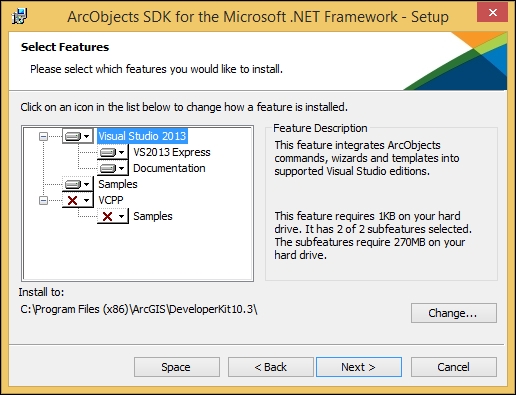
In this book, we will be using Microsoft Visual Studio 2013 Express for Windows Desktop as our IDE. The software can be downloaded for free from the official Microsoft website at http://bit.ly/b04748_vs2013exp. This is quite a big download and it will take some time depending on your Internet connection. When you install ArcObjects SDK, the setup will detect your current Visual Studio and install the plugins accordingly, as shown in the following screenshot:

The system requirements of ArcObjects

You can also use Visual Studio 2012 with ArcObjects SDK 10.3. Just make sure to install the Visual Studio before you install the ArcObjects SDK for .NET. For a complete list of system requirements for ArcObjects SDK 10.3, follow http://bit.ly/b04748_ao103sysreq.

If you are programming under different system configurations, take a look at the following table to make sure you comply with the system requirement:

Product version

Supported IDE

Reference

ArcObjects SDK 10.3

VS2013, VS2012

http://bit.ly/b04748_ao103sysreq

ArcObjects SDK 10.2.x

VS2012, VS2010

http://bit.ly/b04748_ao102sysreq

ArcObjects SDK 10.1

VS2010

http://bit.ly/b04748_ao101sysreq

ArcObjects SDK 10.0

VS2008, VS2010

http://bit.ly/b04748_ao10sysreq

ArcObjects SDK 9.3.x

VS2008, VS2010

N/A

ArcObjects SDK 9.2.x

VS2005, VS2008

N/A

I couldn't find official online references to support my claims for 9.3.x and 9.2.x, but from a personal experience, I did use ArcObjects with 2005 and 2008 on both the 9.2 and 9.3 systems and it was working flawlessly.

Verifying the installation of ArcObjects

In this section, we will validate the ArcObjects SDK installations and Visual Studio. To make sure that you have installed ArcObjects SDK correctly, follow these steps:

  1. From the start menu, locate and run VS Express 2013 for Desktop. If you are using a different version of Visual Studio, refer to the system requirements section to make sure your version complies with ArcGIS.
  2. From the Visual Studio application, click on the File menu and then select New Project.
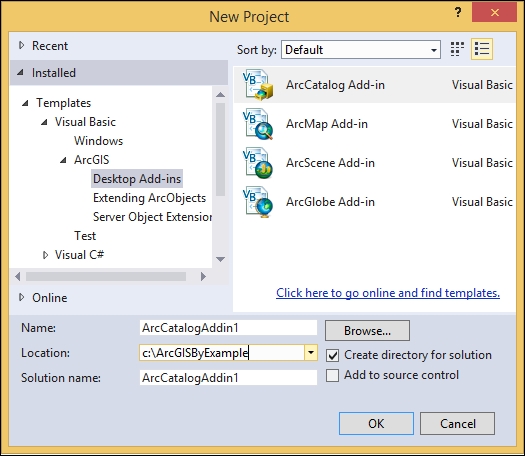
  3. From the New Project dialog, expand the Templates node, and then expand Visual Basic. This is the language we will be using in this book; you can freely use C# if you would like. If you have installed ArcObjects SDK successfully, you should see the ArcGIS node where we have all the different approaches for customizing ArcGIS. This is illustrated in the following screenshot:
    Verifying the installation of ArcObjects
  4. Close Visual Studio.
Visually different images
CONTINUE READING
83
Tech Concepts
36
Programming languages
73
Tech Tools
Icon Unlimited access to the largest independent learning library in tech of over 8,000 expert-authored tech books and videos.
Icon Innovative learning tools, including AI book assistants, code context explainers, and text-to-speech.
Icon 50+ new titles added per month and exclusive early access to books as they are being written.
ArcGIS By Example
notes
bookmark Notes and Bookmarks search Search in title playlist Add to playlist font-size Font size

Change the font size

margin-width Margin width

Change margin width

day-mode Day/Sepia/Night Modes

Change background colour

Close icon Search
Country selected

Close icon Your notes and bookmarks

Confirmation

Modal Close icon
claim successful

Buy this book with your credits?

Modal Close icon
Are you sure you want to buy this book with one of your credits?
Close
YES, BUY

Submit Your Feedback

Modal Close icon
Modal Close icon
Modal Close icon