-
Book Overview & Buying
-
Table Of Contents
Microsoft Team Foundation Server 2015 Cookbook
By :
A Scrum Team consists of a product owner, a development Team, and a Scrum master. While your stakeholders aren't part of the Scrum Team, they will need visibility into the product backlog. The Scrum Team is cross-functional and will have the skills to cover design, development, testing, and deployment of the increment. From a tooling point of view, not everyone in the Team may need the same access to TFS.
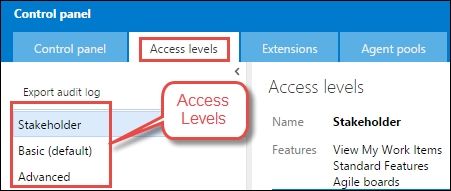
TFS offers three access levels: Stakeholder, Basic, and Advanced. The TFS license required for the access levels is listed here:
|
Access level |
License required |
|---|---|
|
Stakeholder |
No license required. |
|
Basic |
TFS client-access license (CAL) or Visual Studio Professional with MSDN subscription. |
|
Advanced |
One of these MSDN subscriptions: Visual Studio Enterprise with MSDN, MSDN Platforms, or Visual Studio Test Professional with MSDN. |
The product licensing has been significantly simplified over the last year. A few key licensing changes have been introduced in TFS 2015 and now in TFS 2015 Update 1:
Access Level and Role are two separate things in TFS. Access Level dictates the features you have the right to use, the Role dictates the permissions. For example, with the basic license, the Access Level includes grants for source control use; however, if you are in the reader role, you will not have permissions to edit the source code.
The Team Foundation Server Access Levels are closely related to the typical roles in a software project and the activities carried out in those roles. The following table summarizes the feature to access level mapping. So a project supporter will only need a stakeholder license, a project manager or developer will need a basic license, and a tester or portfolio manager will need an advanced license.
|
Feature |
Stakeholder |
Basic |
Advanced |
|---|---|---|---|
|
View and edit all Work Items |
Yes |
Yes |
Yes |
|
Standard features |
Yes |
Yes |
Yes |
|
Agile boards |
Yes |
Yes |
Yes |
|
Basic backlog and sprint planning tools |
Yes |
Yes |
Yes |
|
Chart viewing |
Yes |
Yes |
Yes |
|
Chart authoring |
Yes |
Yes | |
|
Code |
Yes |
Yes | |
|
Build |
Yes |
Yes | |
|
Request and manage feedback |
Yes | ||
|
Web-based Test execution |
Yes |
Yes | |
|
Web-based Test case management |
Yes | ||
|
Team rooms |
Yes |
Yes | |
|
Administer account |
Yes |
Yes | |
|
Advanced home page |
Yes |
Yes | |
|
Advanced backlog and sprint planning tools |
Yes |
Yes | |
|
Advanced portfolio management |
Yes |
Yes | |
|
Analyze test results and manage machine groups |
Yes |
Yes |
With stakeholder access, users can create and modify all Work Items, and create and save queries on all Work Items under their My Queries folder. (This is a change from limited access, in which users can create and modify only those Work Items that they created, and query and view Work Items they created.) Also, stakeholders can create and modify Work Items using Team Foundation clients such as Microsoft Excel, Microsoft Project, and Microsoft Feedback Client.
To set up new users in TFS, the user first needs to be assigned a license and then added to a Team. In this recipe, you'll learn how to allocate licenses and add members to a Team, you'll also learn how to audit user access in TFS.
In this recipe, we'll be allocating the license and permissions to the following users in the FabrikamTFVC Team Project.
|
Name (username) |
Access Level |
Comments |
|---|---|---|
|
John Smith
|
Stakeholder |
John usually provides feedback via the feedback client and creates Work Items in the product backlog. |
|
Brian Miller
|
Basic |
Brian is a developer and spends most of his time programming and unit testing. |
|
Aaron Cook
|
Basic |
Aaron is a developer and spends most of his time programming and unit testing. |
|
Willy Peter
|
Basic |
Willy is a scrum master and developer on the Team. Willy mostly focuses on integration and SQL Server report development. |
|
Annu Arora
|
Advanced |
Annu is a tester and spends most of her time functional and performance testing. |
|
Tom Hacker
|
Advanced |
Tom is a business analyst and spends most of his time programming and integration testing. |
|
Chris Wang
|
Advanced |
Chris is the product owner. He manages the product vision and portfolio. |
In order to add new users to the Access Levels, you'll need to be a collection administrator. To add new users to a Team Project, you need to be a project administrator; if you aren't already, arrange to be added to these groups.
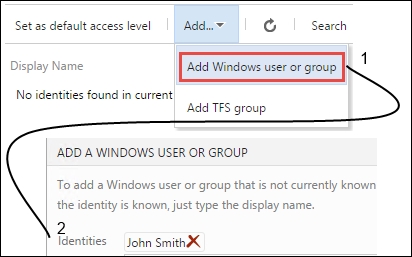
http://tfs2015:8080/tfs/_admin/_licenses:

Repeat this step to add all users into the Access Levels as specified in the user table in the Getting ready section of this recipe. At this point, you should have one Stakeholder, three Basic, and three Advanced users.
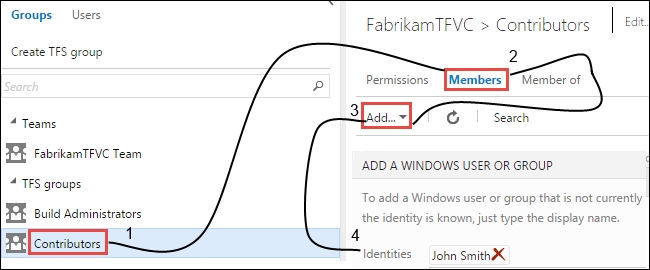
http://tfs2015:8080/tfs/DefaultCollection/FabrikamTFVC/_admin/_security. From the left panel, click on the Contributors group, from the right panel, click on the Members tab and the Add... button to add Windows user or group. Enter the user details and click on OK:
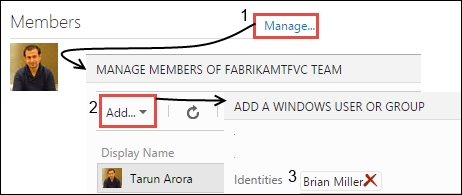
http://tfs2015:8080/tfs/DefaultCollection/FabrikamTFVC. From the Members widget, click on Manage..., in the MANAGE MEMBERS OF FABRIKAMTFVC TEAM window enter the user details and press OK. Repeat these steps to add other users listed in the user table in the getting started section.
Managing users in TFS is much easier if you create Windows or Active Directory groups for them. If you decide to use Active Directory groups in TFS, consider creating specific ones whose purpose is dedicated to user management in TFS.
In the next few steps, you'll learn how to extract an audit log to track the last login of users and groups and their access type:
http://tfs2015:8080/tfs/_admin/_licenses.
The default Access Level is assigned to a user that is directly added via the Team Project security or members screen. It is recommended that the default Access Level be set to Basic. If a user is assigned to multiple Access Levels, the highest always takes precedence.
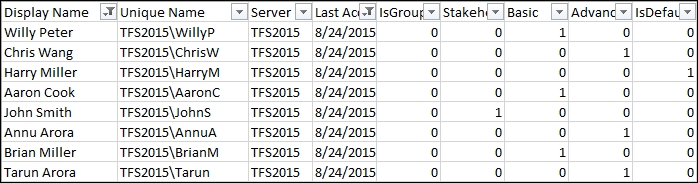
Next, let's review the audit log, import the data.csv into Excel. You should see a view similar to the following screenshot. The Last Accessed (UTC) column tells you whether the user has accessed TFS or not; you don't need to pay for a license for users that have not accessed TFS.

Change the font size
Change margin width
Change background colour