Sign In Start Free Trial
Account

Add to playlist

Create a Playlist

Modal Close icon
You need to login to use this feature.
  • Book Overview & Buying Selenium Testing Tools Cookbook Second Edition
  • Table Of Contents Toc
Selenium Testing Tools Cookbook Second Edition

Selenium Testing Tools Cookbook Second Edition

By : UNMESH GUNDECHA
4.3 (12)
close
close
Selenium Testing Tools Cookbook Second Edition

Selenium Testing Tools Cookbook Second Edition

4.3 (12)
By: UNMESH GUNDECHA

Overview of this book

This book is an incremental guide that will help you learn and use the advanced features of the Selenium toolset including the WebDriver API in various situations to build a reliable test automation. You start off by setting up the test development environment and gain tips on the advanced locater strategy and the effective use of the Selenium WebDriver API. After that, the use of design patterns such as data - driven tests and PageFactory are demonstrated. You will then be familiarised with extending Selenium WebDriver API by implementing custom tasks and setting up your own distributed environment to run tests in parallel for cross-browser testing. Finally, we give you some tips on integrating Selenium WebDriver with other popular tools and testing mobile applications. By the end of this book, you will have learned enough to solve complex testing issues on your own.
Table of Contents (16 chapters)
close
close
15
Index

Setting up ChromeDriver for Google Chrome

Similar to Internet Explorer, in order to execute test scripts on the Google Chrome browser, we need to use ChromeDriver and a standalone ChromeDriver executable.

ChromeDriver is maintained by the Google Chromium team. You can find more information at https://sites.google.com/a/chromium.org/chromedriver/.

Let's setup ChromeDriver and create a test for testing the search feature on Google Chrome.

Getting ready

You need to download ChromeDriver from https://sites.google.com/a/chromium.org/chromedriver/downloads.

How to do it...

  1. After downloading the ChromeDriver server, unzip and copy the file to the driver's directory in the src/test/resources folder, as shown in the following screenshot:
    How to do it...

    Note

    On Linux and Mac operating systems, the chromdriver file needs to be made executable using the chmod +x command filename or the chmod 775filename command.

  2. Add a new test and name it as GoogleSearchTestOnChrome.java, and add the following code:
    package com.secookbook.examples.chapter01;
    
    import org.openqa.selenium.chrome.ChromeDriver;
    import org.openqa.selenium.WebDriver;
    import org.openqa.selenium.WebElement;
    import org.openqa.selenium.By;
    import org.openqa.selenium.support.ui.ExpectedCondition;
    import org.openqa.selenium.support.ui.WebDriverWait;
    import org.junit.*;
    
    import static org.junit.Assert.*;
    
    public class GoogleSearchTestOnChrome {
    
      private WebDriver driver;
    
      @Before
      public void setUp() {
        System.setProperty("webdriver.chrome.driver",
            "./src/test/resources/drivers/chromedriver.exe");
    
        // Launch Chrome
        driver = new ChromeDriver();
        // Maximize the browser window
        driver.manage().window().maximize();
        // Navigate to Google
        driver.get("http://www.google.com");
      }
    
      @Test
      public void testGoogleSearch() {
        // Find the text input element by its name
        WebElement element = driver.findElement(By.name("q"));
    
        // Enter something to search for
        element.sendKeys("Selenium testing tools cookbook");
    
        // Now submit the form. WebDriver will find
        // the form for us from the element
        element.submit();
    
        // Google's search is rendered dynamically with JavaScript.
        // Wait for the page to load, timeout after 10 seconds
        new WebDriverWait(driver, 10).until(new ExpectedCondition<Boolean>() {
          public Boolean apply(WebDriver d) {
            return d.getTitle().toLowerCase()
                .startsWith("selenium testing tools cookbook");
          }
        });
    
        assertEquals("Selenium testing tools cookbook - Google Search",
            driver.getTitle());
      }
    
      @After
      public void tearDown() throws Exception {
        // Close the browser
        driver.quit();
      }
    }

    Execute this test and you will see a Chrome window being launched and all the steps executed.

How it works...

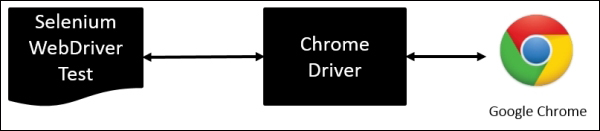
ChromeDriver is a standalone server executable that implements WebDriver's JSON-wire protocol and works as a glue between the test script and Google Chrome, as shown in the following diagram:

How it works...

Note

For more information on ChromeDriver please visit https://code.google.com/p/selenium/wiki/ChromeDriver.

The tests should specify the path of the ChromeDriver executable before creating the instance of Chrome. This is done by setting the webdriver.chrome.driver property as shown in the following code:

System.setProperty("webdriver.chrome.driver","src/test/resources/drivers/chromedriver.exe");
    "src/test/resources/drivers/chromedriver.exe");

We can also specify a path externally through the –Dwebdriver.chrome.driver option using Maven command line options. In this case, we don't need to set up this property in test; we need to create an instance of ChromeDriver class that will connect to the ChromeDriver Server, as shown in the following code. It will then run the Selenium commands that we will call by using various WebDriver and WebElement methods from the test script:

driver = new ChromeDriver();
CONTINUE READING
83
Tech Concepts
36
Programming languages
73
Tech Tools
Icon Unlimited access to the largest independent learning library in tech of over 8,000 expert-authored tech books and videos.
Icon Innovative learning tools, including AI book assistants, code context explainers, and text-to-speech.
Icon 50+ new titles added per month and exclusive early access to books as they are being written.
Selenium Testing Tools Cookbook Second Edition
notes
bookmark Notes and Bookmarks search Search in title playlist Add to playlist font-size Font size

Change the font size

margin-width Margin width

Change margin width

day-mode Day/Sepia/Night Modes

Change background colour

Close icon Search
Country selected

Close icon Your notes and bookmarks

Confirmation

Modal Close icon
claim successful

Buy this book with your credits?

Modal Close icon
Are you sure you want to buy this book with one of your credits?
Close
YES, BUY

Submit Your Feedback

Modal Close icon
Modal Close icon
Modal Close icon