Sign In Start Free Trial
Account

Add to playlist

Create a Playlist

Modal Close icon
You need to login to use this feature.
  • Book Overview & Buying Application Development with Qt Creator
  • Table Of Contents Toc
  • Feedback & Rating feedback
Application Development with Qt Creator

Application Development with Qt Creator - Second Edition

4 (25)
close
close
Application Development with Qt Creator

Application Development with Qt Creator

4 (25)

Overview of this book

This book is great for developers who are new to Qt and Qt Creator and who are interested in harnessing the power of Qt for cross-platform development. If you have basic experience programming in C++, you have what it takes to create engaging cross-platform applications using Qt and Qt Creator!
Table of Contents (15 chapters)
close
close
14
Index

Configuring the coding style and coding format options

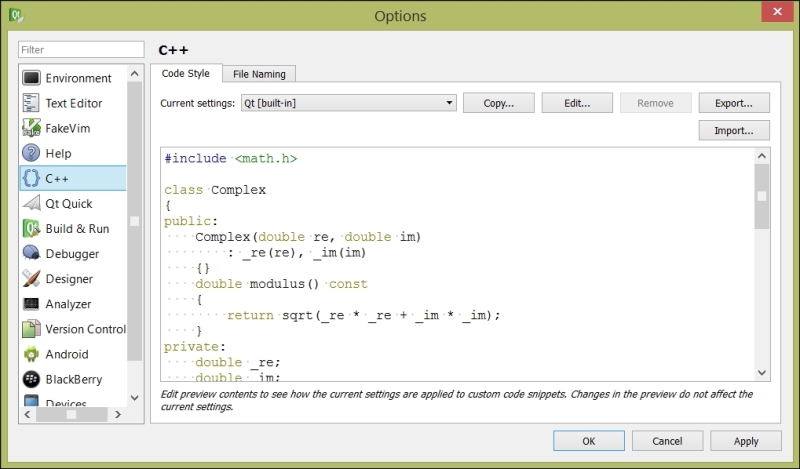
Readable code is crucial, and Qt Creator's default coding style is one that most people find very readable. However, you might be on a project with different coding guidelines, or you might just find that you can't bear a particular facet of how the Qt Creator editor deals with code formatting; maybe it's the positioning of the brackets or how a switch statement gets formatted. Fortunately, Qt Creator is extremely configurable. Go to Tools | Options | C++ and configure how Qt Creator will format your code, as shown in the following screenshot:

Configuring the coding style and coding format options

The basic dialog lets you pick popular formatting styles, such as Qt's default format or the format used by most GNU code. You can also click on Edit, which brings up the code style editor, which you can see in the next screenshot:

Configuring the coding style and coding format options

You'll want to begin by copying a built-in style and editing it to suit your tastes; from the Edit Code Style dialog, you can select whether...

Visually different images
CONTINUE READING
83
Tech Concepts
36
Programming languages
73
Tech Tools
Icon Unlimited access to the largest independent learning library in tech of over 8,000 expert-authored tech books and videos.
Icon Innovative learning tools, including AI book assistants, code context explainers, and text-to-speech.
Icon 50+ new titles added per month and exclusive early access to books as they are being written.
Application Development with Qt Creator
notes
bookmark Notes and Bookmarks search Search in title playlist Add to playlist download Download options font-size Font size

Change the font size

margin-width Margin width

Change margin width

day-mode Day/Sepia/Night Modes

Change background colour

Close icon Search
Country selected

Close icon Your notes and bookmarks

Confirmation

Modal Close icon
claim successful

Buy this book with your credits?

Modal Close icon
Are you sure you want to buy this book with one of your credits?
Close
YES, BUY

Submit Your Feedback

Modal Close icon
Modal Close icon
Modal Close icon